EC-PM-80320 User's Manual
- 6 -
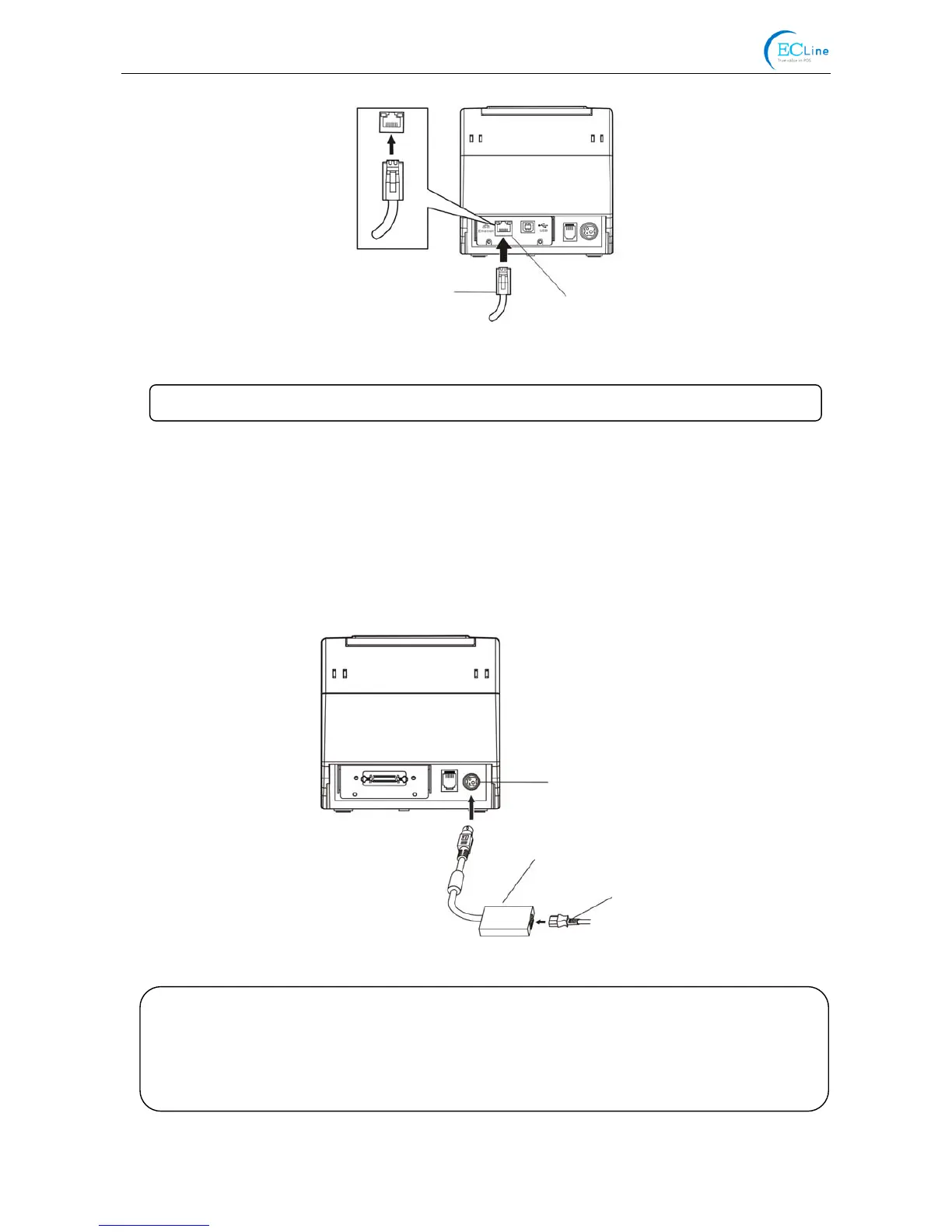
Power Supply Inlet
AC Adapter
Power Cord
2.4 Connecting the Power Cord
1. Make sure the printer’s power is turned off. (The pressed down side on the switch with “O”
mark denotes the printer is off)
2. Make sure the voltage of the electrical outlet matches that of the printer.
3. Plug the AC adapter into printer’s power supply inlet.
4. Plug one end of power cord into the AC adapter, and then plug the other of power cord into the
grounded electrical outlet.
Figure 2-7 Connecting the AC adapter
Figure 2-6 Connecting the Ethernet interface cable
Ethernet Interface Cable
Ethernet Interface
Note: Please refer to the user’s manual for the detailed instructions of network settings.
Caution: 1. If the rated voltage doesn’t match the outlet voltage, contact your dealer for
assistance. Do not plug in the power cord.
2. Please use the electrical outlet connecting the ground properly.
3. Please use original AC adapter only. Manufacturer will not honor warranty
when using unauthorized AC adapter.



 To Next Page