UPS: MKD 700 – 3000 VA RT (XL) Installation and Connection
5.2 Installation as a standing device (TOWER)
In general, the following rules apply to the installation of the UPS as a standing
device:
– Always mind that there is sufficient space behind the UPS in order to
be able to perform the necessary connection work;
– Ensure that the carry capacity of the installation site is adequate;
always place the device on a flat surface;
– Make sure that the ventilation of the device is safeguarded. Because
this UPS will be aired lengthwise, a minimum distance of 150 mm
from adjacent equipment or walls in accordance with the airflow must
be maintained;
– The UPS must only be installed in a clean, dust-free and dry area;
– Avoid extreme temperatures and moisture. A maximal service life,
especially with regard to the battery bank, will be achieved at an
ambient temperature of 15 – 25°C.
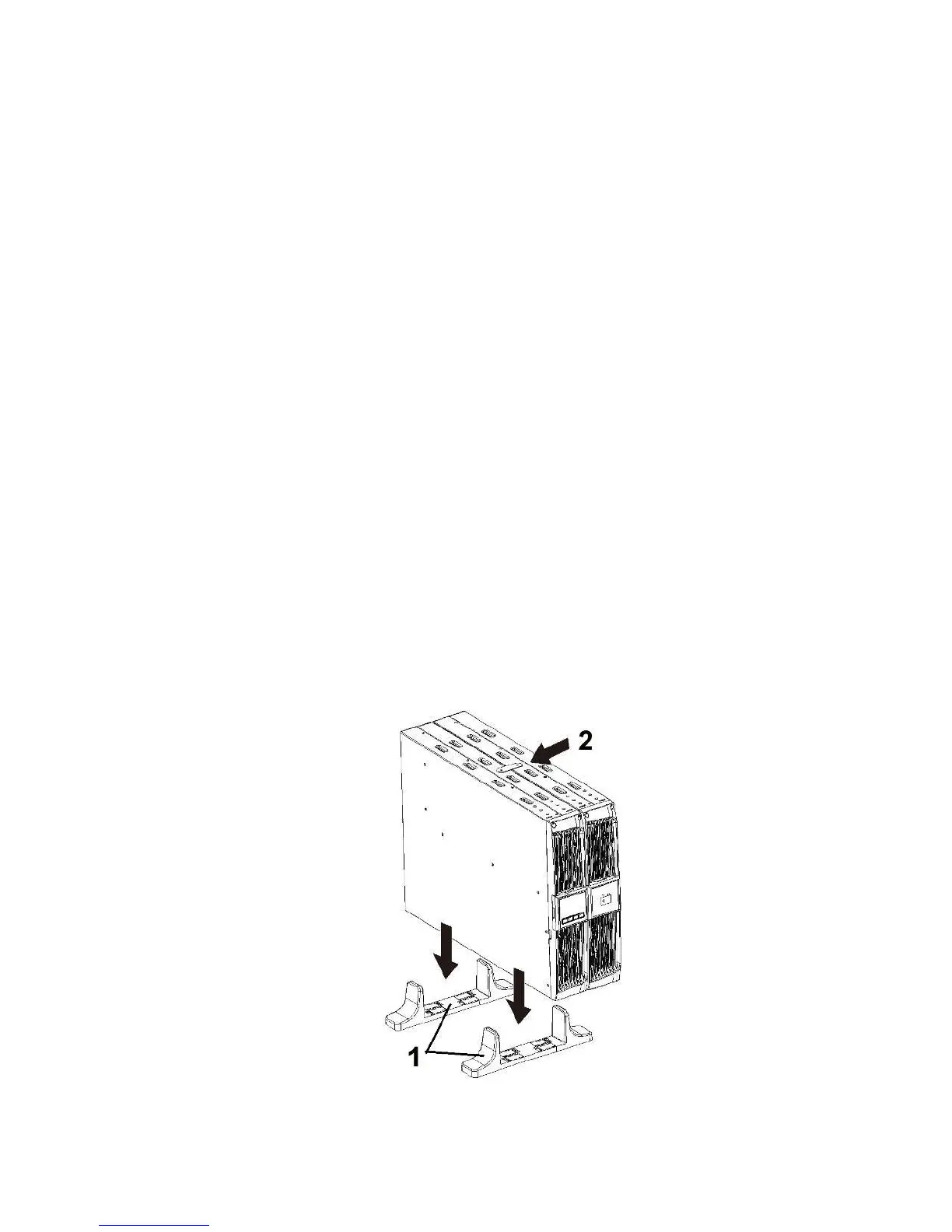
5.2.1 Installation of the UPS and an external battery bank as TOWER device
In using the device as a standing device, the positioning should follow the order
listed below:
Step 1: Mount the base (1) following the method below and stand the devices
(UPS and battery bank) up;
Step 2: Secure both devices on the metal brackets provided (2);
Fig. 5-8 Positioning and securing the devices in the standing format (TOWER).



 To Next Page