13
Chapter 2
Basic Adjustments/Settings
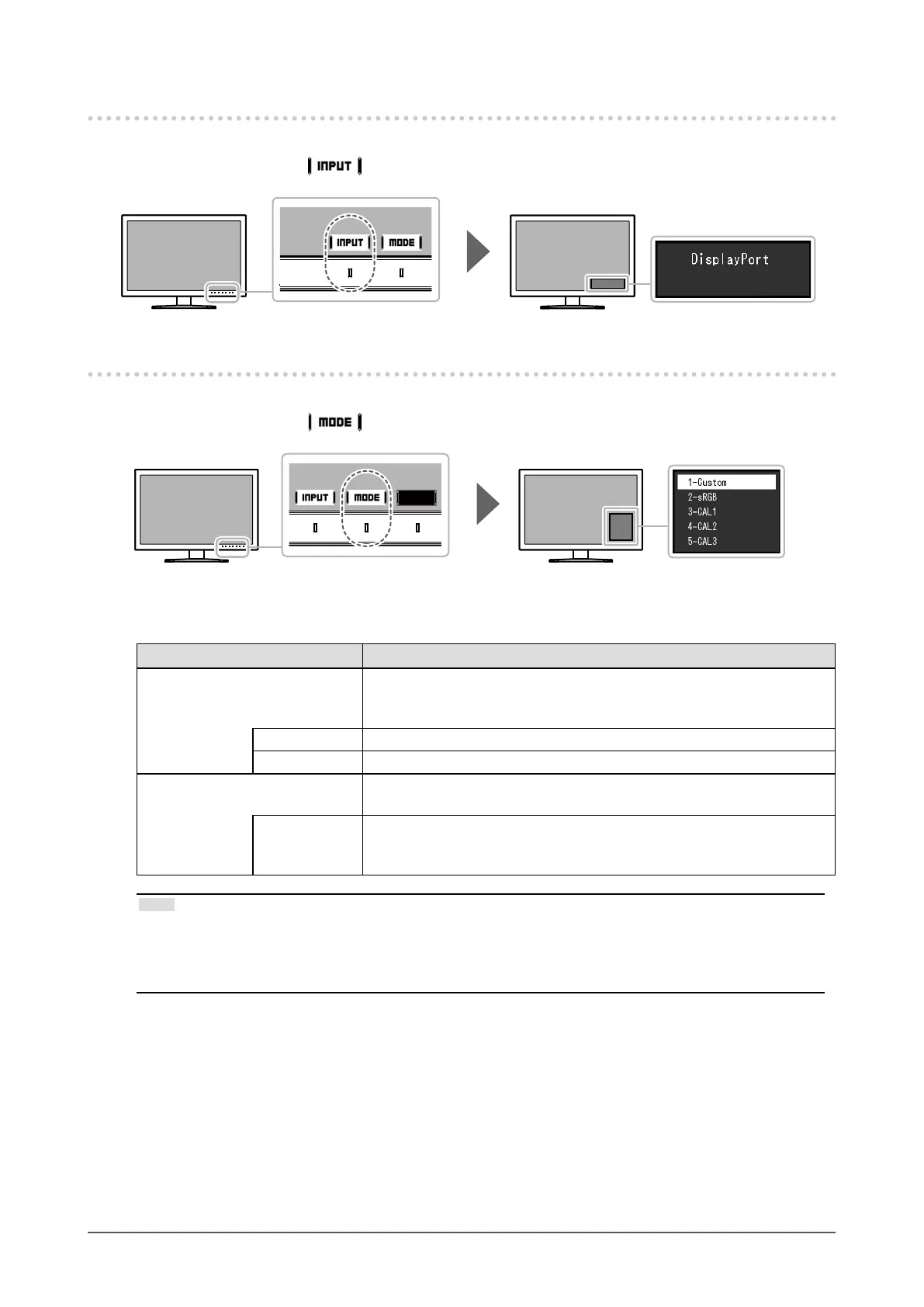
2-2. Switching Input Signals
When a monitor has multiple signal inputs, the signal to display on-screen can be changed.
Touch any switch and select
to switch to the input terminal of the input you want to display.
2-3. Switching the Display Mode (color mode)
This function allows easy selection of a display mode according to monitor application.
Touch any switch and select
to switch to the color mode you want to use.
●
Display Modes
Color Mode Purpose
Standard Mode Adjust color using the monitor's Setting menu.
You can also adjust the monitor’s display using color management
software "ColorNavigator 7".
Custom Select for conguring color settings according to your preference.
sRGB Suitable for color matching with sRGB compatible peripherals.
Advanced Mode Adjusts the monitor’s display using the "ColorNavigator 7" color
management software.
CAL1
CAL2
CAL3
Displays the screen adjusted by ColorNavigator 7.
Note
• Use ColorNavigator 7 to set Advanced Mode (CAL1 to CAL3). These settings cannot be changed in the
Setting menu on the monitor.
• You can set the color mode for each input signal.
• You can disable specic color mode selections. For more information, see “Mode Skip” (page 24).









 To Next Page