ELAN HOME SYSTEMS TS7 User’s Guide
© ELAN Home Systems 2010 | All rights reserved.
Page 39
ELAN DT22 / DT11 (Continued)
Sirius Tuner
Favorites Tab
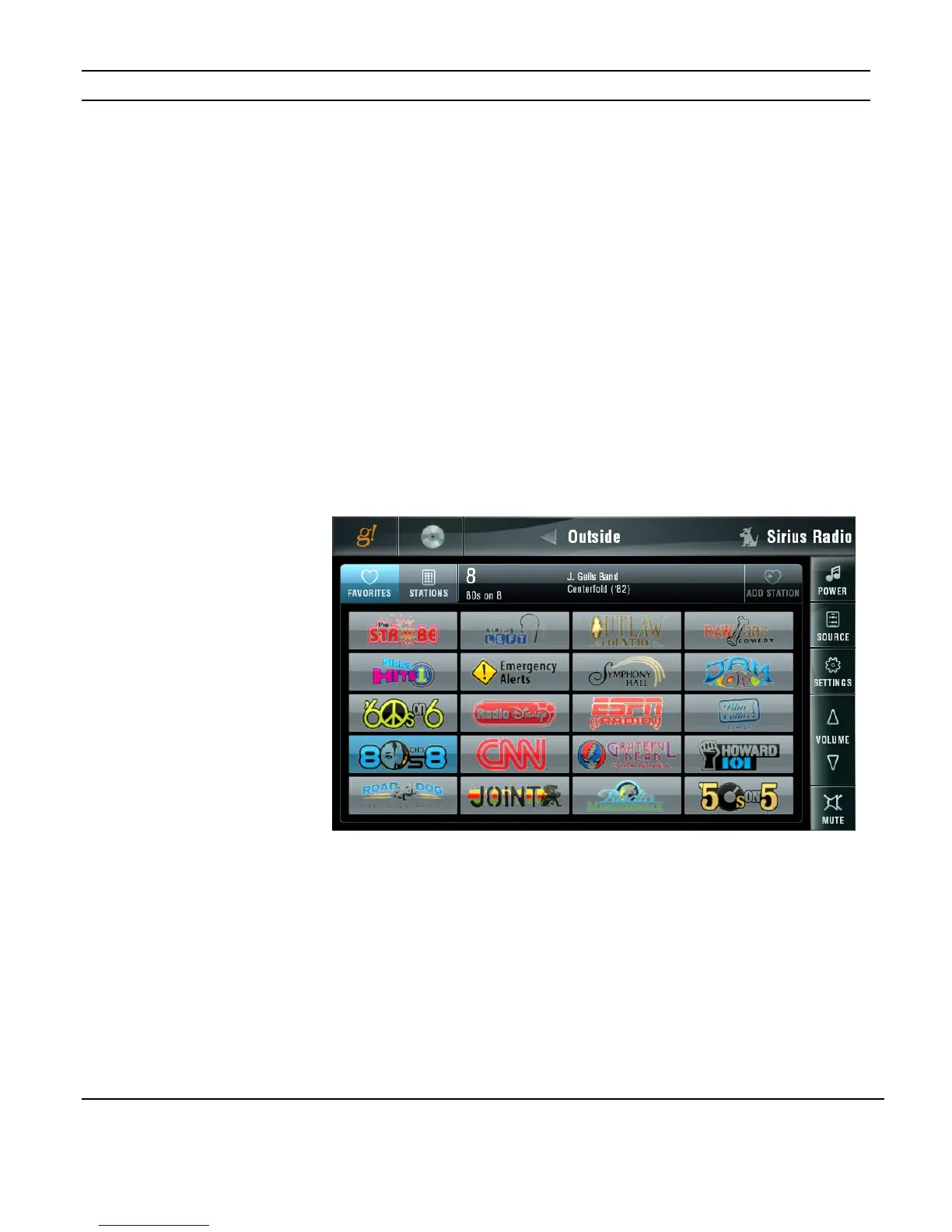
The initial screen displayed when the Sirius tuner is selected is the FAVORITES tab. This
tab displays preset Sirius stations, enabling a station to be tuned in with the press of a
button.
The Sirius FAVORITES tab uses Sirius station logos instead of channel numbers. Sirius
station names may not be edited.
The currently selected station’s channel information is displayed at the top of the screen.
This information includes the channel number, channel name, currently playing artist and
current track title.
If the currently selected station is one of the presets the preset button will also be
highlighted.
Figure 3-55:
Media Page
Sirius Tuner
Favorites Tab


 To Next Page