CTC-1132 868AM 2007.07.18
1
3
Application Overview
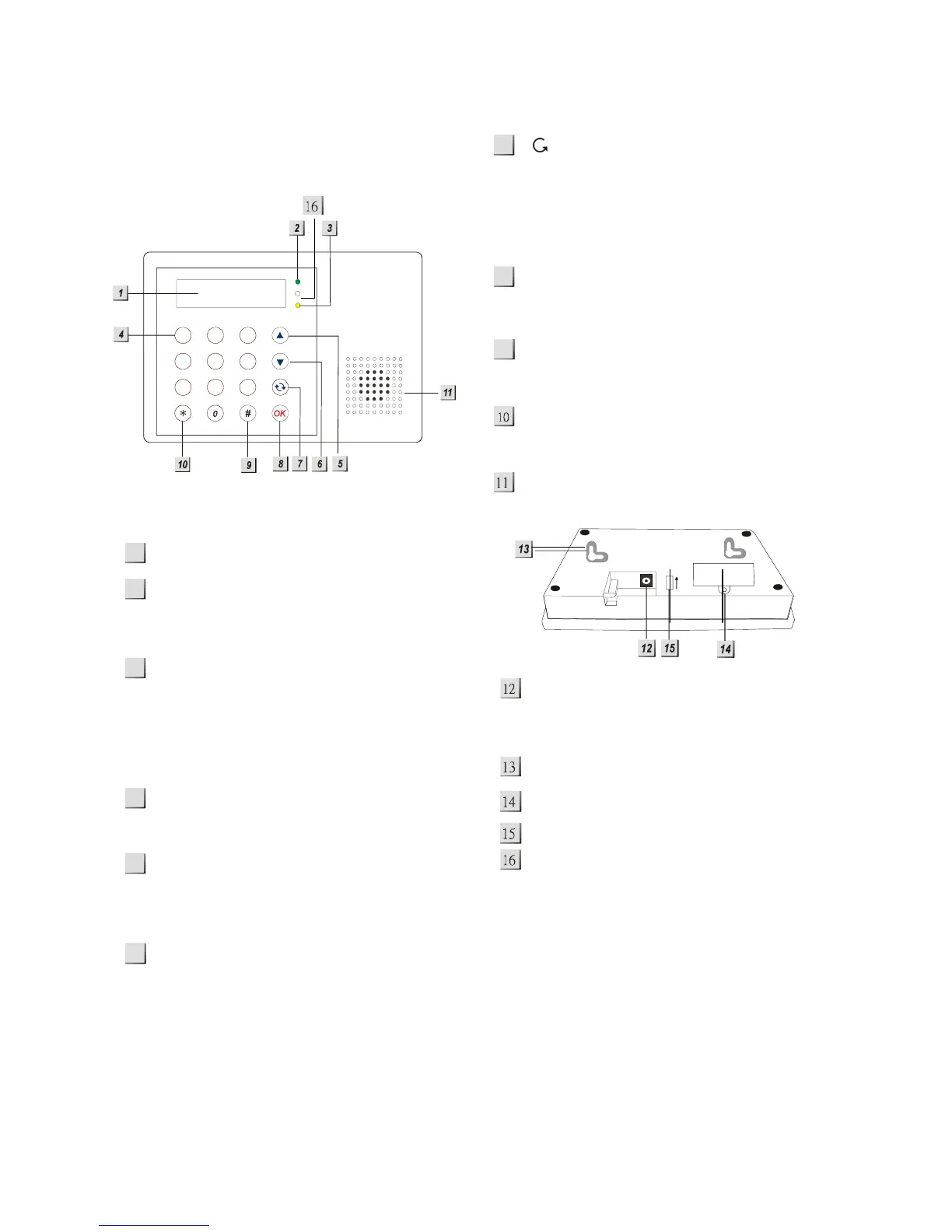
I. Identifying the parts
Backlit LCD Display
Green Power LED
— ON: AC Power is On.
— OFF: AC Power failure.
Yellow Fault LED
— On: when any fault situation Fault is
detected.
— Off: when all fault conditions are
restored. (The Unit is in Normal
Mode)
Numeric Keys
S Key
— Programming mode: press this key
to move the cursor and scroll the
display upwards.
T Key
— Programming mode: press this key to
move the cursor and scroll the
display downwards.
Key
— Programming mode: use this key to
delete a digit, cancel the selection,
abort the current screen, return to the
previous screen, etc.
OK Key
— To confirm the keyed-in data or
confirm the selection.
# Key
— Enter Programming menu
¿ Key
— Enter Installer menu.
Buzzer
DC jack
— DC 9V 500mA power adapter
connection.
2 Mounting Holes & Tamper.
SIM card holder cover
Battery Switch.
Microphone.
1
2
7
8
5
9
6
4
ON
1
23
45
6
78
9
abc
def
ghi jkl mno
pqrs
tuv wxyz



 To Next Page