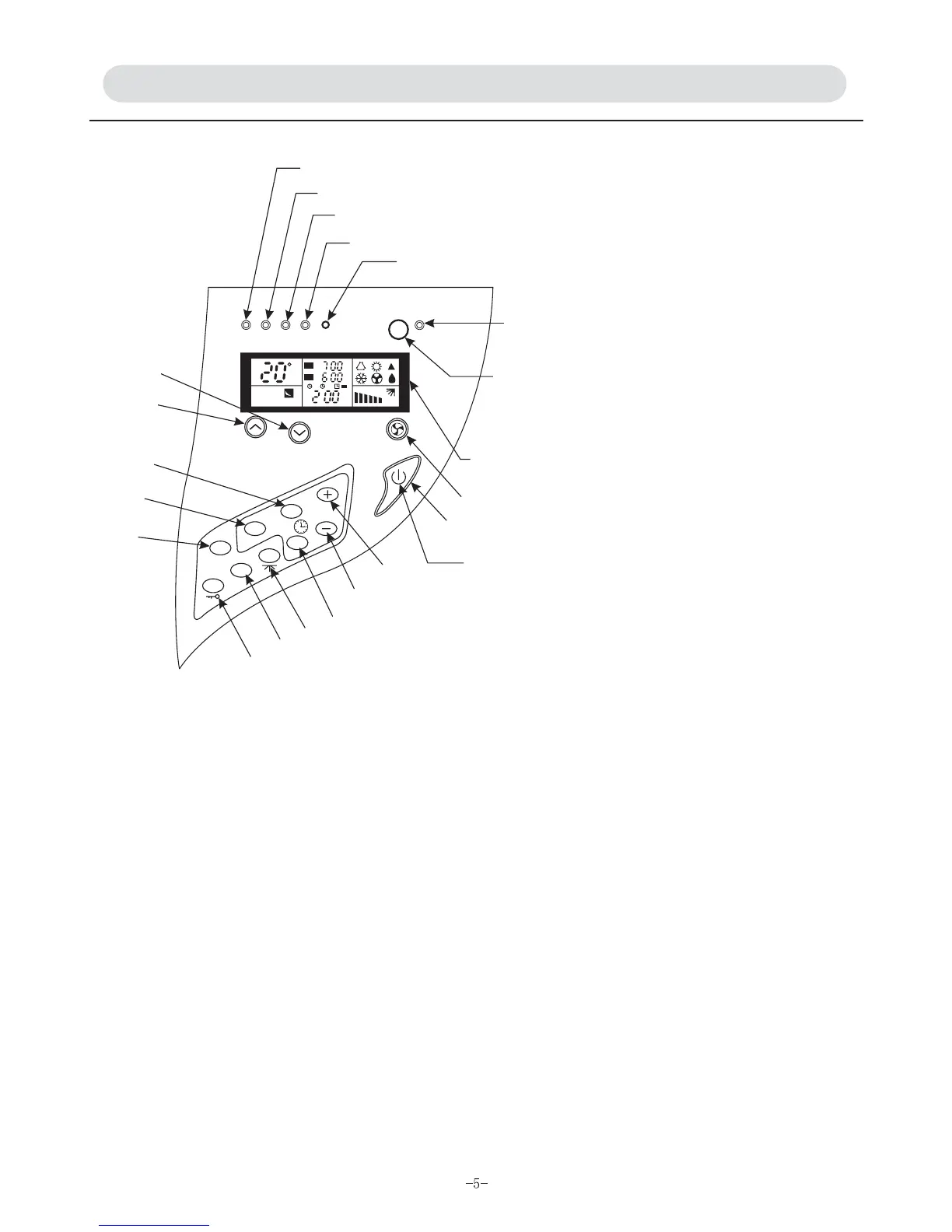
INDICATOR LIGHTS AND CONTROL BUTTONS ON THE UNIT
A. Stand-by Indicator
B. Fan Speed Button: To select
Low Fan / Mid Fan / High Fan / Auto
Fan.
for option
C. Timer Indicator
D. Filter Indicator
E. Operation Indicator
F. Mode
G. Ionizer Button
ionizer
ionizer
H. Temperature Button
I. Ionizer Indicator
ionizer
ionizer
J. Temperature Button
L/K.Timer Button
Lights up when the air conditioner is
connected to power.
Four modes
Lights up when the unit is proceeding
timer mode.
Lights up to remind you that the filter
needs to be cleaned.
Lights up when the conditioner is in
operation.
By pressing the button to select
Cool/Heat/Dry/Auto Fan/Auto mode.
When pressing this button, I lights up
indicating that is working ; I
indicator does not light up indicating
that is not working.
Pressing the button to decrease the
set room temperature.
Lights up when is working.
Goes out when is not working.
Pressing the button to increase the set
room temperature.
When pressing the button, to set
operation time longer or shorter by
pressing L button.
""
""
""
M. Reset Button
N & V Power Switch Button and Indicator
O/Q/P Clock Set Button
R. Air Swing Button
will be
S. Sleep Button
T. Self-Lock Button
After cleaning filter, press this button to reset filter function.
The filter indicator goes out.
Press this button to set power on or off. Indicator lights up
when power is connected. Indicator goes out when power is
disconnected.
Press O or P button to decide clock time up or down.
Press Q button to cancel present clock set.
Press this button to decide if vertical air swing working
or not.
Decide whether or not to proceed sleep operation mode.
All set modes or status are locked after pressing this button.
Cancellation of self-lock button is necessary when adjusting
set status, otherwise it cannot be proceeded.
""""
""""""
"" ""
""
FM
FM
12
AUTO
C
AM
A
E
D
C
M
H
J
L
K
F
I
G
LCD
B
N
V
O
P
Q
R
S
T
POWER RUN FILTER TIMER RESET
IONIZER
FAN SPEED
TEMP
ON/OFF
MODE
TIMER
SET
HR
SWING
SLEEP
CLEAR
LOCK


 To Next Page