OPERATION PROCEDURE (Operations on the Unit)
Turning on the Air Conditioner
Ventilating Operation
Cooling Operation
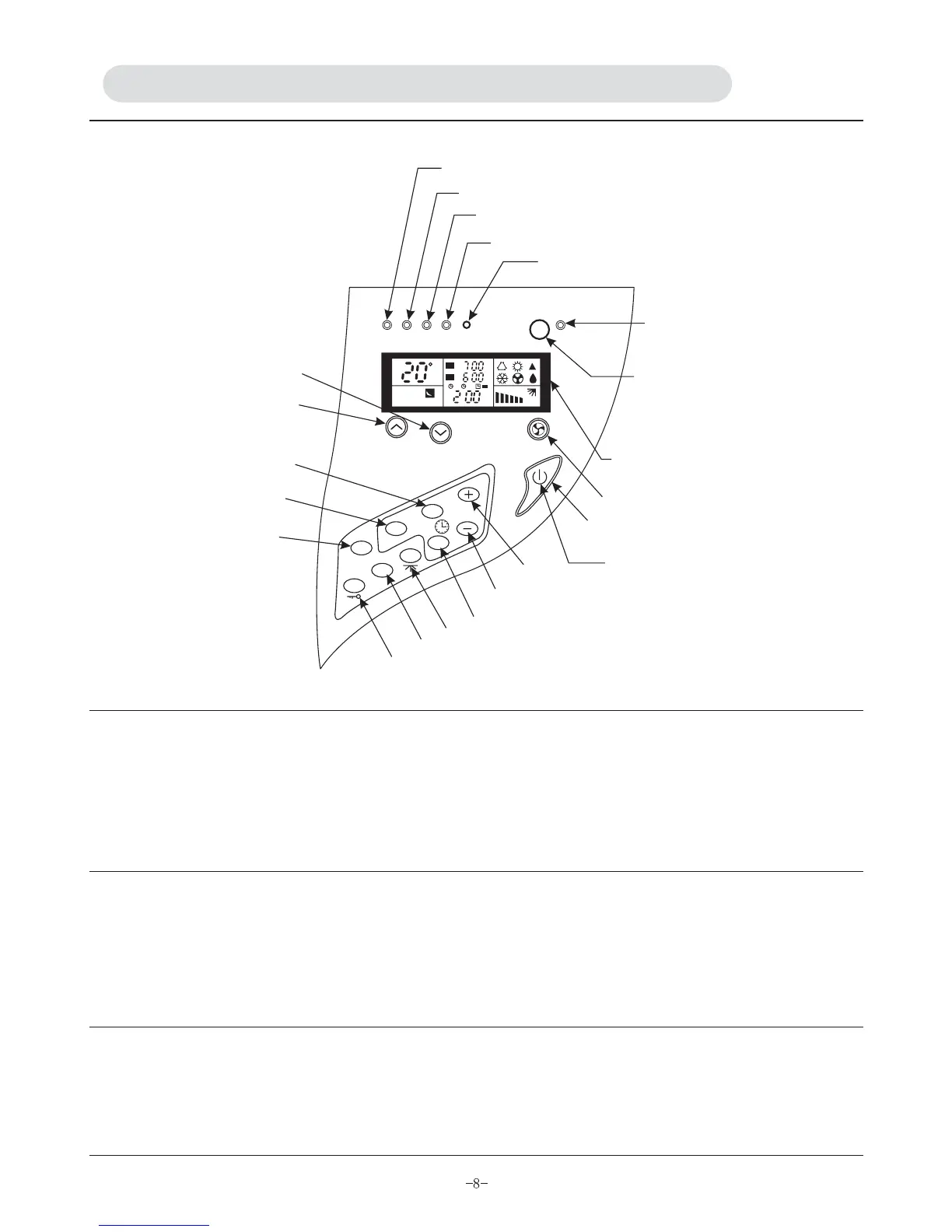
1. Connect the unit to the power supply, indicator A lights up, indicating that the unit is ready for operation.
2. Press N (on/off) button, the unit now is in operation and indicator E lights up.
3. When the unit is turned off, the unit will save the last setting. When it is turned on
again, the unit will automatically start and operate in the last set mode.
Select the ventilating mode by pressing F(mode selection) button.
Select desired fan speed by pressing B (fan speed) button.
Different fan speed will be displayed on display panel after each pressing.
Below are four modes for fan speed : low fan, middle fan, high fan and auto fan
1. Select the cooling mode by pressing F (mode selection) button.
2. Press B (fan speed) button to select desired fan speed or auto fan.
3. Press H or J button to set appropriate room temperature.
FM
FM
12
AUTO
C
AM
A
E
D
C
M
H
J
L
K
F
I
G
LCD
B
N
V
O
P
Q
R
S
T
POWER RUN FILTER TIMER RESET
IONIZER
FAN SPEED
TEMP
ON/OFF
MODE
TIMER
SET
HR
SWING
SLEEP
CLEAR
LOCK


 To Next Page