ATS-5X User Manual Page 22 of 44
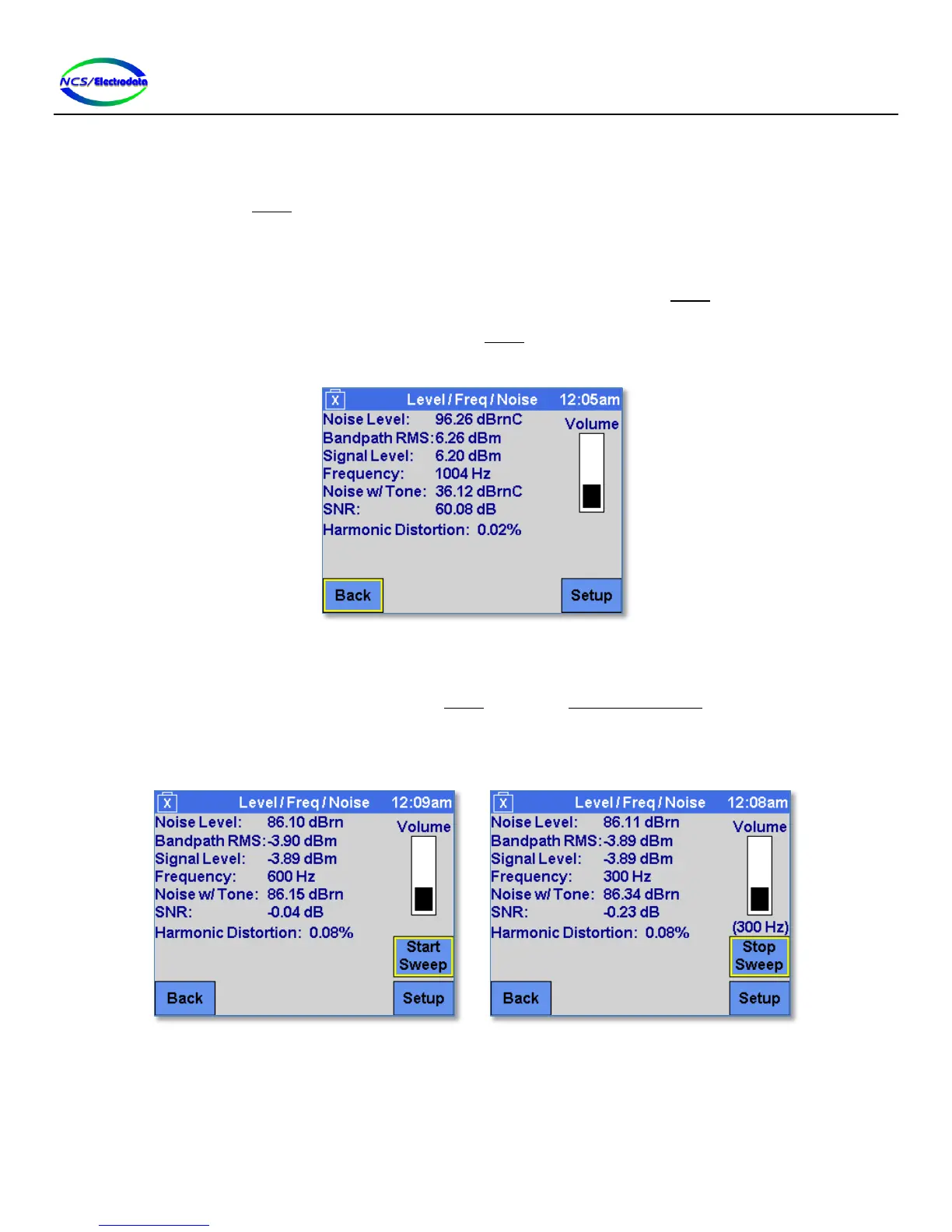
SNR: The ratio between the Signal Level and the Noise w/Tone measurements. If the there are
no significant tones detected, the display shows “N/A”.
Harmonic Distortion: The harmonic distortion of the largest single tone at the receiver before the filter in the
Setup screen has been applied. Harmonic distortion is considered up to the maximum input
frequency (20 kHz). If there is no significant tone or if the frequency of the largest single
tone is beyond 10,500 Hz, the display shows “N/A”.
Volume: Adjusts the volume of the ATS-5X receive signal, which may be the signal at the receive jack
or the transmit jack, depending on the configuration in the Setup screen. Moving the slider
towards the top of the screen will increase the volume. This adjustment is the same as the
Audio Volume adjustment in the Setup screen.
Figure 28 – Level/Frequency/Noise Measurement
2.7.1.4 Tone Sweep Mode
If Tone Sweep is selected as the transmitter type in the Setup screen, the Level / Freq / Noise screen displays controls for
the tone sweep. The Start Sweep and Stop Sweep buttons (see Figure 29) can be used to control the tone sweep.
When the tone sweep is active, the current transmit frequency is displayed just above the Stop Sweep button, as shown
in Figure 29. Once the tone sweep is complete, this area will show the text “Complete”.
Figure 29 – Level/Freq/Noise Tone Sweep Controls
2.7.1.5 Saving Results
To save the measurements, insert a valid memory device into the ATS-5X USB port. Once the memory device is
recognized, the screen will display two additional controls for saving results— Time Record and Freq Record—as shown
in Figure 30.


 To Next Page