Test Printing
1. Model Printing
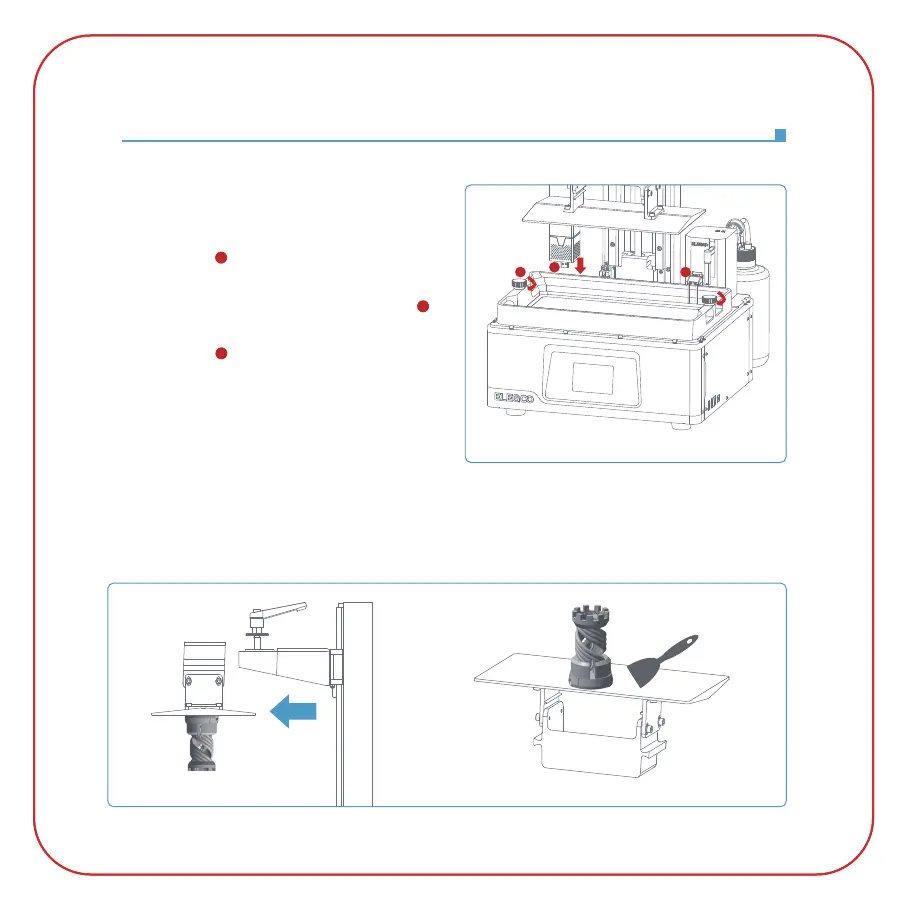
Plug the USB air purifier into the left USB port
(See Picture 13 ), place the resin tank so that
its inner edge presses the probe platen until the
probe is inside the resin tank
(See Picture 13 ),
and tighten the screw knobs on both sides
(See Picture 13 ). Then slowly add resin to the
resin tank (do not exceed the MAX line), cover the
printer and insert the U disk into the printer and
select the pre-sliced test model for printing.
2. Model Processing
After the printing is completed, wait until the resin on the build plate stops dripping, then loosen
the rotary handle of the build plate to remove it and remove the model with a scraper. You can use
ELEGOO's cleaning and curing machine to post-process the model.
(See Picture 14)
(Picture 14)
(
Picture 13)
1
2
3
1
3
2



 To Next Page