(Picture 5)
Automatic Resin Feeding and Automatic Resin Recycle
Precautions:
1. The device can automatically refill resin only in the printing state, and can automatically recycle
resin only in the non-printing state.
2. The green light of the device indicates that it is powered on; The red light indicates that there is
not enough resin in the resin tank and it needs to be refilled.
3. When printing, the resin bottle is detected to be insufficient, if you need to continue to use the
automatic resin feeding function, please replace the resin bottle in time.
4. If you use non-ELEGOO resin, please test the resin by submerging the resin into the two probes
of the detection module before printing. If the red indicator light cannot be turned off normally,
the current resin cannot be used in this device.
5. After installing the bottle cap, do not vigorously shake or invert the resin bottle. If the inside of
the cap is stained with resin, clean it immediately. To prevent the resin from entering the air tube
or blocking the mouth of the bottle, causing the automatic resin feeding module to malfunction
or even be damaged.
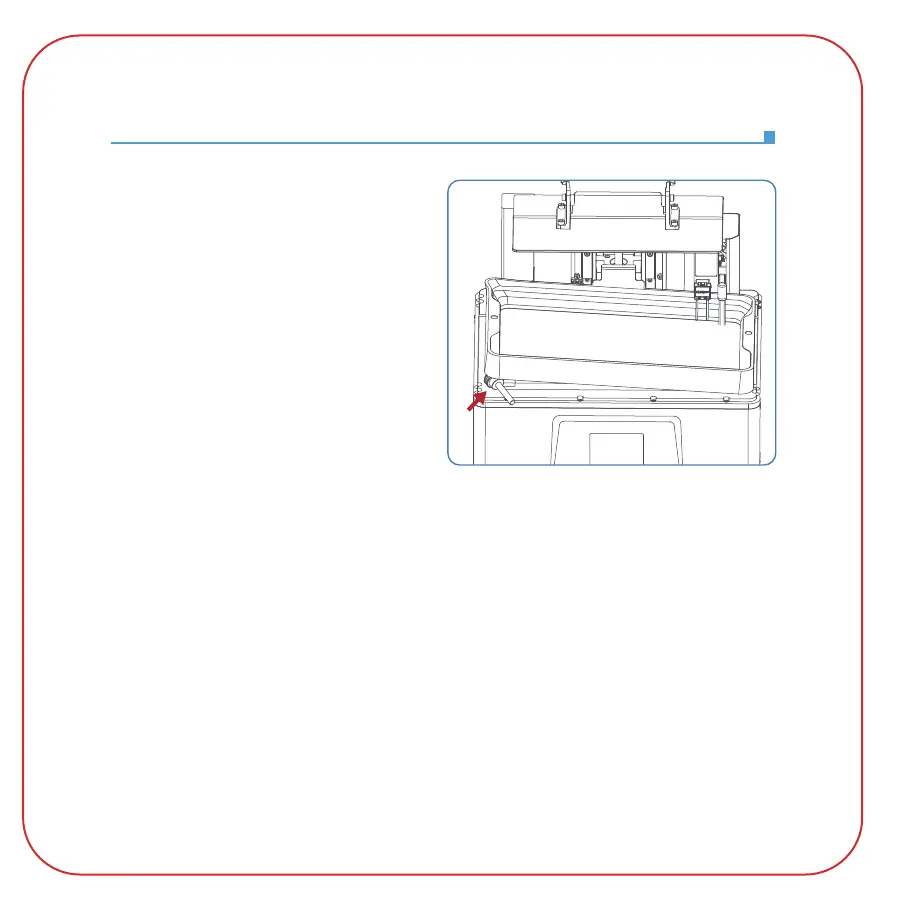
During the resin recycling process, if there is
a small amount of resin remaining in the resin
tank that cannot be recycled, please remove
the screw knobs on the resin tank and place
one of them under the resin tank for more
complete recycling of the resin. (See Picture 5)



 To Next Page