Resistance Welder MULTISPOT MI-100
Maintenance
45
8.2.1 Cleaning
CAUTION
Failure to carry out and/or negligent or improper cleaning jobs may entail damage to
property.
If you do not clean the welder at all or use aggressive cleaning agents or –methods, there is a
danger of damage to property.
Therefore:
Do not use aggressive cleaning agents and/or –methods.
Do not use steam cleaners and/or pressure washers.
Be particularly careful with the display.
Be sure to clean the welder on a regular schedule, especially around air vents. Adequate
dissipation of heat must be ensured.
Clean the welder with a dry, lint-free cloth. For persistent dirt, use a textile cloth that has
been slightly damped with a mild detergent.
As for the display: just dust. Be careful not to scratch the display.
8.2.2 Maintaining the pneumatic unit
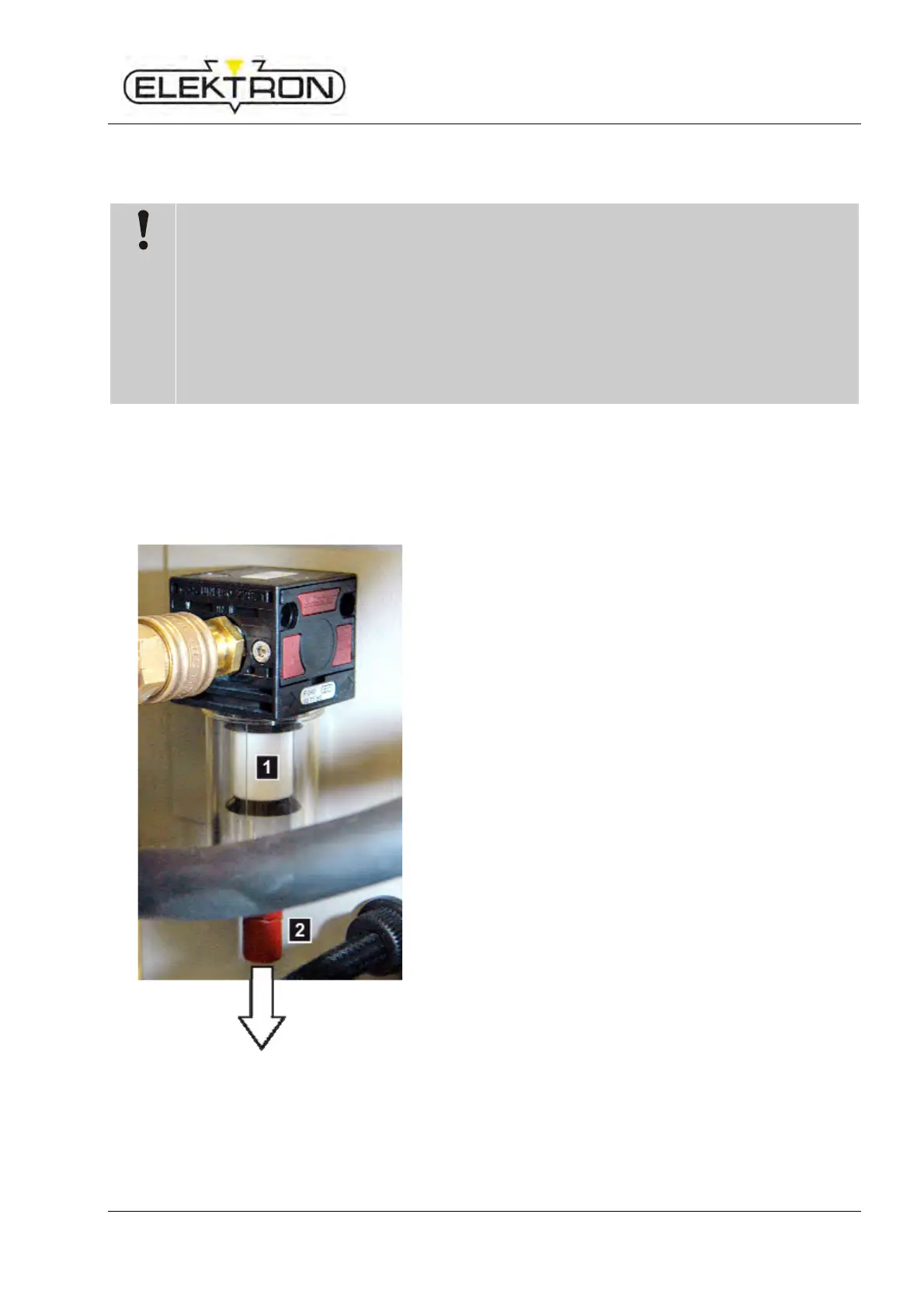
Fig.52: Pneumatic unit
1. Visually check the compressed-air filter (Fig.52/1).
Replace, when you see any accumulation of dirt.
2. Visually check the water separator (Fig.52/2) under the
compressed-air filter for residues of water.
If you find any accumulations of water, pull of the cap in
the direction indicated by the arrow and empty water
from the separator.



 To Next Page