8
DE
DD52R-E (GN 9053)
-
DD52R-E-RF (GN 9153)
Modelle, alle Rechte vorbehalten in Übereinstimmung mit dem Gesetz.
Bei Reproduktion der Zeichnungen, bitte immer Quellenangabe.
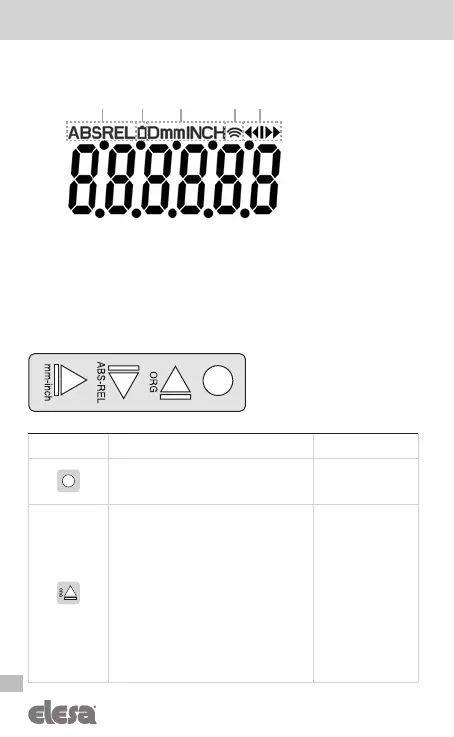
4 Symbols on the display
1. Absolute / relative mode
2. Low battey level
3. Unit of measure (mm / inch / degrees)
4. RF connection
5. Target position indications
5 Key function
Key Operating mode Programming mode
Press for 3 sec to enter the programming
mode.
Parameter selection /
Confirm of parameter
change
Programmable with one of the following
options (see the
___0__
voice of the
menu – cap. 8.3):
d_tArG
: when a target is loaded the display
shows the actual absolute position. Pressing
the key, on the display appears the target
absolute position to reach.
d_toG0 [DEFAULT]: when a target is loaded
the display shows the distance to reach
the target position. Pressing the key, on the
display appear the actual absolute position.
OFF: the key is not assigned to any function
in the operating mode.
Digit increase /
Scroll for
parameters
bottom-top on the
menu tree
1 2 3 54
WARNINGS!
The key icons are conventionally
shown with the default display
rotation set to 180.



 To Next Page