SECTION 3
OPERATING THE CYTOCENTRIFUGE
3.1 Running a Cytocentrifuge Cycle
The display shows the progress of the program, and a signal tone (if enabled)
indicates the end of the cycle.
NOTE: Use the emergency Stop button when required, for example, if there is
abnormal vibration or noise. This will abort the cycle.
Unloading the Rotor
NOTE: When slides are removed from the rotor, cells rapidly begin to dry.
Transporting exposed slides subjects them to air flow and greatly accelerates drying.
Slides to be wet-fixed for Papanicolaou staining should be processed near the rotor
or transported in the rotor to the treatment site. Fix slides as quickly as possible
after removing from the rotor. In situ fixation will prevent these problems.
1 Open the instrument lid and transfer the rotor to a biological safety hood.
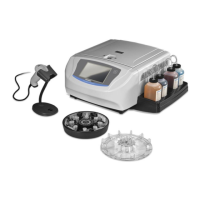
2 Remove the rotor lid by pressing with one hand on the center of the rotor lid
while lifting the locking pin with the other hand.
CAUTION:
Never attempt to release the lid by holding the lid knob and shaking the rotor with
the locking pin released. This can allow the rotor to drop and damage the
microscope slides and rotor.
3 Check single or dual chambers for residual suspension fluid by looking for fluid
in the chamber tunnel. If the fluid is not completely absorbed, rerun the
sample. If fluid flow is stopped, try the following:
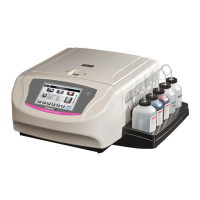
Grip the rotor as shown.
Press the upper right section of the chamber base with your right thumb
while slightly pressing the release lever with your other hand.
Hold for a few seconds until residual fluid (observable in the chamber
tunnel) is absorbed into the Cytopad.
CAUTION:
Removing fluid by these methods causes some cell loss. The remaining cells may
not be completely flattened against the slide.


 To Next Page