SECTION 1
INTRODUCTION
1.2 Touchscreen and User Interface
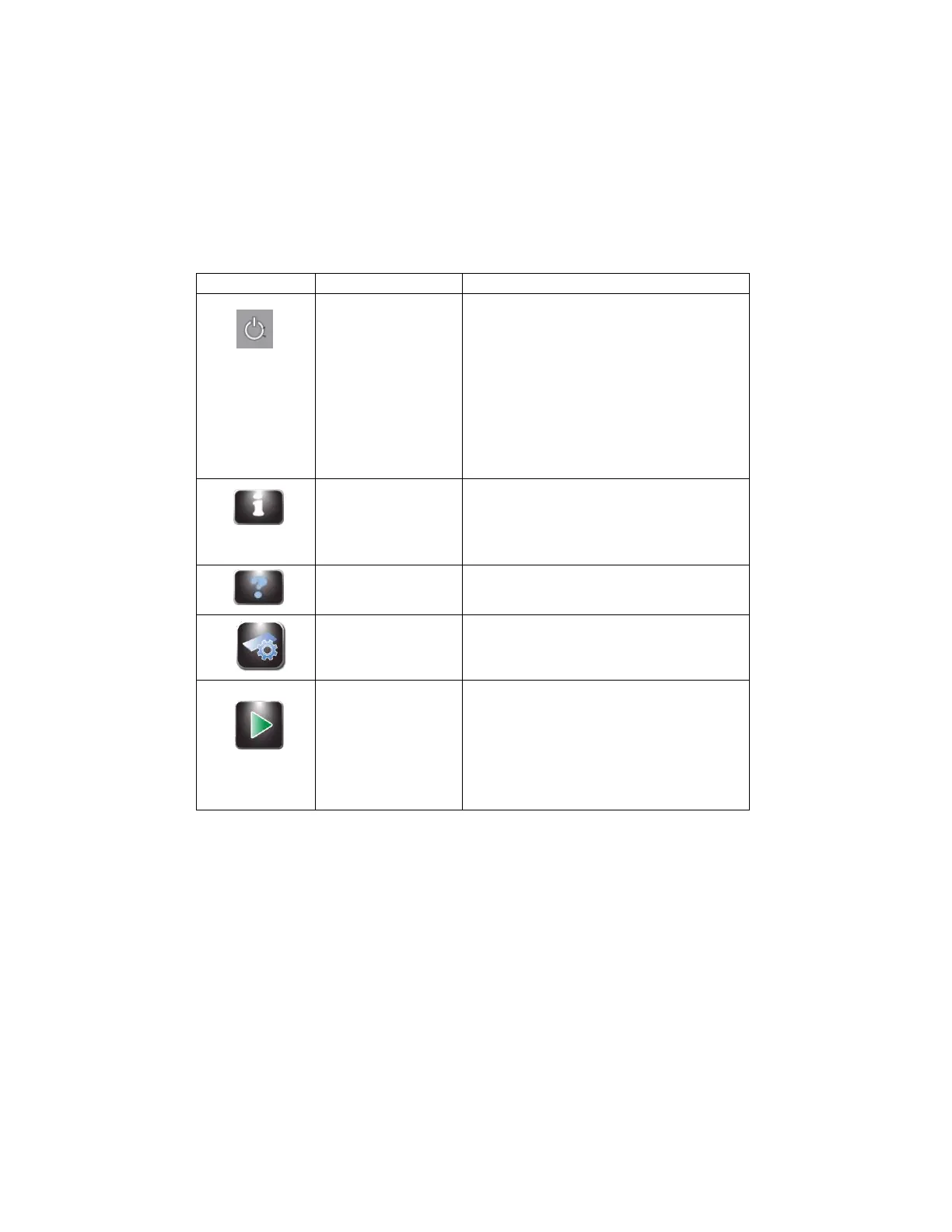
Users control all instrument functions from the interactive touchscreen display.
Table 5: Front Panel/Main Screen Function Keys
With instrument power ON:
Blue = Ready
Amber = Standby
Pressing Standby places instrument into
standby mode
The Standby/Ready button also accesses the
touchscreen calibration function. Refer to
System Setup Menu, (Section 2.1)
Shows the system information, including serial
number and software version. Allows access to
the System Setup features. Refer to System
Setup Menu, (Section 2.1).
Opens the software Help file
Allows users to select or edit programs
Begins a cycle. The Start button is inactive until
a program is created. Refer to Creating a
Cytocentrifuge Program (Section 2.1)
With Slide Tracking enabled, opens the Scan
and Load Slides and Specimen menu, (Section
2.1)


 To Next Page