EasyManua.ls Logo

Elka MK55 - MIDI Patch Configuration

Default Icon
47 pages
Print Icon
To Next Page IconTo Next Page
To Previous Page IconTo Previous Page
Loading...
EDITecnt'd.
(NAME)
il
yvjn
ntMid
tochange
anything
while
In
the
oracessof
-rn'tinga
NAME,
ycu
can
tie
so
by
tivtMnfllhecursor
1
0
the
position
where
YOU
want
tc
mate
1
he
cotrcdlcm
jinri
[U5t
press
the
correct
teyor
button
In,
Sins
vwiy
ijip
corned
Ifltrir,
n
imhw
nr
symlv)'
will
hr-
ifisudM
In
plarHOt
Ike
wrlirUlnrotwhnh
will
Iihvii
Iimi-h
auk.
martJcally
carweltad
|l
Hu?
NAME
has
already
been
saved,
thor
you
J.r&t
retail
Ihe
Preset
by
means
ol
(ha
buttons
on
iho
now
under
the
central
matrw
How
press
NAME
(II),,
You
should
nor
A'
move
the
cursor
to
the
position
that
you
wan
[
to
modify
on-d
tnen
press
the
appropriate
key
or
button
to
ii
lserl
me
corral
Idler,
number
or
symbol
in
p
ace
or
the
wrong
one
which
wi
Mimic
been
iubrnahtaily
cantoned,
veu
can
now
SAVE
me
corrected
name
as
pah
oi
mo
Preset
N
1
as
dasceiboti
below.
1,
It-vivtj
EDIT
made
by
prteiSirig
PLAY
(SOI
2.
Fr&ss.
SAVE
PERFORM
and
keep
tft.S
p-OSSG-J
down.
A!
this
pCrnt
With
uie
Cd
mUieatui
II
as
Sling
above
this
butter,,
piisg
the
appropriate
PERFORMANCE
PRESET
N
3
by
moans
a\
I
he
buttons
in
I
he
row
Imluw
IIiej
cArtltat
mall
i*
(16)-
Th#
row
rinne
w
H
no
1
*'
I
aw
b£0n
saved
sv
pa
r
l
o
f
tt
e
PERFORMANCE
PRESET
INN
shown
QA
hT
display,
(see
(he
SAVE
PERFORMANCE
inslfactions
cm
page
24).
N.Sr
ft
should
be
remembered
that
a
PERFORMANCE
PRESET
memory
contains
dll
the
inltHinathn
programmed
in
PANEL
EOIT,
MIOi
PATCHNAME,
TEMPO,
EXT.
SPLITS
5/6
and
CHAIN.
When
saving
only
a
pad
of
the
se
functions
after
carrying
out
the
programming
(for
protection
against
power
failures
etc.}
or
making
a
change
m
some
part
at
ready
programmed,
an
the
remaining
ppm
of
the
PER¬
FORMANCE
PRESET
will
be
saved
again
without
any
change.
MIDI
PATCH
(9)
Cadi
PERFORMANCE
PRESET
peririrs
you
to
memorize
not
only
Ihc
entire
cel
up
of
the
inslrumertls.
but
atso
u
iuricis
of
commands
for
She
selling
up
c
s
a
complete
MfD:
environment
VrttGr-
you
press
one
of
IhE
PERFORMANCE
PRESET
b
tlttl
has
been
set
up
In
a
curiam
way,
Ibis
will
ato»
stl
up
the
whtfe
MIDI
system
in
me
way
that
you
have
or
eg
rammed
the
VtDI
PATCH
To
sd
up
-a
MlCll
iPATCt
I
yiiu
Should
do
US
falt-liw*
1.
Press.
MIDI
PATCH
in
(he
EDIT
St&Eion
(11).
1
he
lii
lowing
display
will
new
be
SG*n:
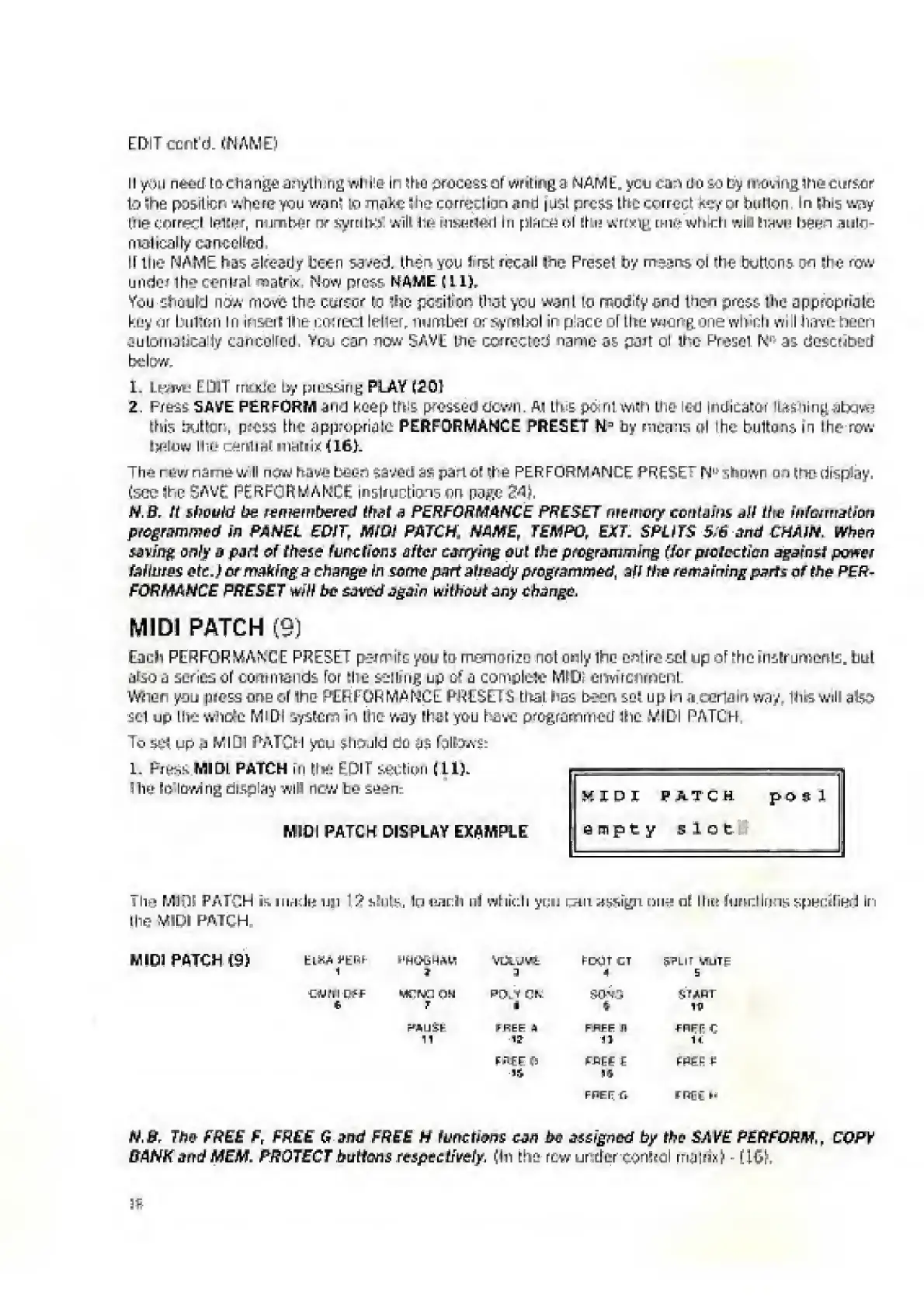
MIDI
PATCH
DISPLAY
EXAMPLE
HfJDI
PATCH
po
9
1
empty
slot
Tlvi
MIDI
PATCH
is
mack*
1131
ISsSuIk,
Ip
each
ill
which
yns;
i..-ui
tinaol
Hit*
lum:liiKiK
spuciliH.!
in
the
MIDI
PATCH
MIDI
PATCH
(9)
1
?
VUtJVt
FOOT
CT
4
SPLIT
UUTE
s
tfdKl
Of
f
t.
MflNC
UW
7
PT>.
V
dK
i
150*13
t
start
ip
POLISH
11
t
REF
A
1?
FAFF
H
11
FHFFC
U
rflfEP
li
F-BEE
£
IS
ppse£
FPFI7
n
FREf
N
IV,
B
.
The
FREE
F,
FREE
G
and
FREE
H
functions
can
tw
assigned
by
the
SAVE
PERFORM.,
COPV
BANK
and
MEM.
PROTECT
buttons
respectively.
(In
the
rew
under
conhpl
rniiirix)
-
rl^|i.

Related product manuals