EasyManua.ls Logo

Elka MK55 - Connecting the ELKA MK 88;55; MIDI Connectivity Explained

Default Icon
47 pages
Print Icon
To Next Page IconTo Next Page
To Previous Page IconTo Previous Page
Loading...
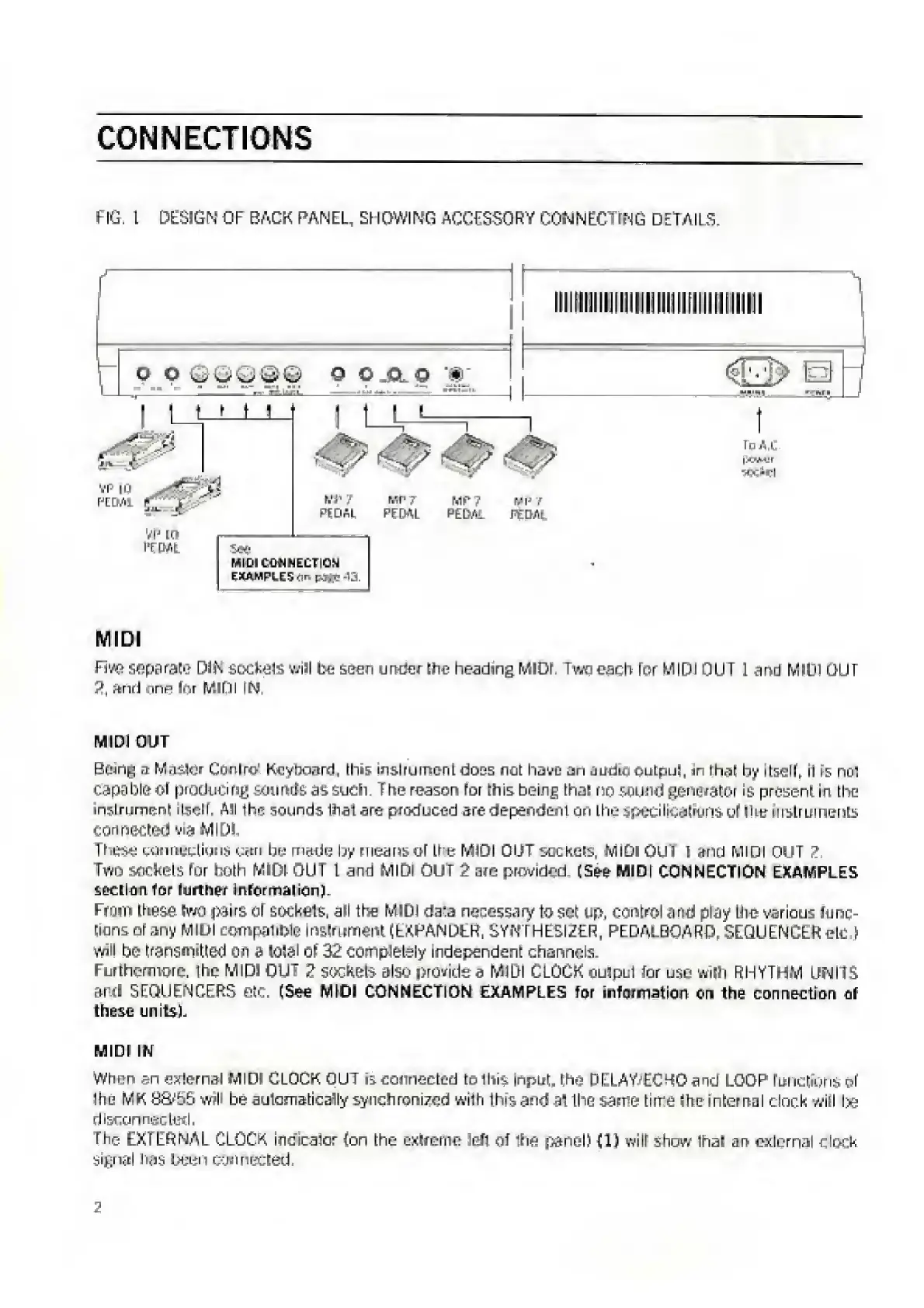
CONNECTIONS
FIG,
1
DESIGN
0
F
BACK
PAN
EL,
SHOWING
ACCESSO
R
Y
COM
N
EC
TIN
G
D
ET
AILS.
O
O
9
O.ALO
W
l
__,
f
_
_
-
_
t
To
AC
|)f.W!r
VX-fl
MIDI
Five
separate
D3iK
sockete
vail
be
seen
under
the
heading
MIDI,
Two
each
for
MIDI
OUT
1
and
MO
GUT
2,
and
enn
Inr
MIDI
IN
MIDI
OUT
Brnn^
a
Master
Cnnlro
KeyrraFird,
this
instrument
doss
not
have
an
uudLt
uutpui,
ir
l
hat
by
itsdl,
il
ts
no".
capable
of
producing
sounds
as
such.
T
he
reason
for
this
being
that
no
sound
generator
Is
present
in
Line
instrument
ilscll.
All
ihe
sounds
Ihal
are
produced
are
depended
on
the
specilicetKins
uMhu
mstrLirnents
connected
via
MID!
The$£
connections
cm
be
made
by
means
of
the
MIDI
OUT
sockets,
MIDI
0U3
1
and
MIDI
OUT
2.
Two
sockets
for
both
MIDI
OU
I
L
and
MIDI
OUT
2
are
provided.
(See
MIDI
CONNECTION
EXAMPLES
section
for
further
Informal
ion).
From
these
two
pairs
of
sockets,
all
the
MIDI
da:a
necessary
to
set
up,
control
and
play
Ihe
various
Junc¬
tions
or
any
MIDI
compatiOle
Instrument
(EXPANDtH,
SYNTHESIZER.
PEDAE.BOARD,
SEQUENCER
elu
)
will
bo
transmitted
Oh
a
lOSSl
Of
32
completely
independent
channels.
Furthermore.
The
MIDI
OUT
2
sockets
also
provide
a
MIDI
CLOCK
ouipul
for
use
wilh
RHYTHM
UNITS
&r.fl
SEQUENCERS
etc.
(See
MIDI
CONNECTION
EXAMPLES
for
information
On
the
connection
of
these
units).
MIDI
IN
When
r>n
eternal
MIDI
CLOCK
OUT
is
connected
tolhis
Input,
the
DELAY’EC40
and
LOOP
fuiiLtiuris
of
Ihe
MK
S&bb
w\
be
automatically
synchronized
with
this
and
ai
the
same
time
Ihc
internal
clock
will
Ixs
disconnected.
The
EXTERNAL
CLOCK
inc'icalor
(on
the
extreme
left
of
the
panel)
(1)
will
show
lhai
an
external
dock
signal
hfjs
ueen
connected
2

Related product manuals