16
Focus
Auto Focus
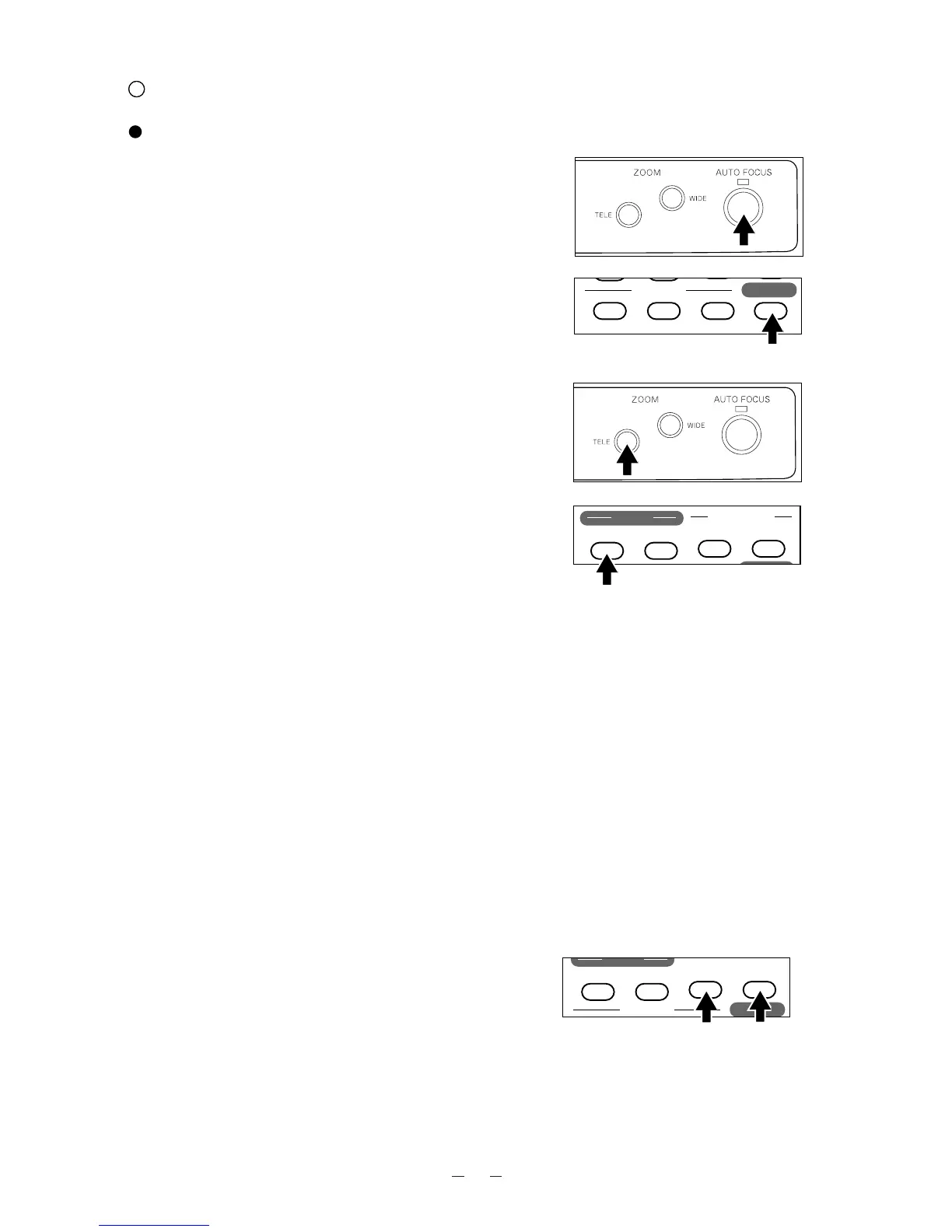
To operate Auto-Focus, press the auto focus button
[AF] on the front operation panel or wireless remote
control, and the Auto-Focus will be activated.
While the auto-focus is in operation, the indication
lamp blinks until the object is brought into focus.
The Presenter features a one-shot auto focus function.
Once focusing is completed, the auto focus function is
released, and the focused position maintains
unchanged. (FOCUSFREE)
To obtain sharper image, zoom in on the object in the
auto-focus mode while pressing the zoom button
[TELE] on the front operation panel or wireless remote
control.
Front operation panel
Remote control
However, the objects listed below may not be brought
into focus in the auto focus mode. In these cases, use
the manual focus mode.
· Objects bearing little contrast
· Objects with fine repeated patterns, such as lateral
stripes and cross stripes
· Objects glittering or reflecting strong light
· Objects with bright background, or excessive
contrast
· Objects in a dark picture plane
· Objects located near and far away at the same time.
· Objects in motion
If the focus button [NEAR] or [FAR] on the wireless
remote control is pressed during the auto focus, the
auto focus will be released.
Note: The auto focus functions up to approx. 15cm
(5.9 in.) above the stage surface (with the
close-up lens attached).



 To Next Page