28
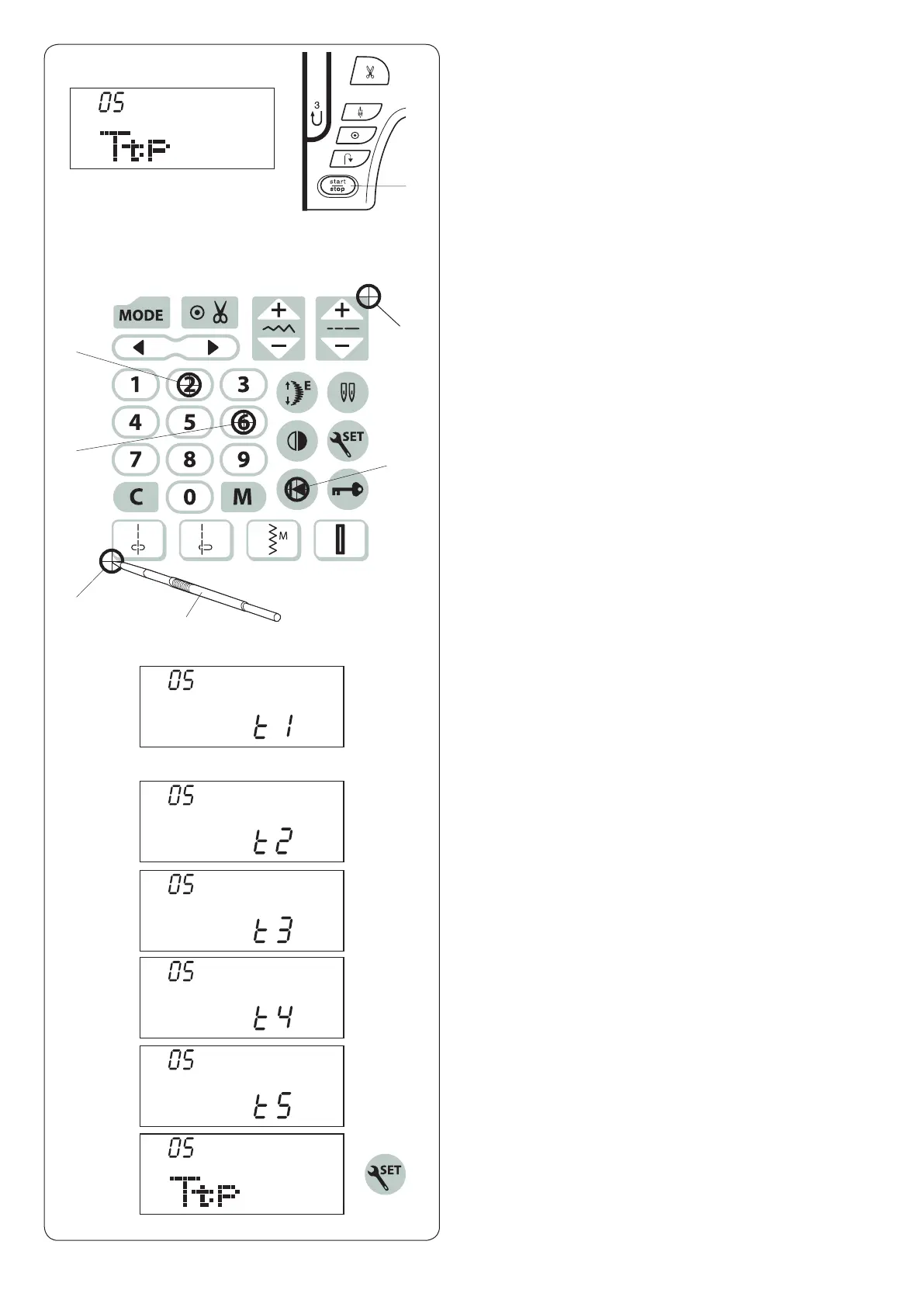
m “t5” will be shown on the LCD screen. Press u on the
touch panel.
Key position calibration
If the function keys seem out of alignment, calibrate the
key position as follows.
z Enter the machine setting mode. Press the mode key
4 times to enter the key position calibration.
x Press the start/stop button q.
c The key position adjustment screen appears and
“t1” is shown on the right side of the screen. With the
touch panel stylus w, press e on the touch panel of
your machine.
v “t2” will be shown on the LCD screen. Press r on the
touch panel.
b “t3” will be shown on the LCD screen. Press t on the
touch panel.
n “t4” will be shown on the LCD screen. Press y on the
touch panel.
z x
c
, The screen will be back to the key position adjustment
screen. Press the set key to exit the machine setting
mode.
v
b
n
m
,
e
r
t
y
u
(t1)
(t2)
(t3)
(t4)
(t5)
w
q












 To Next Page