34
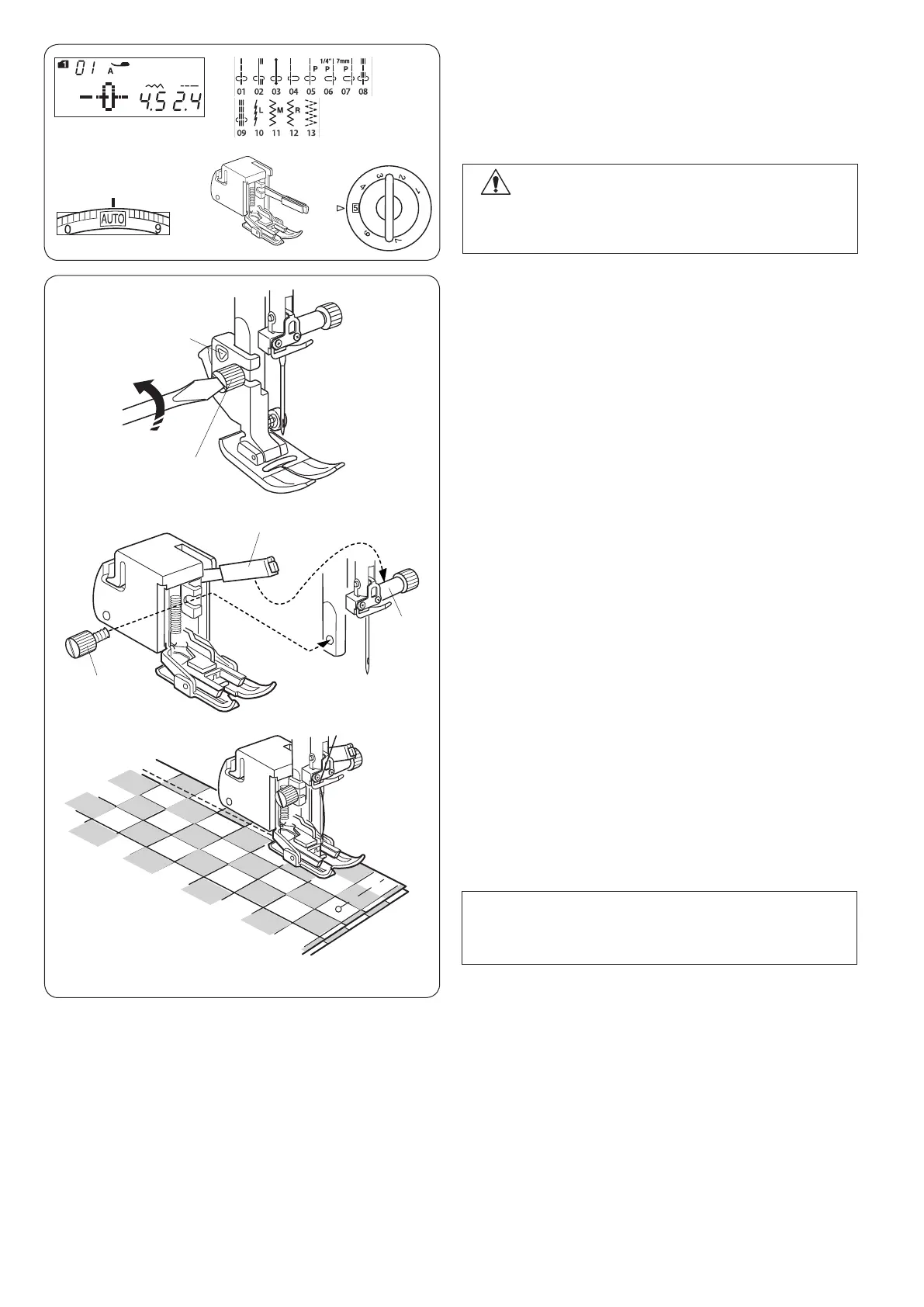
Sewing with Even Feed Foot (Walking foot)
Machine settings
q Pattern: MODE 1: 01-13
w Thread tension: AUTO
e Presser foot: Even feed foot
r Foot pressure: 5
Even feed foot (walking foot) is a special attachment for
hard-to-feed materials. This foot prevents the fabric from
slipping or puckering by feeding fabrics with upper and
lower feed dogs. Even feed foot is great for ne fabrics,
knits, leather and matching plaids.
Attaching the even feed foot
Loosen the setscrew and remove the foot holder.
Attach the even feed foot to the presser bar with the lever
above the needle clamp, and secure it with the setscrew.
q Foot holder
w Setscrew
e Lever
r Needle clamp
q
ew
r
Sewing
Place the fabric under the foot and lower the needle at
the point where you wish to start.
When seaming plaid fabrics, match the plaids of the
upper and lower layers and pin them together.
Remove the pins as you sew.
CAUTION:
Always make sure to press the lockout key to lockout
the machine or turn the power switch off before
replacing the presser foot.
e
r
w
NOTE:
When sewing with the even feed foot, be sure to sew
at a slow speed.
q
w












 To Next Page