Note: The batch is different, the appearance of the receiver will be a difference, one on the power light red
light, a power supply lights, but the use of the same method, pin definition is the same.
Di/dat: Signal flow, from the handle to the host, this signal is a 8bit serial data, synchronous transmission in
the clock down the edge. The reading of the signal is done in the process of changing the clock from high to
low.
Do/CMD: Signal flow, from the host to the handle, this signal and DI relative, the signal is a 8bit serial data,
synchronously transmitted to the clock down the edge.NC: Empty port; .
GND: Ground;
VDD: The 3~5V power supply;
CS/SEL: Providing trigger signals for handles, the level is low during communication;
CLK: The clock signal is sent by the host to maintain data synchronization;
NC: Empty port;
ACK: the response signal from the handle to the host. This signal changes to low in the last cycle of each 8-
bit data sending, and the CS remains low. If the CS signal do not remain low, the PS host will try another
device in about 60 microseconds. The ACK port is not used in programming.
Drive PS2 remote
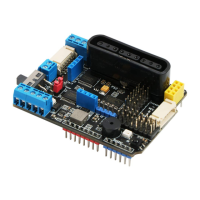
There is a PS2 port on the PS2X&Motor Driver Board. The PS2 infrared receiver can be directly
plugged into the PS2 port. After the PS2 receiver is properly inserted (as shown in Figure 11-1), the sample
program starts to be burned. (Example program file Path: Load File -> ArduinoDemo -> PS2X_Example ->
PS2X_Example.ino) After burning the sample program, turn on the power switch and turn the handle switch
to ON. When the receiver is not searched, the light on the handle will flash continuously. The receiver has
not been searched for a certain period of time. It will enter standby mode, the light on the handle will be
extinguished, then press the "START" button to wake up the handle. The handle and the receiver are
automatically paired. When the pairing is not successful, the green light of the receiver flashes, and the light
on the handle will also flash. After the pairing is successful, the green light on the receiver is always on, and
the light on the handle is always on. Press the button “MODE”. "(The handle batch is different, the above
logo may be "ANALOG", but it will not affect the use), you can choose "red light mode", "green light


 To Next Page