Emaldo Power Core User Manual
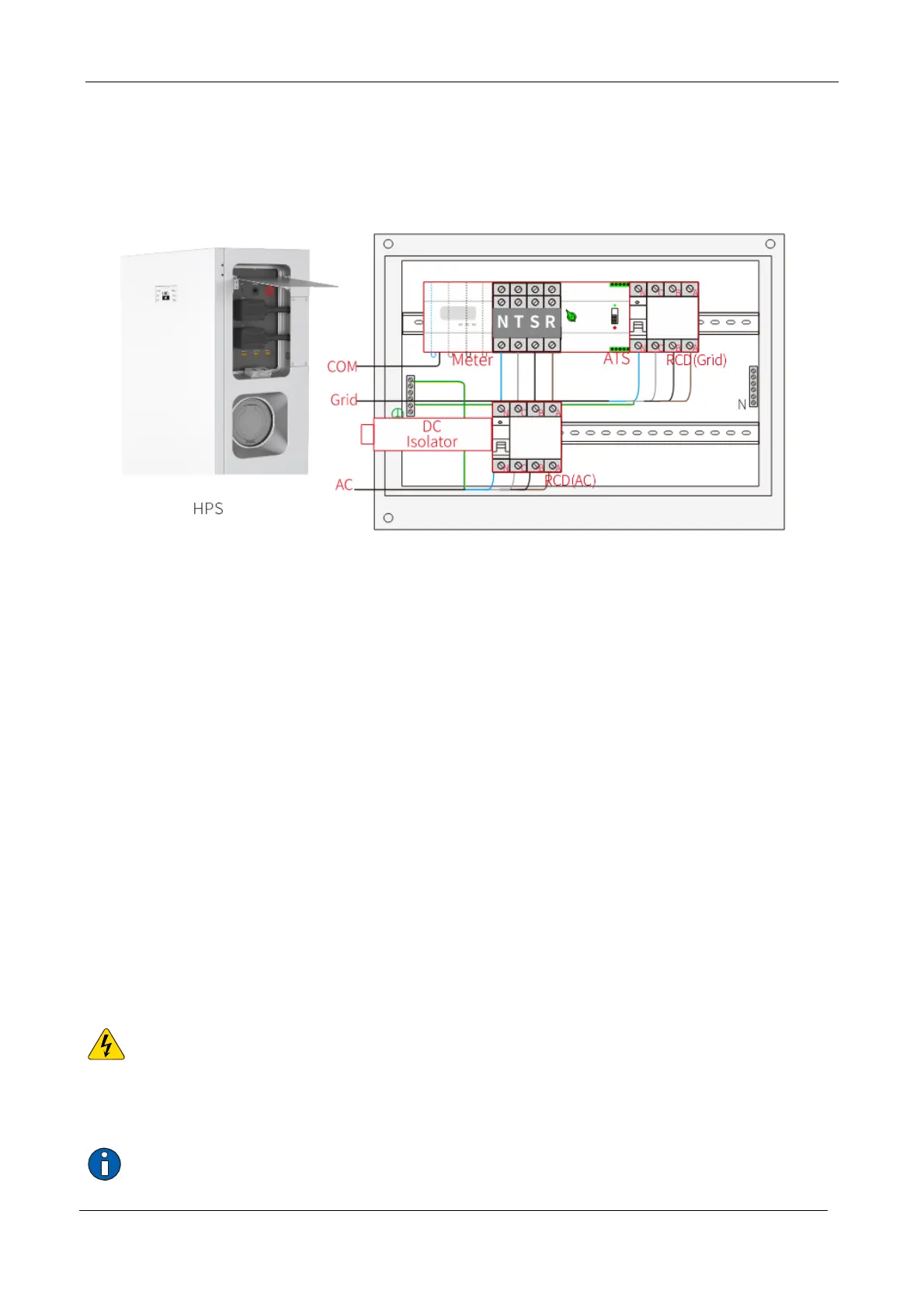
Insert one end of the electricity meter communication cable RJ45 into the COM electricity
meter communication port of the energy storage system.
Wiring from the leading-out cabin of the cabinet to Additional Cabinet
Step 1
Thread one end of the cable through the threading hole of Additional Cabinet from outside to
inside.
Step 2
Press and connect the five wires of the AC cable into the lower part of the second row RCD (AC)
and the ground bar in the line sequence, and then connect the upper part of RCD to the
common power supply input terminal of ATS; Press and connect the five wires of the Grid cable
into the output terminal and ground bar of the RCD (Grid) as per line sequence.
Step 3
Connect the other end of the electricity meter communication cable to the corresponding
terminal of the electricity meter.
4.3 Wiring for photovoltaic array
Warning: Electric shock!
A small amount of exterior sunlight may activate photovoltaic modules. Please be careful during
wiring to avoid electric shock or electric arc hazard.
Important


 To Next Page