3410 Series Gas Ultrasonic Meters Operations Manual Section 2: Setup meter communications
3-9000-777 Rev E January 2018
Customize Daniel MeterLink settings 9
2.1.4 Customize Daniel MeterLink settings
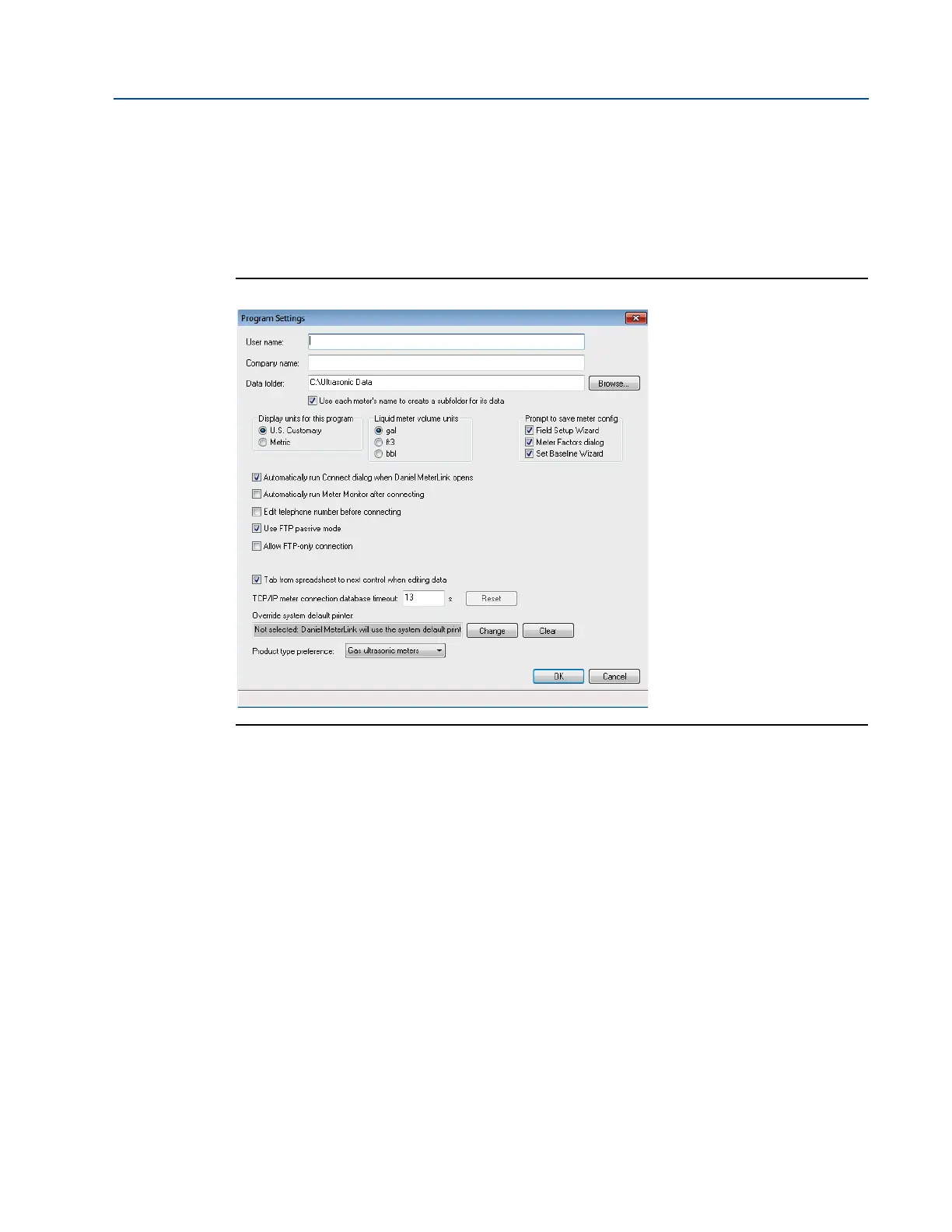
Open Daniel MeterLink and access File>Program Settings, then input the desired settings for your
meter. Your user name and company name is included on reports and logs generated with
Daniel MeterLink.
Figure 2-1 Program settings
• User name
• Company name
• Data folder (where meter’s data is stored)
• Select the checkbox to create a subfolder with the meter’s name under Data folder for
saving and opening files for your meter
• Display units (of measurement); U.S. Customary or Metric for necessary unit conversions
read by the meter
• Meter volume units; gal, cubic feet, or bbl
• Prompt to save meter config (configuration) prompts you to save a copy of the meter
configuration after writing changes to the meter
• Run Connect dialog automatically after connecting
• Run Meter Monitor automatically after connecting
• Run Meter Monitor summary or detailed view after connecting





 To Next Page