To Next Page
E
Emily HinesAug 17, 2025
How to fix error message during calibration (ERROR- SPAn) on Emerson daniel 1500?
- RRenee KempAug 17, 2025
If the meter displays the error message ERROR- SPAn during calibration, verify the minimum input span requirements.

How to fix error message during calibration (ERROR- SPAn) on Emerson daniel 1500?
If the meter displays the error message ERROR- SPAn during calibration, verify the minimum input span requirements.
Why is the Emerson Measuring Instruments read-out inaccurate?
An inaccurate read-out can stem from a few causes. Start by inspecting the rotor blades for any foreign material and clean them if necessary. If the rotor blades are bent, return the device to the factory for replacement or repair. Also, troubleshoot any defective accessory equipment.
What to do if the turbine meter rotor of Emerson daniel 1500 is not turning?
If the turbine meter rotor isn't turning, it could be due to a defective rotor bearing or damage from foreign material. In either case, return the rotor assembly to the factory for replacement or repair.
What to do if Emerson daniel 1500 display locks up?
If the display locks up or the meter does not respond, perform a hard reset. This can be done by removing the display module or by removing external loop or DC power.
What to do if Emerson daniel 1500 thru-glass buttons do not respond?
If the thru-glass buttons do not respond, several factors could be at play. If is displayed, hold the Menu Through-glass button to exit power save mode. If is flashing, allow 60 seconds to pass to exit manual pushbutton lockout mode. If the cover was recently tightly secured, allow up to 2 minutes for the buttons to self-calibrate to the new cover position due to glass reflection. Ensure the Through-glass Button switch on the display module is in the ON position. Direct sunlight can also interfere with the sensors, so shielding the window while operating the buttons is recommended.
What to do if Emerson daniel 1500 meter flashes 99999?
If the meter flashes 99999, check that the input signal is within the scaled range of 99999.
What to do if Emerson Measuring Instruments display stuck displaying maximum or minimum?
If the display is stuck displaying MAXIMUM or MINIMUM, press Enter (Unlock) to exit Max/Min display.
How to fix unsteady rate display on Emerson Measuring Instruments?
To stabilize an unsteady rate display, increase the low gate setting in the Advanced menu.
Why backlight does not appear on Emerson Measuring Instruments?
The backlight is designed to aid viewing in dim lighting and may not be noticeable in well-lit conditions. Also, on battery-powered models, the backlight turns off after ten seconds of button inactivity.
What to do if Emerson daniel 1500 Measuring Instruments display response is too slow?
If the display response is too slow, check if gate settings can be lowered.
Explains the safety alert symbol for potential physical injury hazards.
Adherence to manual instructions and warnings for safe operation.
Outlines warranty period, coverage, and exclusions for products.
Defines the extent of liability and available remedies for product issues.
Describes the explosion-proof display, programming methods, and enclosure.
Lists available Daniel models and associated accessories.
Outlines general operating specifications including display, programming, and power options.
Covers rate input, display settings, 4-20mA output, and open collector outputs.
Details RS-485 communication and factory default startup parameters.
Lists electrical, environmental, and installation regulations.
Describes connector board setup and various input/output connection types.
Outlines essential steps and safety precautions for safe installation.
Covers function keys, button tips, numeric/alphanumeric input, and main menu.
Details input type, K-Factor, units, decimal points, display, and tag settings.
Configures the display duration for toggling between values or tags.
Introduces the menu for advanced functions not used in basic setup.
Covers open collector outputs, 4-20mA scaling, gate function, and filters.
Details methods for scaling, calibration, linearization, and total resets.
Manages passwords, non-resettable totals, and custom menu configurations.
Covers system functions, clock, logging, and serial communication.
Guides on basic operation and initial startup using buttons.
How to read, reset totals, grand totals, and max/min values.
Restores default parameters and provides space for user settings.
Provides solutions for issues and a quick guide to interface functions.
Step-by-step instructions for replacing the internal battery.
 General
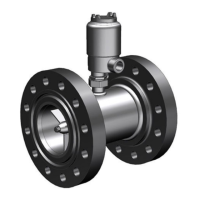
| Type | Ultrasonic Flow Meter |
|---|---|
| Flow Velocity Range | 0.01 to 23 m/s |
| Operating Temperature | -40°C to +200°C |
| Communication Protocols | HART, Modbus |
| Power Supply | 24 VDC |
| Approvals | ATEX, IECEx |
| Measurement Range | 0.01 to 25 m/s |
| Output | 4-20 mA, pulse, frequency |
| Process Connection | Flanged |
| Material | Carbon steel, stainless steel |
| Path Configuration | Multi-path |