Press the Enter button at any time, to accept a setting or press the Menu button to exit
without saving changes.
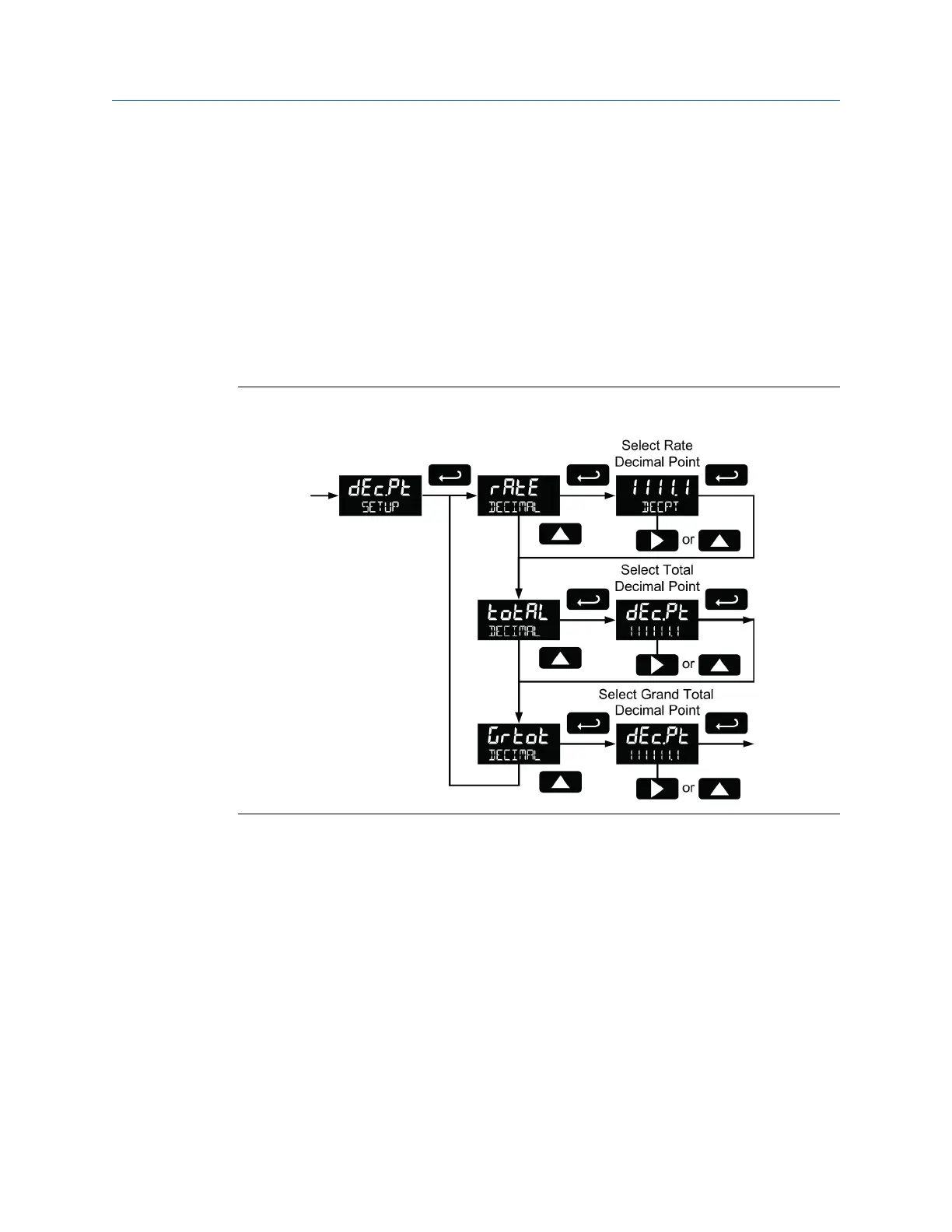
5.7.4 Set the decimal point (dEc.Pt)
Set the rate decimal point from 0-4 decimal places. The total decimal point may be set
with 0-6 decimal places or Grand total. Rate decimal, total decimal, and grand total
decimal are programmed individually.
Press the Right arrow to move the decimal point one place to the right (including no
decimal point). Press the Up arrow to move the decimal point one place to the left.
Setting the decimal point (dEc.Pt)Figure 5-16:
5.7.5 Configure the display (dSPLY)
The top and bottom displays can be independently programmed to display selected
information.
Configure the top display (dSPLY)
The top display can be programmed to display rate or total. When displaying total, the top
display will only show the 5 least significant digits, with no overflow display, for a total
from 0 to 99999. The total rolls over at 99999 to 0 when on the top display. For a full 7-
digit total with 13-digit total overflow display function, use the bottom display for total.
Setup and programming
48 LTM Internal Display



 To Next Page
 Loading...









