EasyManua.ls Logo

Emerson LC320EM2 - Remote Control and Battery Installation; Remote Control Functionality; Installing Batteries and Precautions

Emerson LC320EM2
33 pages
Print Icon
To Next Page IconTo Next Page
To Previous Page IconTo Previous Page
Loading...
7
E
ng
li
s
h
INTRODUCTION
PREPARATION WATCHING TV
USING FUNCTIONS
USEFUL TIPS
CONNECTING DEVICES
INFORMATION
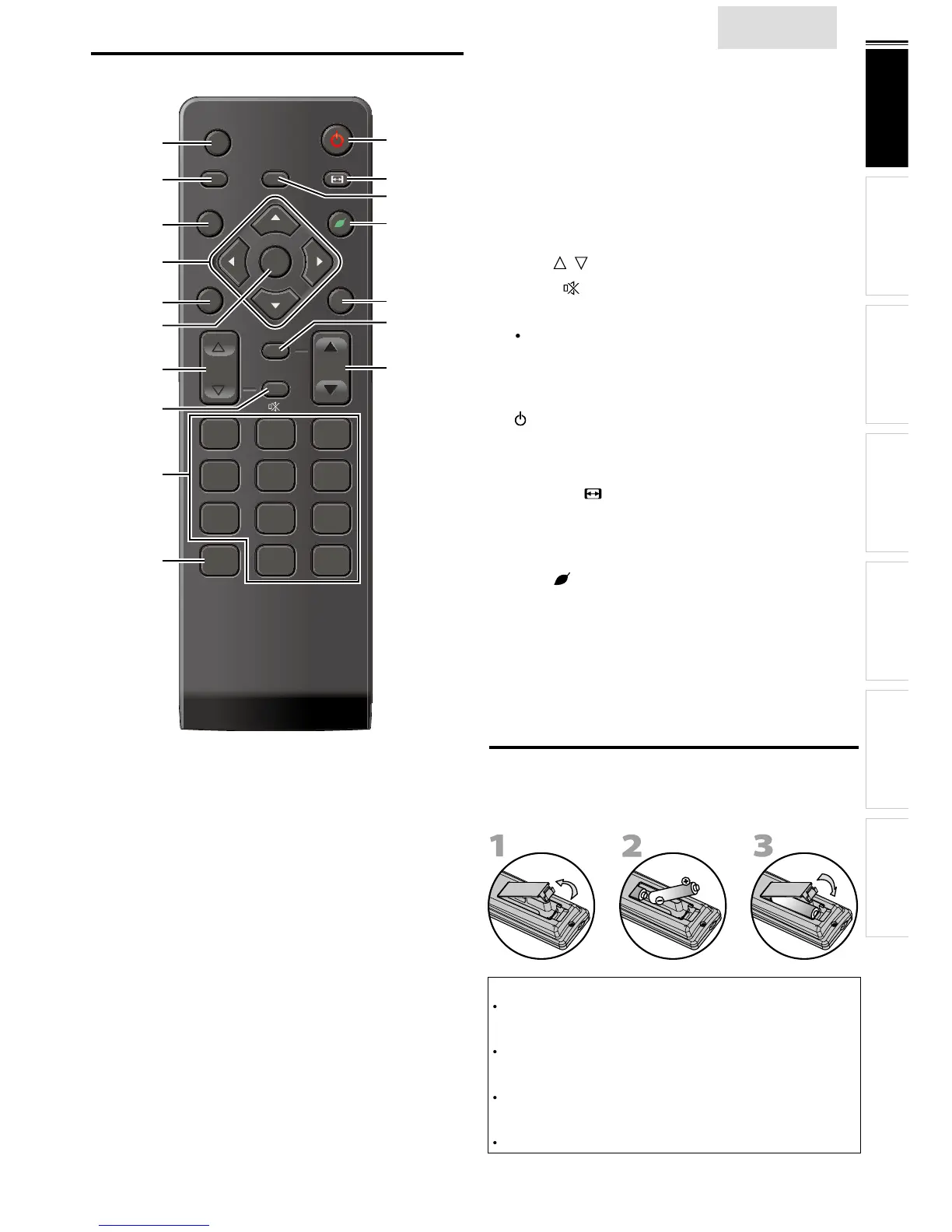
Remote Control Function
FREEZE
SLEEP
BACK
MENU INFO
CHVOL
SAP
MUTE
456
789
0.
123
SOURCE
FORMAT
ECO
PREV CH
OK
1
9
2
3
12
14
11
16
8
5
7
17
10
15
13
4
6
1
SOURCE
p. 12
2 SLEE
P
p. 12
3 BAC
K
p. 1
4
4 ///(cursor)
p. 1
1
5
MENU
p. 1
5
6
OK
p. 1
1
7
VOL /
p. 12
8
MUTE
p. 12
9
N
um
b
er
b
utton
s
p. 13
(dot)
P
ress to shift the subchannel from the main channel
.
1
0
P
REV CH
p. 13
P
ress to return to prev
i
ous
l
y v
i
ewe
d
c
h
anne
l.
1
1 (power)
p. 1
1
P
ress to turn t
h
e un
i
t on an
d
go
i
nto stan
db
y mo
d
e
.
T
o completely turn off the unit, you must unplug the AC
power cor
d.
1
2 FORMAT
p. 13
Press to select as
p
ect ratio available for the TV screen
.
1
3
FREEZE
p. 13
P
ress to freeze screen image
.
14
ECO
p. 1
4
P
ress to re
d
uce power consumpt
i
on
.
1
5 INFO
p. 1
4
1
6
S
AP
p. 12
1
7
C
H /
p. 13
I
nsta
ll
ing t
h
e
B
atterie
s
Install the batteries (AAA, 1.5V x 2) matching the polarity
i
ndicated inside batter
y
com
p
artment of the remote control
.
Battery Precautions:
Be sure to follow the correct polarity as indicated in the battery
c
ompartment.
R
everse
d
b
atter
i
es may cause
d
amage to t
h
e
d
ev
i
ce
.
Do not mix different types of batteries together (e.g. Alkaline and
C
arbon-Zinc, or rechargeable batteries like ni-cad, ni-mh, etc) o
r
o
ld batteries with fresh ones
.
If the device is not to be used for a long period of time, remove
t
he batteries to prevent damage or injury from possible battery

l
ea
k
age
.
D
o not try to rec
h
arge
b
atter
i
es; t
h
ey can over
h
eat an
d
rupture
.

Related product manuals