2 5
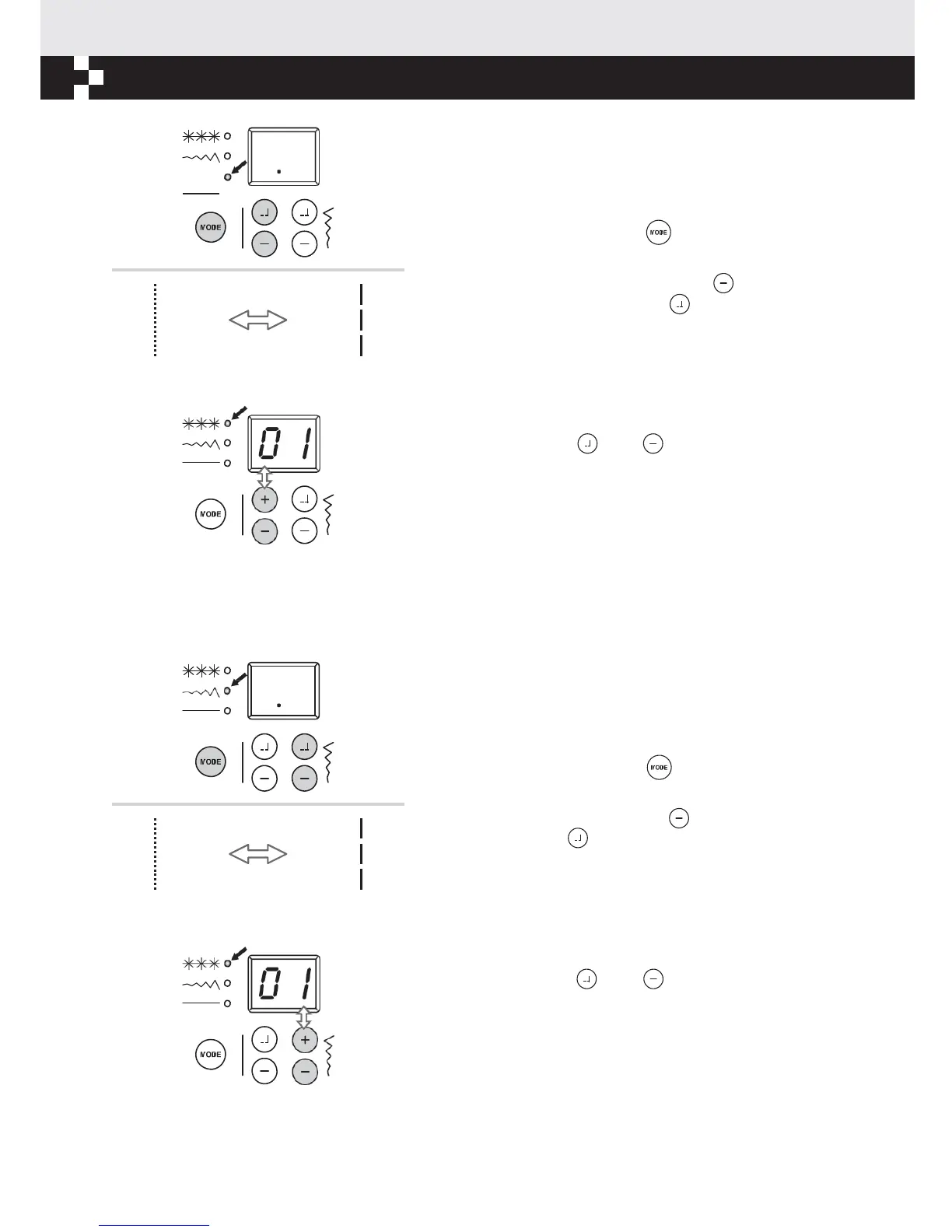
Stitch length
adjustment
button (3)
When you select a stitch the machine will automatically set
the recommended stitch length.
If the pre-set stitch length need adjusting once the pattern is
selected, push mode button " " to move to the stitch
length position.
To shorten the stitch length, press the " " button. For a
longer stitch length, press the " " button. The stitch
length can be adjusted between "0.0-4.5". Certain stitches
have a limited length.
When the setting is at the auto position, the digital display
screen will blink 3 times.
When MODE is set on pattern, press stitch length
adjustment buttons " " or " " for tens place 0~4 .
Stitch width
adjustment
button (4)
When you select a stitch the machine will automatically set
the recommended stitch width.
If the pre-set stitch width need adjusting once the pattern is
selected, push mode button " " to move to the stitch
width position.
For a narrower stitch, press the " " button. For a wider
stitch, press the " " button. The stitch width can be
adjusted between "0.0-7.0". Certain stitches have a limited
stitch width.
When the setting is at the auto position, the digital display
screen will blink 3 times.
When MODE is set on pattern, press stitch width
adjustment buttons " " or " " for ones place 0~9 .
If the numbers are beyond the selections, the numbers in
display will be flashing and voice warning. The machine
can not start.


 To Next Page