CONTROL PORT
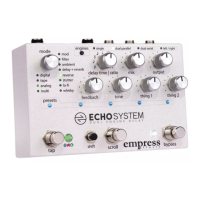
The control port jack allows the Echosystem to be controlled by
a multitude of devices. The pedal ships configured to accept an
expression pedal. Please see the Advanced Configuration
section on how to configure the control port for the device you
plan to use.
EXPRESSION PEDAL
Each parameter, with the exception of the mode knob, can be
controlled simultaneously via the expression pedal.
To control a parameter with the expression pedal, move the
parameter's knob to the desired heel setting, then hold down
the shift button and move the knob to the desired toe setting,
then release the shift button. Multiple parameters can be
assigned for expression pedal control simultaneously by
repeating this process for each parameter to be assigned. Each
parameter can be set with independent heel and toe settings.
To release a parameter from the expression pedal's control,
move the knob that controls that parameter.
Any expression pedal used with the Echosystem should have
the following pinout: tip to signal, ring to power, and sleeve to
ground.


 To Next Page