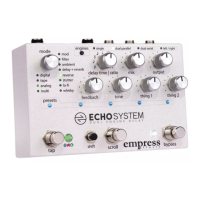
Controls at a Glance
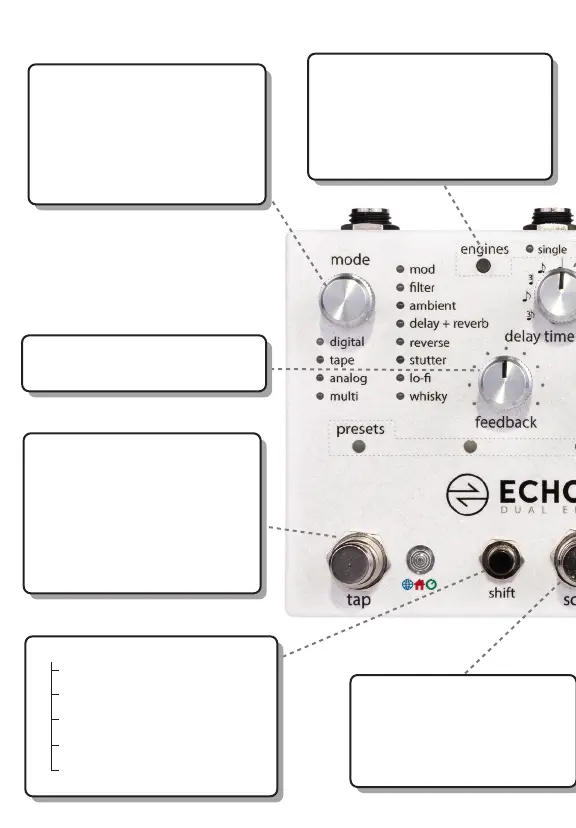
mode selector: selects which
mode is active. Each mode can
have many submodes which are
indicated by dierent color LEDs.
when using dual engines, press
to switch active engine.
engines: press to cycle through
the 4 dierent routing modes.
hold tap and press engines to
send current tempo from the
active delay to the other delay
feedback: controls how long the
delay takes to decay.
shift +
engine - switch engine order
mode btn- solo active engine
knob(s) - assign exp pedal
scroll - save preset
tap - select delay time source
tap: tap to enter a delay time.
also used to engage a preset
that has been scrolled to with
the scroll stompswitch.
hold tap to temporarily set
innite repeats (in most modes).
release to return to knob setting.
scroll: press to scroll through
presets, then engage the preset
with the tap switch.
scroll + tap: will scroll
backwards through presets.


 To Next Page