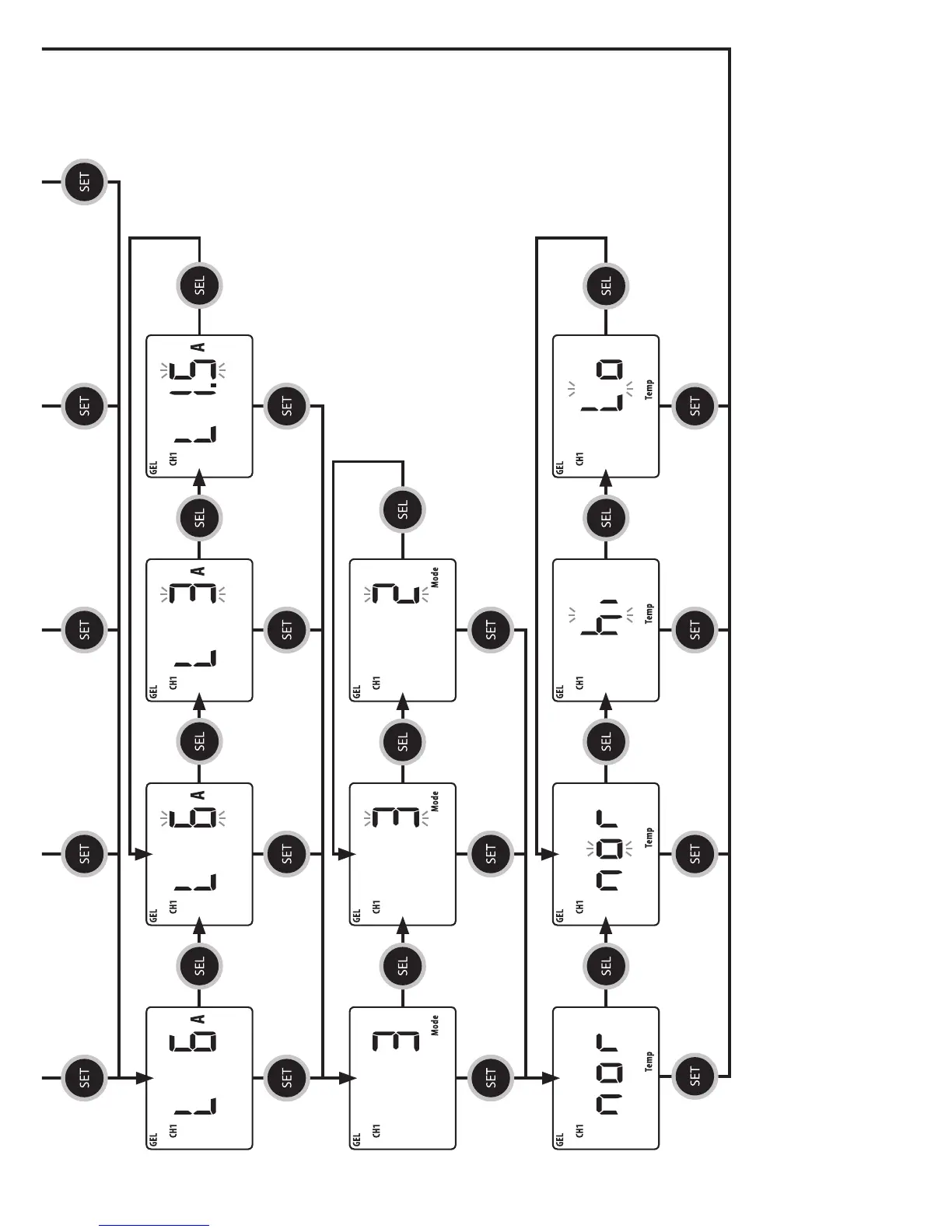
Press SEL
to enter low
current menu
Press SEL
to enter
mode menu
Press SEL
to enter
temp menu
Press SEL
to change
current
Press SEL
to change
mode
Press SEL
to change
temp
Press SEL
to change
temp
Press SEL
to change
current
Press SEL
to return to
change current
Press SEL
to return to
change mode
Press SEL
to return to
change temp
NOTE: At any function setting, pressing the MENU button will exit the function mode.
WARNING: FIRE HAZARD
When choosing the battery type and setting the charging parameter, please consult the battery manufacturer on all the voltage and
current settings. Using the wrong setting to charge a battery may overcharge, damage the battery and may cause a re.
* Disregard the
Temp Select
setting if the
Temperature
Sensor is NOT
connected.
CH1 CHARGE MODE
CH1 TEMP. SELECT
CH1 ABSORPTION
TO FLOAT CURRENT
Display shows Absorption to
Float as currently set.
Display shows
Charge Mode as
currently set.
Shows Temp Mode
current setting.
Press SET to keep the
current setting and return
to the top level menu
Press SET to keep the
current setting and return
to the top level menu
Press SET to keep the
current setting and return
to the top level menu
Press SET to keep the
current setting and return
to the top level menu
Press SET
to keep the
current setting
and toggle to
the next menu
Press SET to keep the
current setting and
toggle to the next menu
Press SET to keep the
current setting and
toggle to the next menu
Press SET to keep the
current setting and
toggle to the next menu
Press SET to keep the
current setting and
toggle to the next menu
Press SET to keep the
current setting and
toggle to the next menu
Press SET to keep the
current setting and
toggle to the next menu
Press SET to keep the
current setting and
toggle to the next menu
Press SET to keep the
current setting and
toggle to the next menu
Press SET to keep the
current setting and
toggle to the next menu
Press SET to keep the
current setting and
toggle to the next menu
Press SET to keep the
current setting and
toggle to the next menu


 To Next Page