6 Troubleshooting
When the Auto Control function
is activated and the button is
pressed, a fault code is set in
the DC2: "AUTO CONTROL
COMMUNICATION ERROR" is
started.
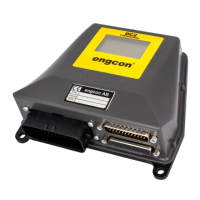
DC2 receives no information from
an external excavator guidance
system (via C2C).
Check that the external excavator
guidance system is running, that it
is properly configured and that it is
connected correctly according to
section 3.2.2. B: Connecting C2C
with cable 842174 (also check
the excavator guidance system
manufacturer’s configuration
documentation if the above has
not cured the fault)
GP buttons do not work in DC2
Buttons not activated in DC2
or not used by the external
excavator guidance system
Check the settings in the DC2,
see section 4.4.5. Select buttons
on the grip and/or configuration
of external excavator guidance
system
Incorrect rotation angle is
displayed in the excavator
guidance system and/or in
MicroConf
Rotation sensor configured for
other gear ratios of the Tiltrotator's
rotation.
Check if the correct sensor is
being used. Read in MicroConf or
check the marking on the rotation
sensor. Replace with the correct
sensor.
No tilt data in MicroConf.
Incorrect firmware or setting (in
case of DC2).
Activate the function in MicroConf.
See section 4.4.5. Select buttons
on the grip.
No rotation data in MicroConf.
Incorrect firmware or setting (in
case of DC2).
Activate the function in MicroConf.
See section 4.4.5. Select buttons
on the grip.
"No license" appears in
MicroConf.
Upgrade the firmware in the C2C
device to version 2.1.0 or later.
26


 To Next Page