17
1
2
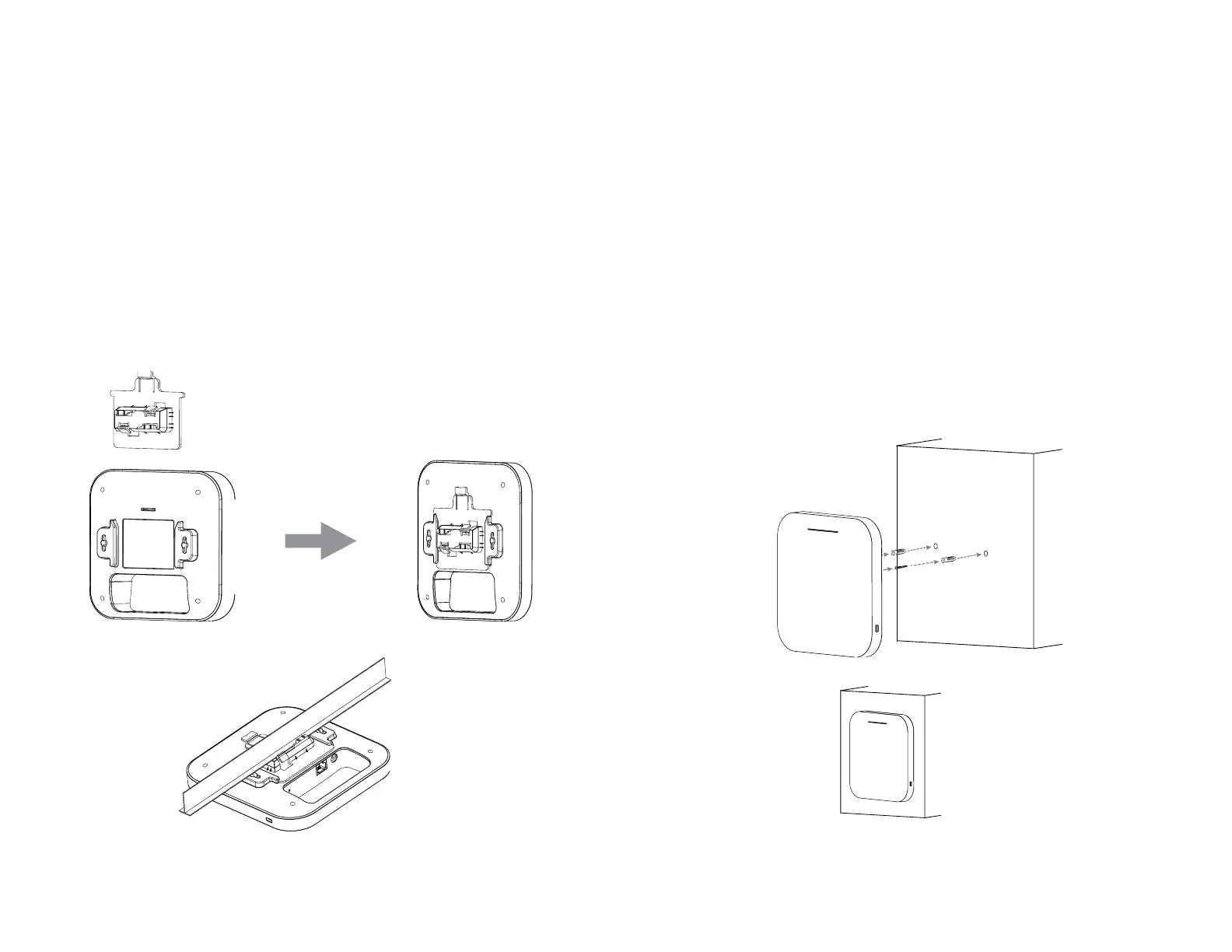
Ceiling Mount an Access Point
1)SlidetheceilingmountbaseintotheslotoftheAccess
Point.
2)HoldtheAccessPointwithonehandtoreachtheother
hand over the T-Rail sides of the bracket. Then hook the
stationary end of the ceiling mount bracket onto the
T-Rail.
3
4
5
Wall Mount an Access Point
3)ContinuedfromA,determinewheretheAccessPoint
to be placed and mark location on the surface for the two
mountingholes.Usetheappropriatedrillbittodrilltwo
8.1mm diagram and 26mm depth holes in the markings
and hammer the bolts into the openings.
4)Screwtheanchorsuntotheholesuntiltheyareush
with the wall ; screw the included screws into the anchors.h
5)PlacetheAccessPointagainstwallwiththemounting
screw heads.















 To Next Page