RAK139_ENG / 2023-09-14
16 / 36
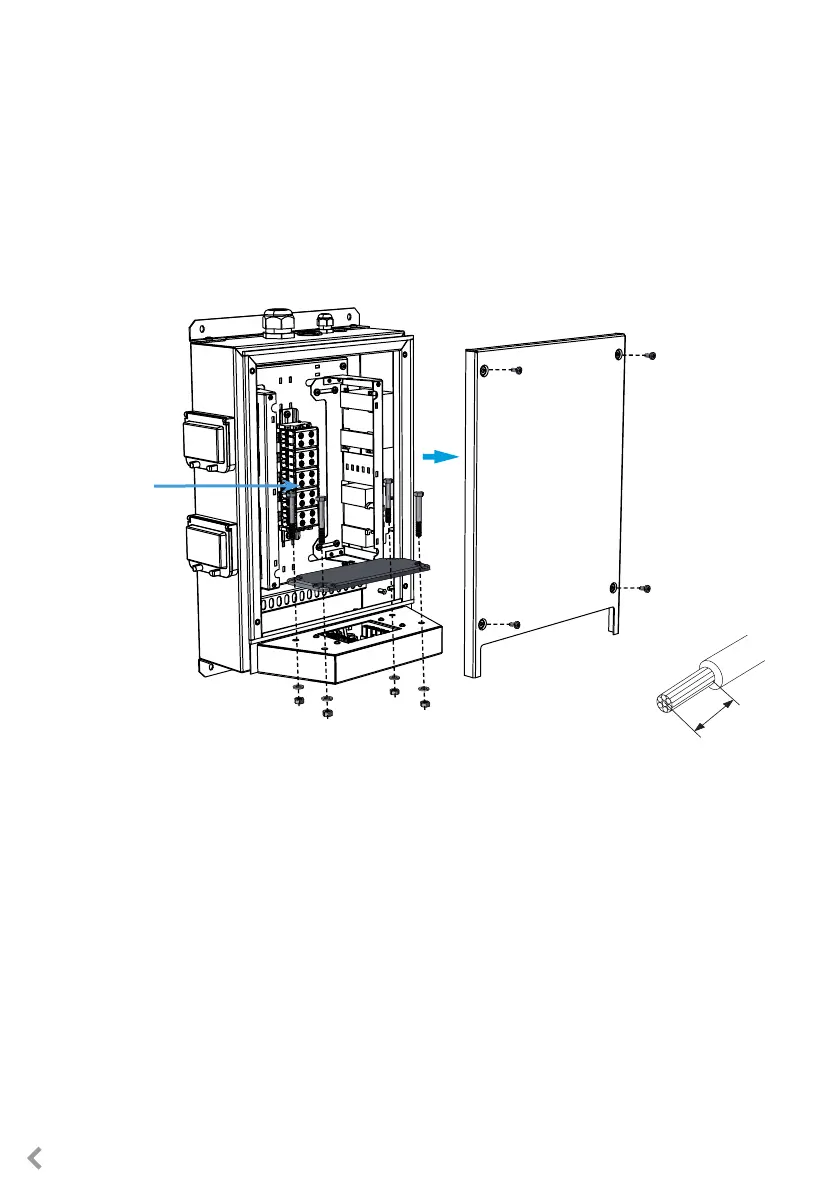
Supply
connectors
10-12 mm
7.1. Wiring instructions
Installation steps
1. Remove the front plate from the extension box.
2. Remove the bolts, nuts and washers from the ange on the extension box. You need the bolts and
washers when you attach the charger to the extension box.
3. Remove the ange from the extension box.
4. Pull the supply cable through the cable gland M32.
5. Remove the cable sheath approx. 200 mm.
6. Cut the supply cable conductors to applicable lengths. The earth conductor must be long enough,
so that if a fault occurs it is the last one that comes loose.
7. Strip the conductors 10 - 12 mm and connect to the supply connectors.
8. Pull the data cable through the cable gland M16.
9. Connect the data conductors to the Ethernet RJ45 connectors (2 pcs included).
10. Put the Ethernet RJ45 connectors in place.
11. Attach the front plate to the extension box.
7. Electrical connections



 To Next Page