RAK139_ENG / 2023-09-14
15 / 36
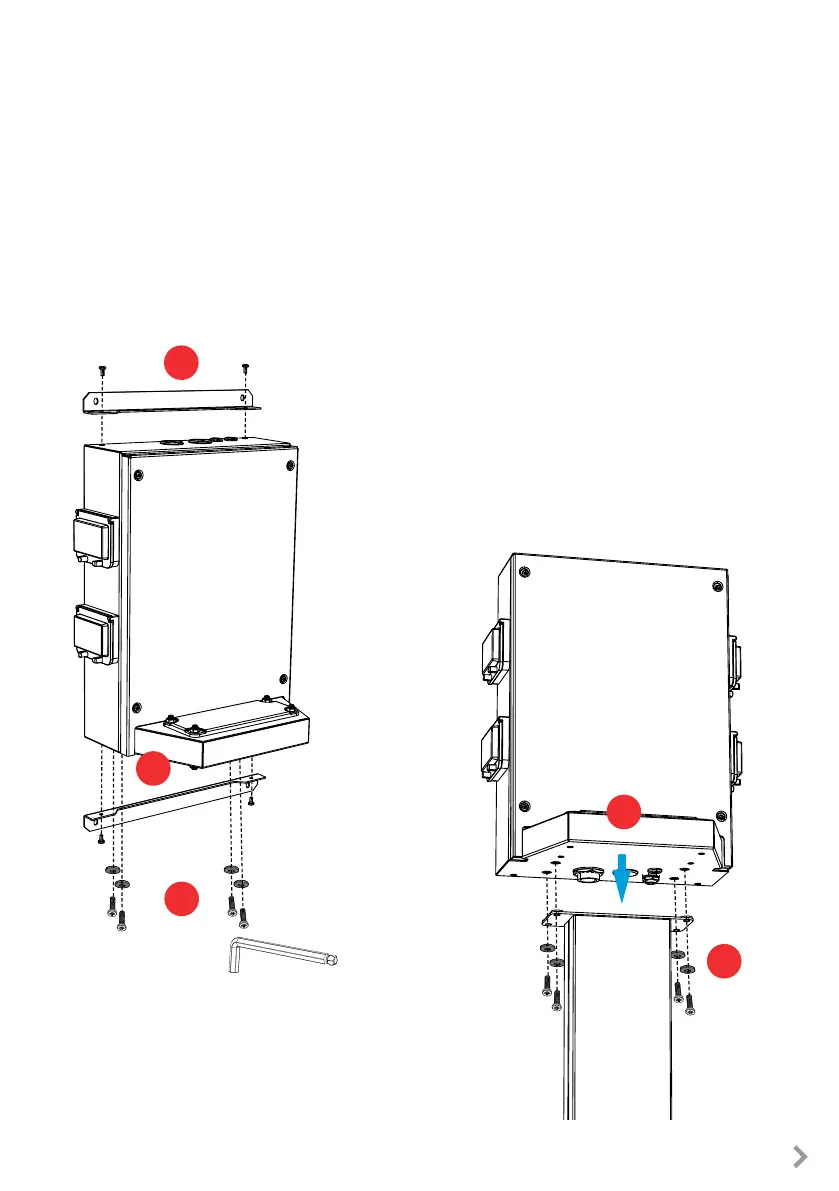
6.7. Attaching charging station to mounting pole EVTL43.00
Installation steps
1. Remove the wall brackets 2 pcs from the rear side of the
extension box [1]. Both brackets are attached with two
screws (This step is not mandatory.)
2. Remove the four M8 screws and washers from the bot-
tom [2].
3. Lift the extension box on the mounting pole [3].
4. Attach the extension box to the mounting pole with the
screws and washers you removed in the step 2 [4].
Precondition
• The mounting pole is mounted on site properly.
• The cable glands are moved from top to the bottom of the extension box. See chapter 6.2 Cable
entries.
• The electrical cables are installed and routed to the extension box. See chapter 7.1 Wiring instruc-
tions, steps 1 - 11.
1
1
4
2
3
8 mm


 To Next Page