48
IP1967EN - 2016-08-01
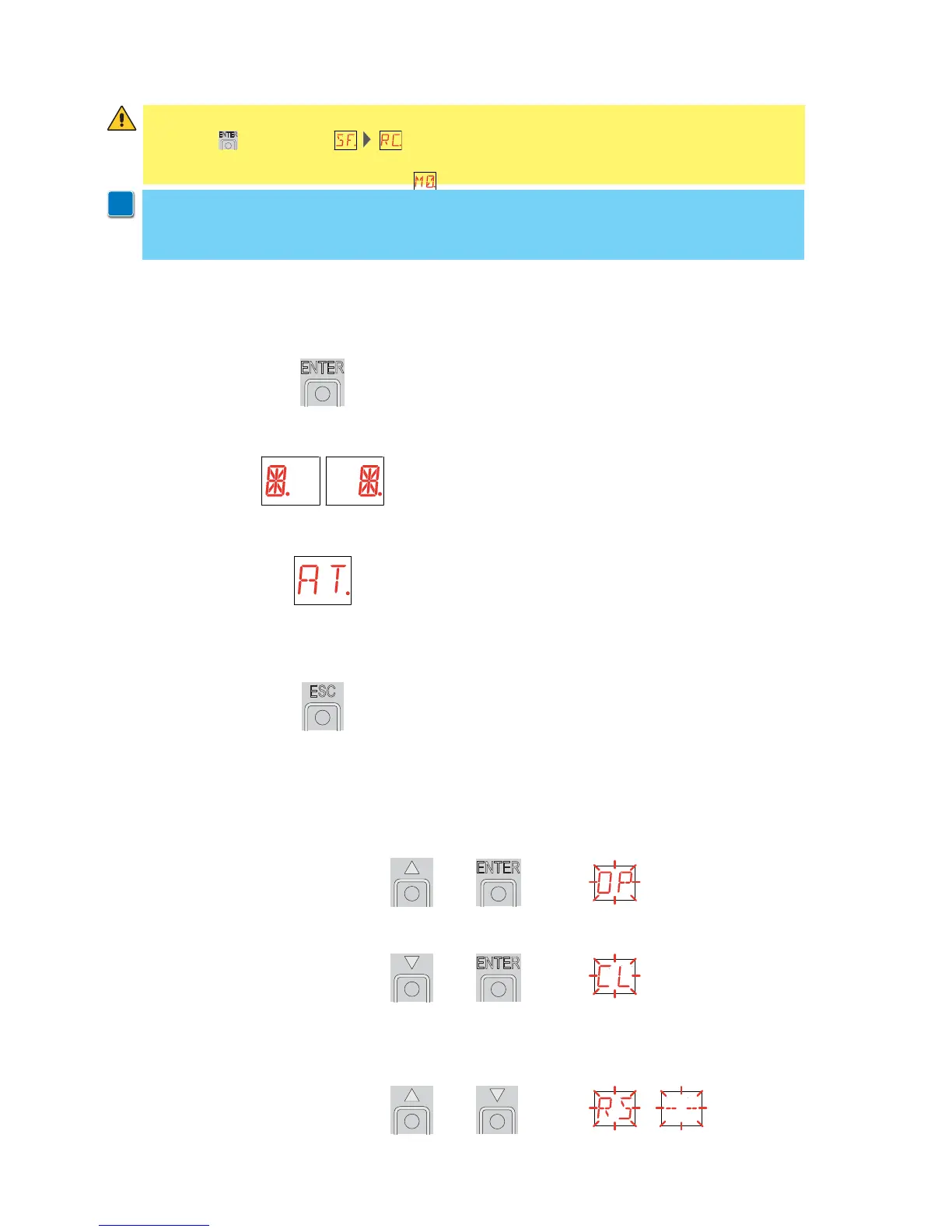
The procedure to switch on the display is as follows:
- press the ENTER key
- start of display functioning check
- visualisation of first level menu
The procedure to switch off the display is as follows:
- press the ESC key and keep it pressed
NOTE: the display switches off automatically after 60 s of inactivity.
The simultaneous pressing of the keys S and ENTER performs an opening command.
+ =
The simultaneous pressing of the keys T and ENTER performs a closing command.
+ =
The simultaneous pressing of the keys S and T performs a POWER RESET command.
(Interruption of the power supply and restart of the automation).
+ =
9. Adjustment
9.1 Switching on and off
9.2 Key combinations
NOTE: before making all the automation adjustments, insert the dedicated memory module
and press , or load the configuration applying to the automation installed (see
options). When the power is connected or in the case of motor non-selection, the display
will block all operations and give an error message.
WARNING: the pressure on the keys can be quick (less than 2 s) or prolonged (longer than 2
s). Unless specified otherwise, quick pressure is intended.
To confirm the setting of a parameter, prolonged pressure is necessary.
i


 To Next Page