67
IP1967EN - 2016-08-01
Type of
alarm
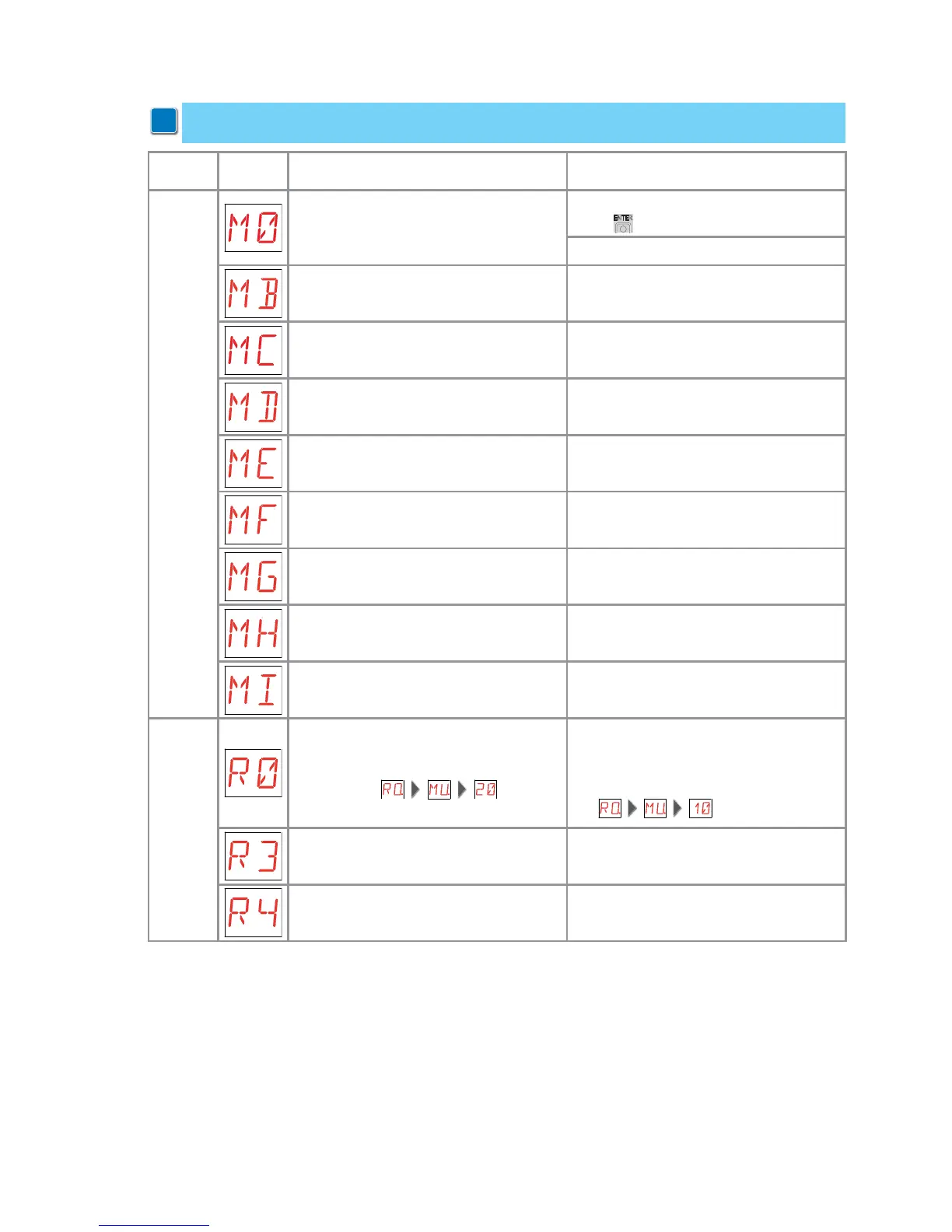
Display Description Remedy
Mechanical alarm
M0 - Automation type not selected. If the dedicated memory module is present
press
.
Select a type of automation.
MB - Absence of motor 1 during an ope-
ration.
Check the connection of motor 1.
MC - Absence of motor 2 during an opera-
tion (if 2-motor functioning has been set).
Check the connection of motor 2.
MD - Irregular functioning of motor 1
opening limit switch.
Check the connection of the motor 1 ope-
ning limit switch.
ME - Irregular functioning of motor 1 clo-
sing limit switch.
Check the connection of the motor 1 clo-
sing limit switch.
MF - Irregular functioning of motor 2
opening limit switch.
Check the connection of the motor 2 ope-
ning limit switch.
MG - Irregular functioning of motor 2 clo-
sing limit switch.
Check the connection of the motor 2 clo-
sing limit switch.
MH - Incorrect wings overlap. Verify that the motor which opens first (M1)
is connected as shown in fig. 1.
MI - Detection of third consecutive obsta-
cle.
Check for the presence of permanent ob-
stacles along the automation path.
Radio operations
alarm
R0 - Insertion of a memory module contai-
ning more than 100 memorized transmit-
ters.
Warning: the setting is
automatic.
To save the set configurations in the me-
mory module, cancel a few memorized
transmitters to bring the total lower than
100.
Set .
R3 - Memory module not detected. Insert a memory module.
R4 - Memory module not compatible with
control panel.
Insert a compatible memory module.
10.3 Alarms and anomalies display
i
WARNING: alarms and anomalies are displayed when any display selection is made. The
signaling of alarm messages takes priority over all other displays.


 To Next Page