70
IP1967EN - 2016-08-01
12. Troubleshooting
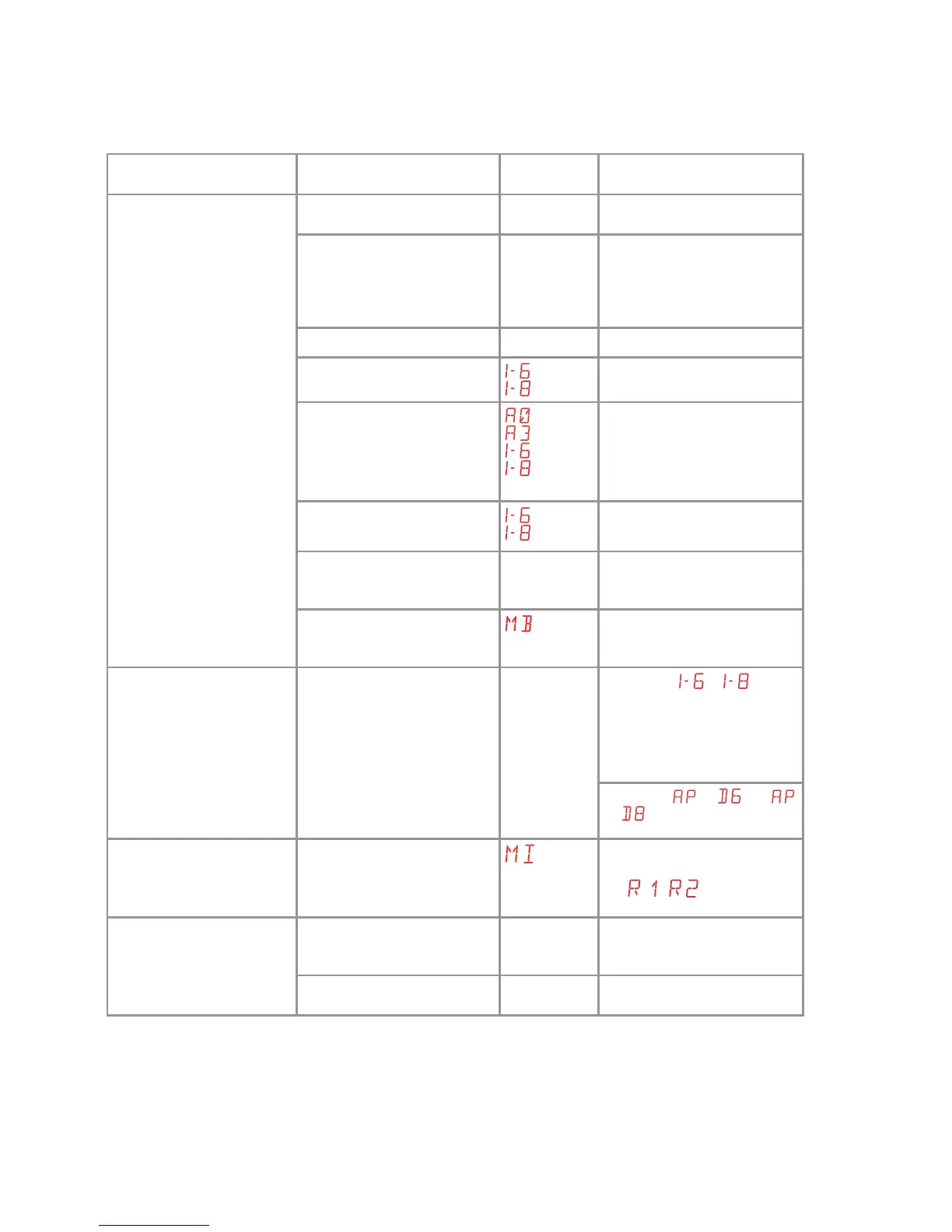
Problem Possible cause Alarm
signalling
Operation
The automation does not
open or close.
No power. Check power supply cable.
Short circuited accessories. Disconnect all accessories
from terminals 0-1 (a voltage
of 24V= must be present) and
reconnect them one at a time.
Contact Technical Service
Blown line fuse. Replace fuse.
Safety contacts are open.
Check that the safety contacts
are closed correctly (NC).
Safety contacts not correctly
connected or self-controlled
safety edge not functioning
correctly.
Check connections to terminals
6-8 on control panel and con-
nections to the self-controlled
safety edge.
Photocells activated.
Check that the photocells are
clean and operating correctly.
The automatic closing does
not work.
Issue any command. If the
problem persists, contact
Technical Service
Faulty motor
Check motor connection, if
the problem persists, contact
Technical Service.
The external safety devices
are not activated.
Incorrect connections be-
tween the photocells and the
control panel.
Check that
/ is dis-
played
Connect NC safety contacts
together in series and remove
any jumpers on the control
panel terminal board.
Check the
→ and
→ setting
The automation opens/clos-
es briefly and then stops.
There is a presence of friction.
Manually check that the auto-
mation moves freely and check
the
/ adjustment
Contact Technical Service
The remote control has lim-
ited range and does not work
with the automation moving.
The radio transmission is im-
peded by metal structures and
reinforced concrete walls.
Install the antenna outside.
Replace the transmitter bat-
teries.


 To Next Page