8
41
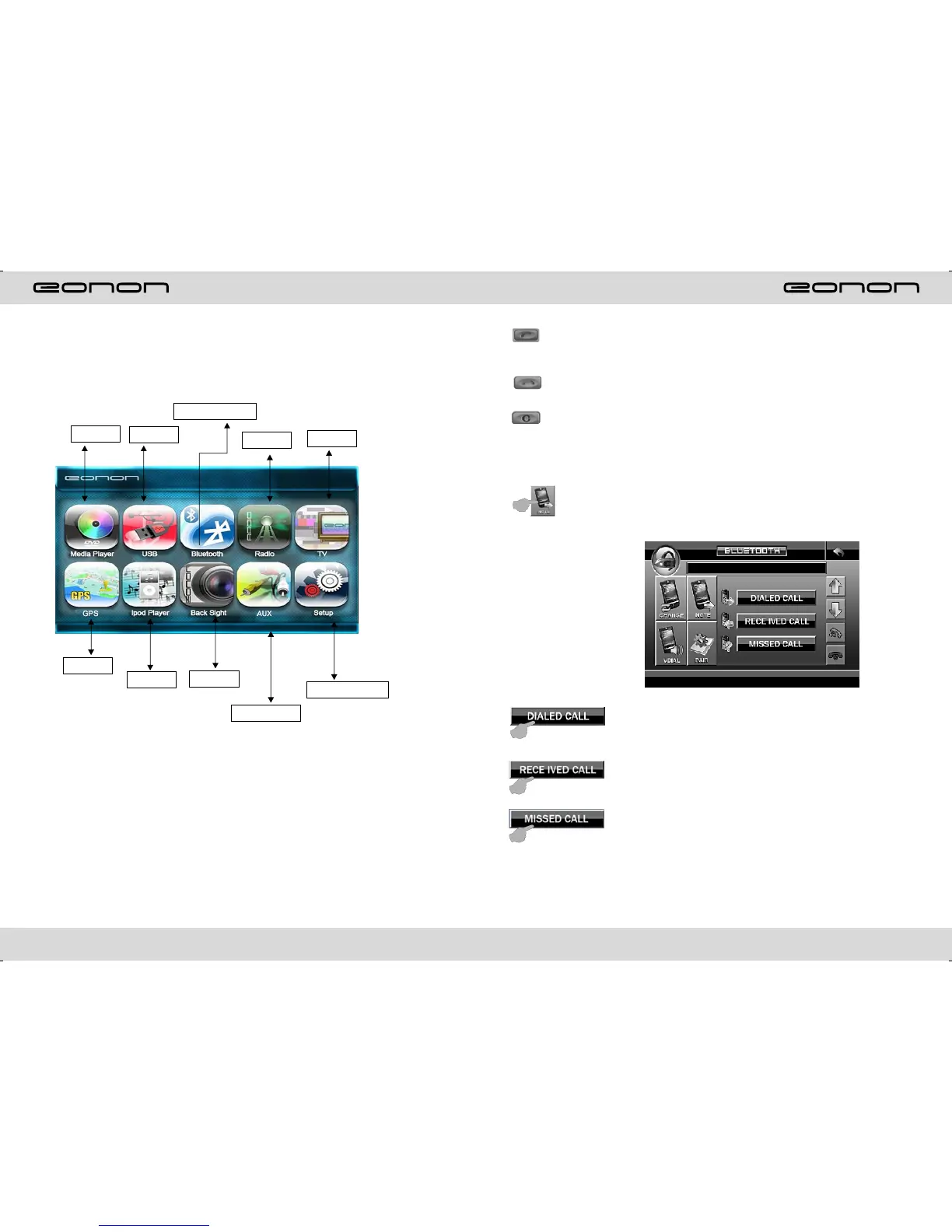
MAIN MENU TOUCH OPERATION
DVD
USB/SD
BLUETOOTH
RADIO
TV
GPS
IPOD
CCD
AUX INPUT
PATTERN SET
Hand-free button: After a phone number is keyed in, press this button to call
the user of this phone number. When there is an incoming call. Press this button
to connect this call.
Hang-up button: When there is an incoming call, press this button to hang up
or refuse to connect it.
Delete button: When a wrong digit is keyed in, press this button to delete the
wrong digit.
Number keys: You can use these number keys to enter a phone number.
Phone number display: The phone number that you have just entered is Displayed
here.
Contact book mode switching
You can touch this button under the Bluetooth mode to select the next mode.
Touch this function key to search the dialed numbers. Each time
This key is touched, the cursor will move to the next dialed number.
Touch this function key to search the received numbers. Each time
This key is touched, the cursor will move to the next received number.
Touch this function key to search the missed numbers. Each time
This key is touched, the cursor will move to the next missed number.



 To Next Page