12
37
PROGRAM
PLAY DELETE
PROGRAM
PLAY DELETE
10.CD program play
In CD mode, you can set the sequence of playing by the program function, the operation
is as follow:
When CD is playing, press ST/PROG button, then the display shows:
Input the NO. of the song you want to program by the remote control, program the first
song, input your desired song, for example, the sixth song, and press number button 6
on the remote control. Program the second song, press button move the cursor to
2 . Input your desired song, for example, the ninth song, press number button 9 on
the remote control. Press button to program play.
Back to the normal mode, press the ST/PROG button , then press button,
Note: This function can only be worked by the remote control.
11.MP3 program play
In MP3 mode, you can set the sequence of playing by the program function, the
operation is as follow:
When MP3 is playing, press ST/PROG button, then the display shows:
Then, input desired song by remote control.
For example: Program the first song, input 01, press button move the cursor to the
second lattice, input desired song, for example the third song. Program the second song,
press button, work with button, move the cursor to 2 . Input 01, press button
move the cursor to the second lattice, input desired song, for example, the sixth song
(press 6). Press button to program play.
Back to the normal mode, press the ST/PROG button , then press button,
Note: This function can only be worked by the remote control.
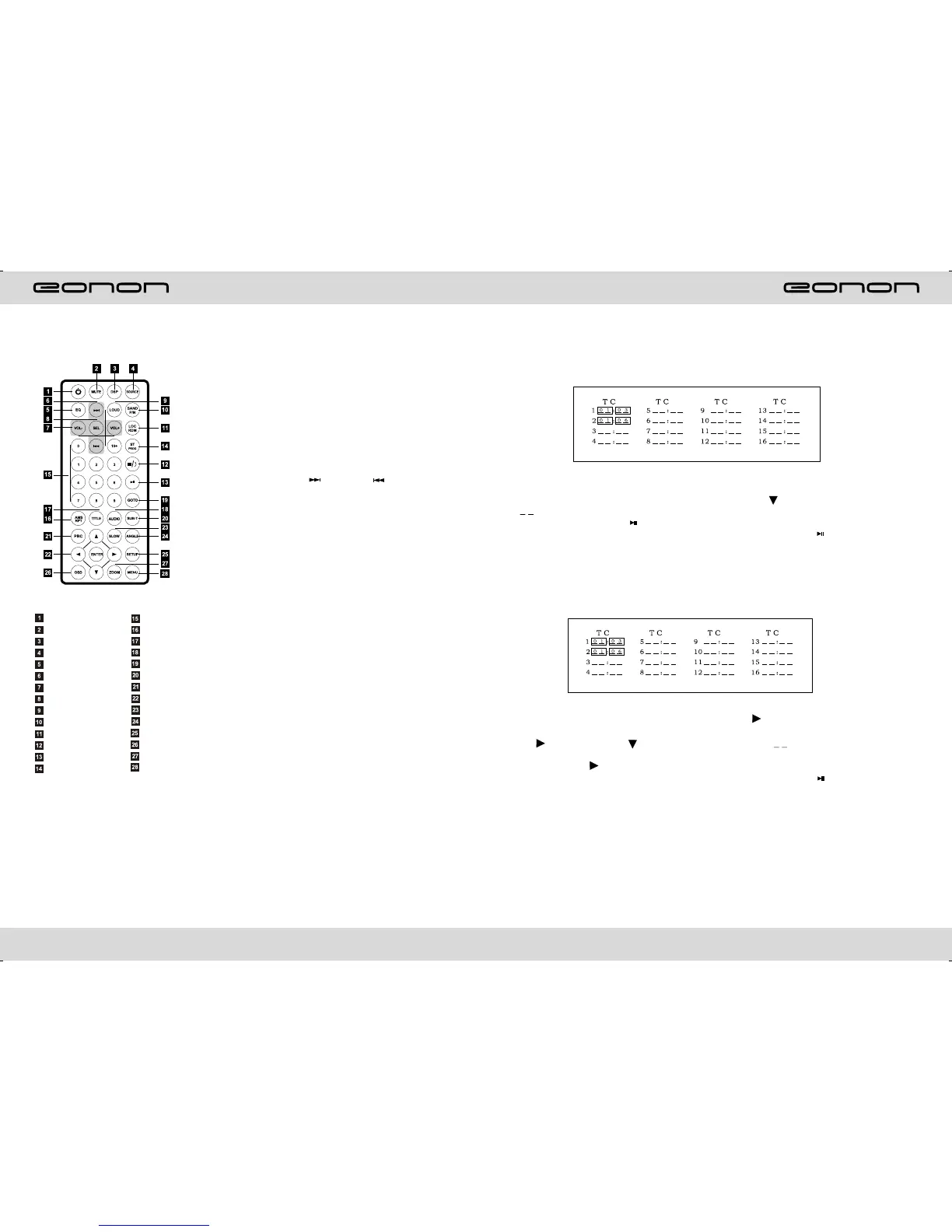
REMOTE CONTROL FUNCTION
1.POWER
Press once to switch on, press again to
switch off.
2.MUTE button
Press once to turn off audio output,
press again to resume volume level.
5.EQ button
Press this button to choose POP, ROCK,
EQ off.
6.SEEK + ( ) / SEEK ( ) button
Press this button to manual turning, speed
or quick back, previous song and next song.
7.VOL + ( → ) / VOL - ( ← )
Press this button to increase or decrease
volume level.
8.SEL button
Press this button to choose sound feature.
9.LOUD button
Press this button to startup LOUD function.
10.BAND/P/N button
In radio mode, press this button to choose
band. In VCD, DVD mode, press this button
to choose AUTO, PAL or NTSC system.
11.LOC / RDM button
In radio mode, press this button to switch
between local and direction. In VCD, CD
mode, press this key to randomly play.
12.STOP button
Press this button to stop playing.
13.PLAY /PAUSE button
Press this button to switch between play
and pause. In stop mode, press this button
to play.
14.ST/ PROG button
In radio mode, press this button to choose
stereo or mono station. In audio mode, it
can help STOP button to programmed play.
3.DSP
Press this button to show the time.
4.SOURCE button
Press this button to choose audio sources.
POWER ON/OFF
MUTE
TIME DISPLAY
SOURCE
EQ
SEEK+/SEEK-
VOL+/VOL-
SEL
LOUD
BAND/P/N
LOC/RDM
STOP
PLAY/PAUSE
ST/PROG
0-10+
AMS/RPT
TITLE
AUDIO
SET PLAYING TIME
SUBTITLE
PBC/MENU
UP/DOWN / L / ENTER
SLOW
ANGLE
SET UP
OSD
ZOOM
MENU



 To Next Page