15
34
8. OSD
In playing mode, short press OSD on remote control to show all information of present
disc.
9.Number button
In VCD mode, press 0-9 number button to input song. For example, you want to choose
th th
13 song, press 10+ button, and then press 3 button once to play 13 song.
Note: This function can only be worked by the remote control.
11. Randomly play
In VCD mode, press LOC/RDM button on remote control, to instantly play each song.
Press again to back to the normal play.
Note: When VCD disk, if PBC is on, RDM will not work.
Links → Rechts → Stereo →Links
.OPEN
Press OPEN button on panel to eject disc.
10. Repeatedly play
In playing mode, press AMS/RPT button on remote control, to startup following, repeat
function. Single song repeat→ Repeat play off.
Note:
1) When playing VCD disc, if PBC is on, no repeat function.
2) After unit is power off or mode is switched to other playing mode except VCD mode,
if you switch back to VCD mode, repeat playing will be cancelled.
12.Scan play
In playing mode, instantly play each song for 15 seconds to scan your desired song.
1) Press 3/INT touch button on display to scan and play from the first song.
2) When heard you desired song, press those button to cancel scan playing, back to
normal playing.
13.Switch Track
In VCD mode, press AUDIO button on remote control to switch track as following
sequence:
14
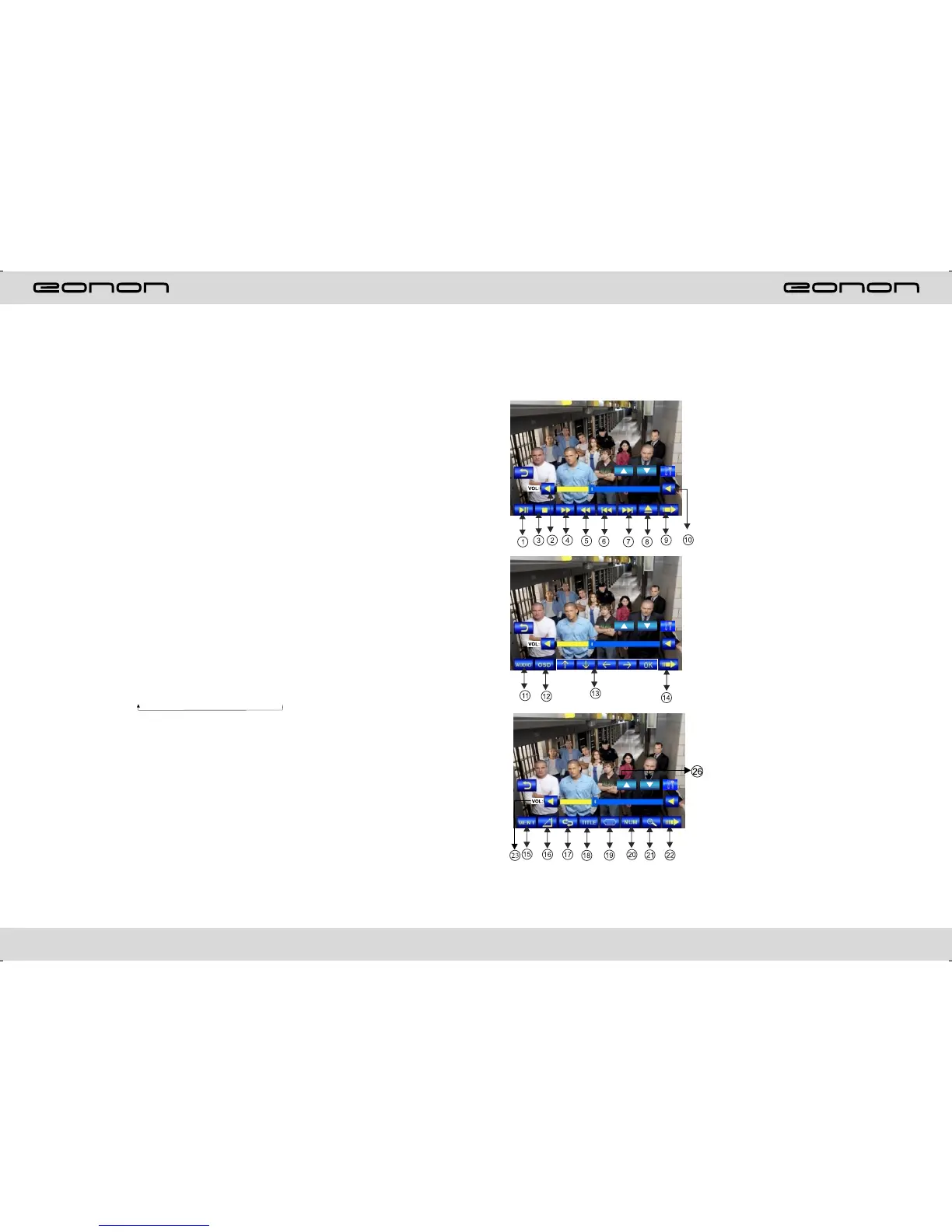
DISC PLAY TOUCH OPERATION
When playing disc,touch any position of the screen, it will display the function menu, touch
the menu and the operation of relative function will display.
Note:When loading a disc,touch screen function can not be used.
1.Click to choose play/pause
2.Click to reduce the volume
3.Click to stop playing
4.Click to choose the speed of quick back
5.Click to choose the speed speeding play
6.Click to leap backwards to play
7.Click to leap upwards to play
8.Click to exit
9.Click to enter the next page to setup the menu
10.Click to increase the volume
11.Audio
12.Click to display title,chapter the time already
played, the time left.
13.At MP3 mode,press this button so you can
move the cursor to left/right/up/down and select
the songs which in the system menu.Then press
“OK” button to enter.
14.Click to enter next page set up menu
15.In DVD mode,touch this button to return the
directory menu.
16.Click this button to switch to different angles
of playing picture in the disc.
17.Repeat play
DVD:Title Repeat→Chapter Repeat Repeat
play off
VCD:Single song repea Full disc repeat
Repeat play off
MP3:Single song repeat Directory repeat
Repeat play off
18.Click on this button to enter title menu
19.Click this button to choose language,
20.Click this button and the screen will display
0-10 button
21.Click this button to ZOO in/ZOON out the
picture.
22.Click to enter the menu of operation for
touching.
23.Click this to choose mode as below:
VOL BASS TRE BAL FAD,after your
desired mode is selected,touch VOL+/VOL- to
adjust the volume.
→
t→ →
→ →
N
t→ t→ t→ t→



 To Next Page