4
45
BASIC OPERATION
1.SOURCE ON/OFF
Press SOURCE button on panel or PWR button on remote control shortly to power on,
Press SOURCE button on panel or PWR button on remote control longer to power off.
2.PLAYING SOURCE CHOOSE
Press SOURCE button on remote control, unit will switch source of playing as
following sequence:
RADIO → DVD → AUX → TV→Bluetooth
1)During switch mode, TFT LCD display will show the name of mode in English;
2)You can't switch to CDC and GPS mode by SOURCE button, content as follows:
RADIO
DVD
AUX
TV
Bluetooth
3.MUTE CONTROL
Press MUTE button on panel or MUTE button on remote control shortly to turn off
sound output, press again to back to sound output.
4.VOLUME ADJUSTMENT
1)Press VOL+/VOL- button on panel, VOL+/VOL- button on remote control or touch
button on display to adjust volume level.
2)The tone of volume is 0-39.
TONE MODE ADJUSTMENT (SEL)
Press SEL button on remote control shortly or touch area or SEL button on panel to
choose your desired tone mode:
VOL→BAL→TRE→L/R
F/R
NOTE:
1)At DVD playing state, MBP & User will be automatically activated.
2)After 5 seconds you choose desired mode, do not adjust volume button, the mode
will auto to back to status before adjustment.
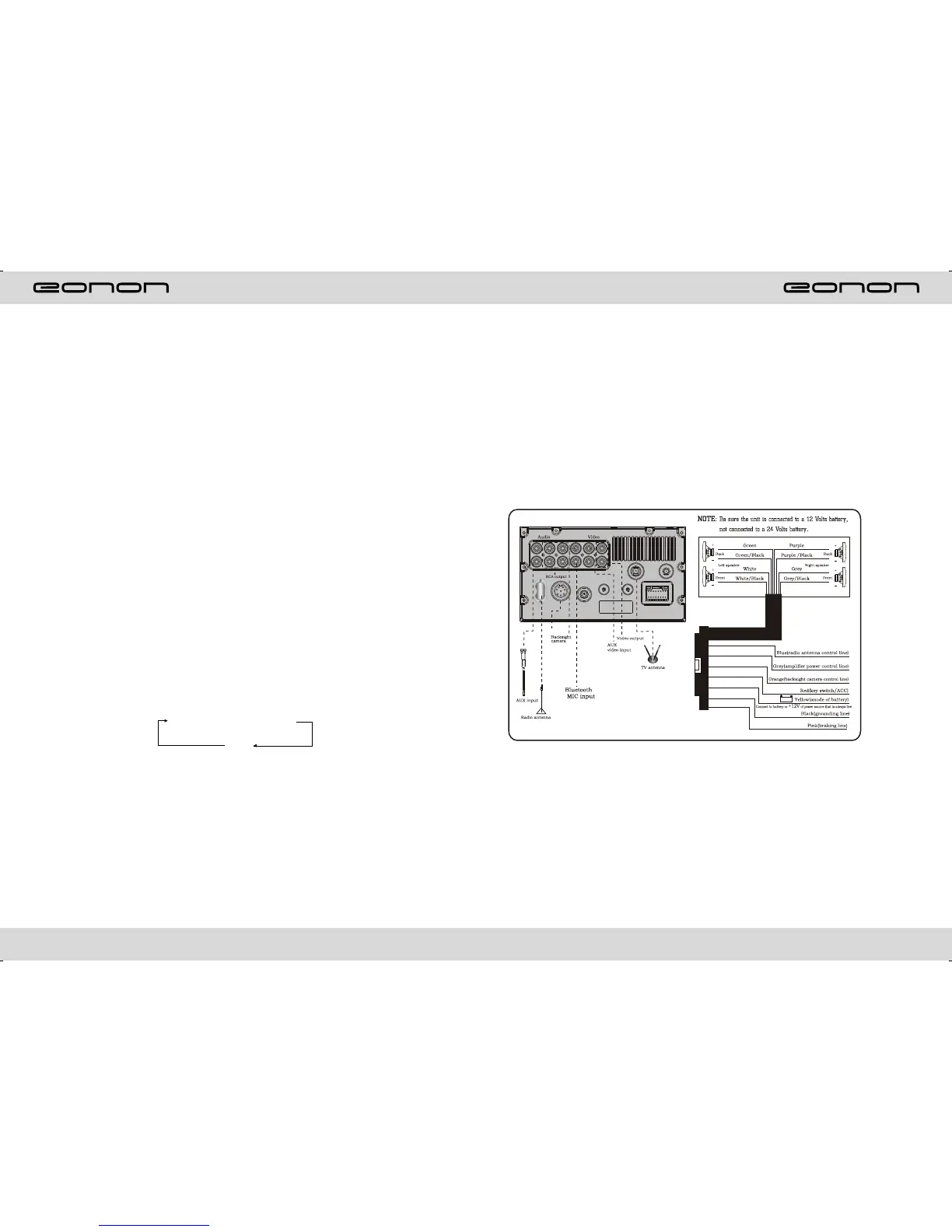
WIRING DIAGRAM
This player is equipped with ISO standard connector, please follow below instruction:
● Red - ACC ON (+12V) ● Grey/Grey black - Right front speaker anode/cathode
● Yellow - Battery anode (+12V) ● White/White black - Left front speaker anode/cathode
● Black - Ground line ● Purple/Purple black - Right rear speaker anode/cathode
● Blue - Power Antenna Control line ● Green/Green black - Left speaker anode/cathode
● Orange - Backsight camera power
control line
● Pink - Braking line



 To Next Page