940
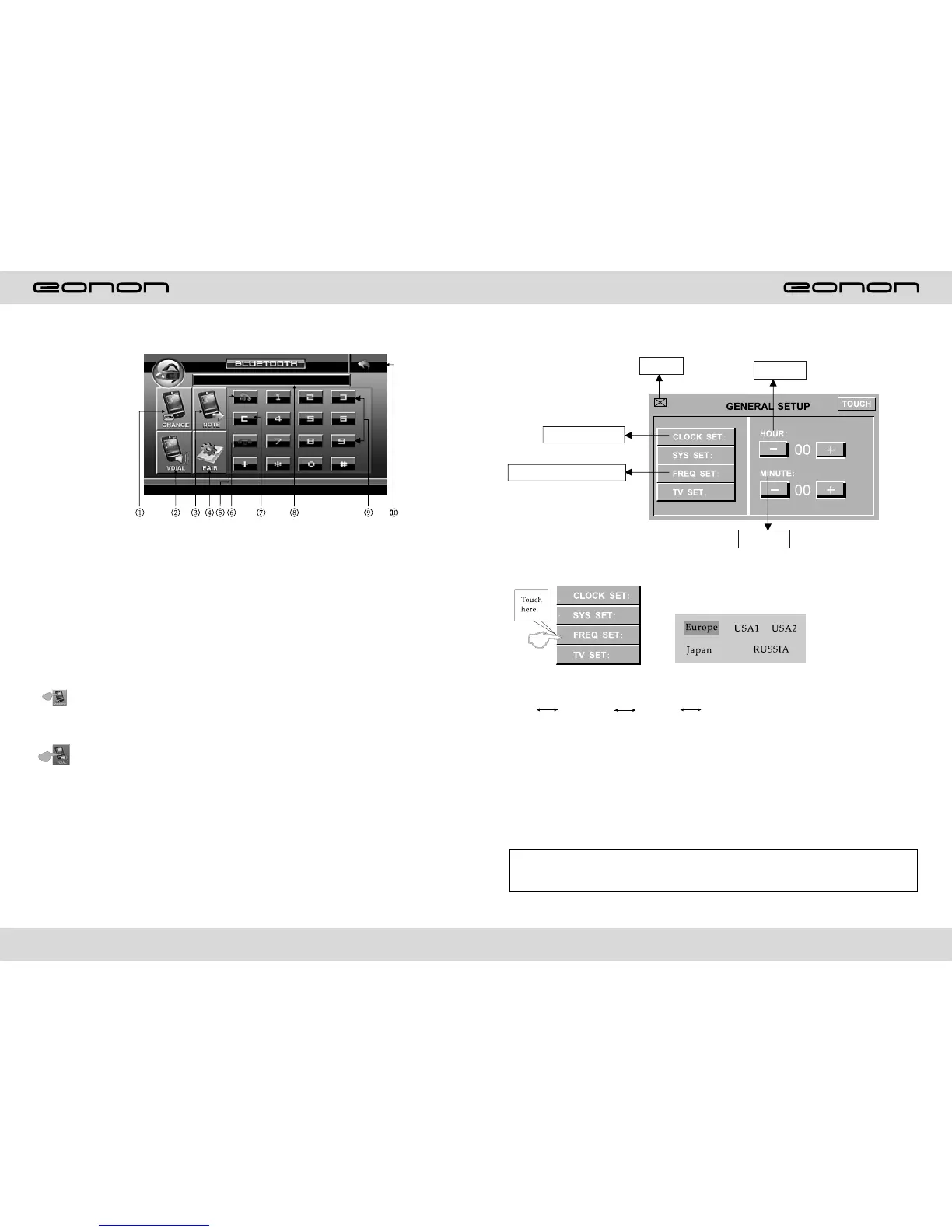
1.Bluetooth hand-free/cell phone switching
2.Voice dialing function
3.Contact book mode switching
4.Matching function during Bluetooth connection
5.Hand-free key
6.Hang-up key
7.Delete key
8.Phone number display
9.Number keys
10.Return to the main screen
BLUETOOTH TOUCH OPERATION
Functions and Descriptions
Bluetooth hand-free/cell phone switching
If you touch this switching button at the upper-left corner of the screen under the
Bluetooth hand-free mode, the speaker will beep and the hand-free mode will be
switched to the cell-phone mode.
Voice dialing function
If you touch the “Voice dial” button at the lower-left corner of the screen under the
Bluetooth hand-free mode and the cell-phone mode, you will hear the keying tone, and
you can go ahead with the voice dialing function according to the cell-phone instructions.
Eg, if you wish to call someone, you can pronounce his/her name stored in the cell
phone, then ,the name of the person to be called will be played by the speaker, and the
telephone number of this person will be displayed on the screen and automatically dialed.
To cancel voice dialing
If you wish to disable the voice dialing function in the voice dialing mode, you can press
the “Voice dialing” key again, and this function will be disabled after you hearing the
keying tone.
OSD SETUP
Exit
Minute
Radio frequency setting
Time setting
Note:There are 3 buttons automatically changed according to your setting change in radio
state when you activate or exit RDS,Changes are as following:
PTY LOUD, TA EQ, AF ST.
TIME DISPLAY AND ADJUST
Time display: Touch main menu into adjust mode, press time setup button, the
corresponding function will be display in yellow words.
(1)Press ”+” on hour to add hour, press “-” to reduce hour;
(2)Press ”+” on minute to add minute, press “-” to reduce minute.
NOTE: Touch the correspondence function, will be display in green background.
The unit include two times system: Europe time (24 hour setup), America time (12
hour setup), when show the AM mark it indicate morning time, when appear the PM
mark, it show the time of afternoon.
Remark:This unit is with RDS function, it will automatically adjust the time when you
activate RDS function of have received RDS radio channels. At no received RDS radio
channels or AM state,you should adjust the time.
Hour
Radio frequency setting
According to different area to choose frequency,
pls as blew PIC:



 To Next Page