37
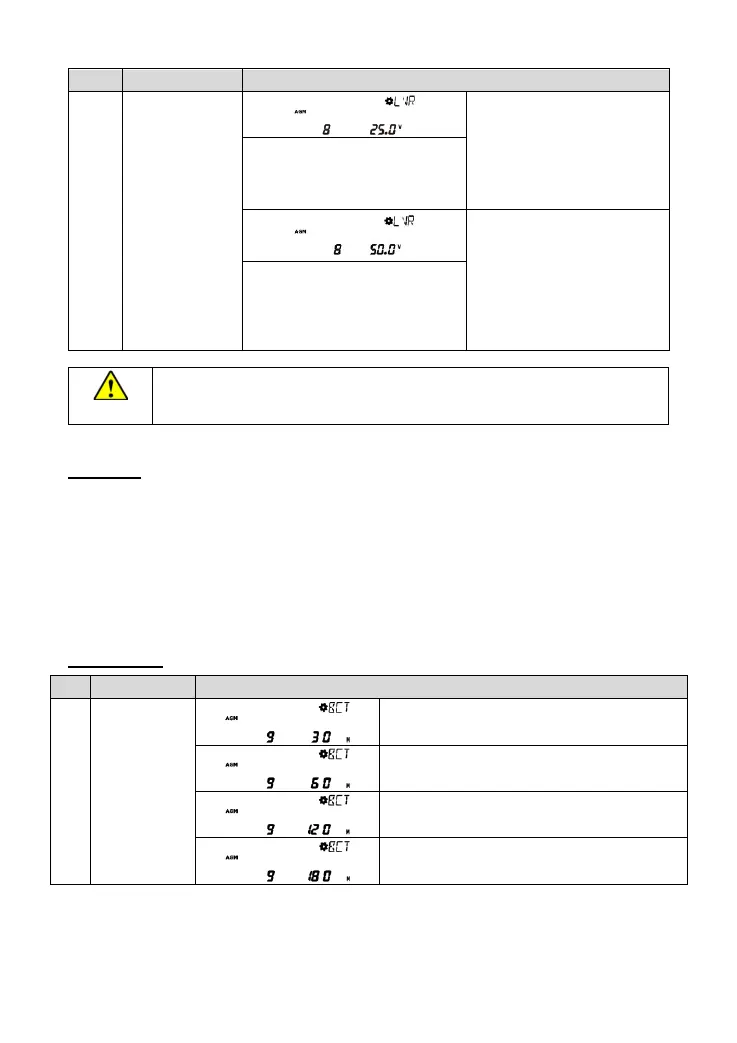
Low voltage
reconnect
voltage
User define for the 24V system:
21.6~32.0V
Step size: long press for 1V,
short press for 0.1V
AGM(Default)/GEL/FLD: 25.0V
User define for the 48V system:
43.2~64.0V
Step size: long press for 1V,
short press for 0.1V
AGM(Default)/GEL/FLD: 50.0V
LFP15: 48.8V
LFP16: 52.0V
LNCM14: 52.0V
When the output mode is inverter priority, and the battery voltage is lower than the low
voltage disconnect voltage (configurable), the utility supplies the load.
2) Advanced interface for engineers
Operations:
Step1: In the real-time interface, long press the UP+DOWN button to enter the advanced interface.
Step2: Press the UP/DOWN button to select the setting item.
Step3: Long press the SET/ENTER button to enter the parameter configuring the interface.
Step4
:Press the UP/DOWN button to modify the parameters.
Step5
:Press the SET/ENTER button to confirm.
Step6
:Press the ESC button to exit.
Setting items
:




 To Next Page