44
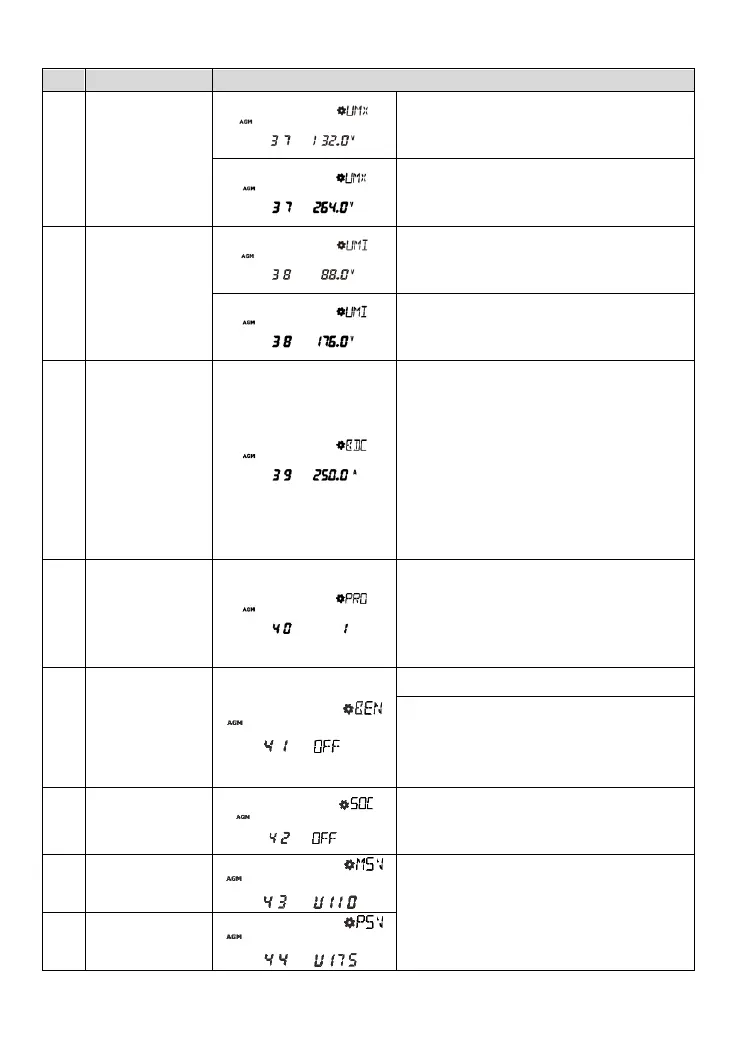
Utility over
voltage
disconnect
voltage
132.0V(Default for the 110V system)
User define: 110VAC~140VAC
Step size: long press for 10V, short press for 1V
264.0V(Default for the 220V system)
User define: 220VAC~280VAC
Step size: long press for 10V, short press for 1V
Utility low voltage
disconnect
voltage
88.0V(Default for the 110V system)
User define: 80VAC~110VAC
Step size: long press for 10V, short press for 1V
176.0V(Default for the 220V system)
User define: 90VAC~190VAC
Step size: long press for 10V, short press for 1V
Battery discharge
current limit
Refer to 3.7 for
details.
UP2000-HM6021/UP2000-HM6022:
200A(Default) User define: 10~200A
UP3000-HM5041/UP3000-HM5042/UP3000-
HM8041: 150A(Default) User define: 10~150A
UP3000-HM10021/UP3000-HM10022:
300A(Default) User define: 10~300A
UP5000-HM8042: 250A(Default)
User define: 10~250A
Step size: Long press for 10A, short press for 1A
Lithium battery
protocol type
User Define: 1~200
NOTE: Refer to the "1.2 Identification of parts >
①
BMS-Link connection port(RJ45)" for details.
OFF(Default), disable the BMS function.
ON, enable the BMS function.
Normal BMS comm.: The BMS controls the
UP-Hi charge/discharge.
Error BMS comm.: The UP-Hi automatically
enters the no-battery mode and displays
BME.
OFF(Default)
ON: The SOC parameters are cleared and
recalculated.
NOTE: Detail version refers to the actual display.
Power board
software version




 To Next Page