Maintenance 9. Troubleshooting
204 RC700 / RC700-A Rev.23
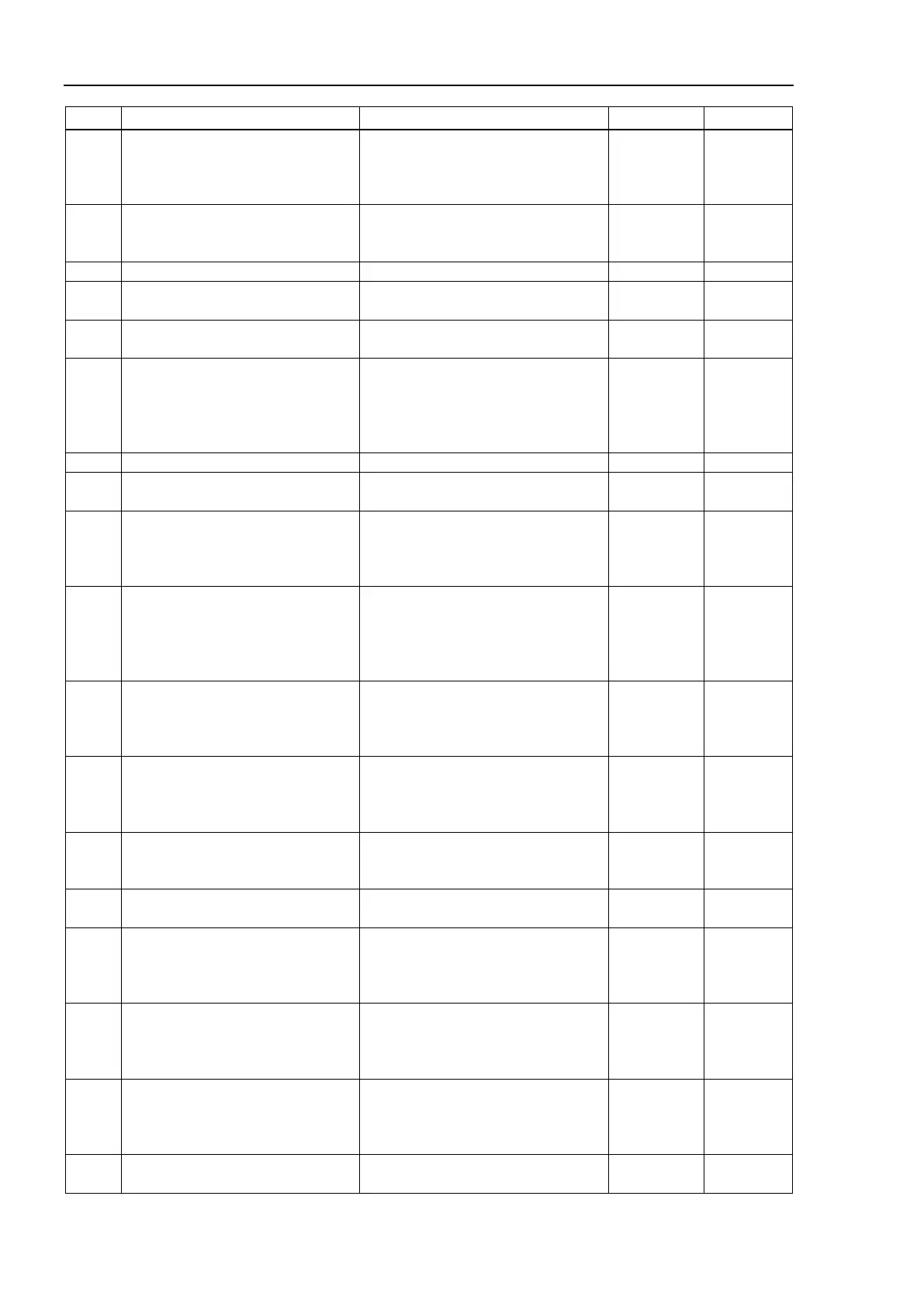
No. Message Remedy Note 1 Note 2
2549
The force file which is not
associated with the robot cannot be
specified.
Specify the correct force file.
Reboot the controller.
Initialize the controller firmware.
Replace the controller.
2550
Specified command is not
supported for joint type robot and
Specified robot is not supported.
Check the robot configuration.
Failed to Get the health information.
2552
Does not allow setting in UL mode
to be changed.
Setup the authority.
2553
Failed to change setting in UL
Reboot the Controller.
2557
An error occurred in Trap.
Note 1: Detailed error information
Following the detailed error
information, take a relevant
An error occurred in Trap.
Check the corresponding error code
in the system history and take
countermeasures.
Detailed
error
information
Argument parameter is too long.
Confirm a parameter of the argument.
2559
Cannot execute when the motor is
Change to the state to motor on and
2560
The current robot number and the
robot number of the force guide
sequence property do not match.
Please check the robot number.
Confirm the current robot number and
the robot number of the force guide
sequence.
Robot
number
2561
The current robot type and the
robot type of the force guide
sequence property do not match.
Reconfigure the RobotNumber
Confirm the current robot number and
the robot number of the force guide
sequence property.
Reconfigure the RobotNumber
2562
The current tool number and the
robot tool of the force guide
sequence property do not match.
Please check the tool number.
Confirm the current tool number and
the robot tool of the force guide
sequence property.
Tool
number
2563
The point file being loaded does not
match the point file of the force
guide sequence property.
Please check the point file.
Confirm the loaded point file and the
the point file of the force guide
sequence.
2564
An instruction that cannot be
executed during torque control was
Turn OFF the torque control and
execute.
2565
Prohibited command while tracking
Delete Prohibited commands from
2566
Cannot execute the FGRun
command for same robot.
command for same robot. End the
FGRun command or execute it in
2567
Cannot execute the FGGet
command for the running force
guide sequence.
Cannot execute the FGGet command
for the running force guide sequence.
Execute it after the force guide
2568
An instruction that cannot be
executed by parallel processing
was executed.
Review the program.
2569
Cannot get the force guide
Reboot the Controller.



 To Next Page