47
2. Operation on Main Menu
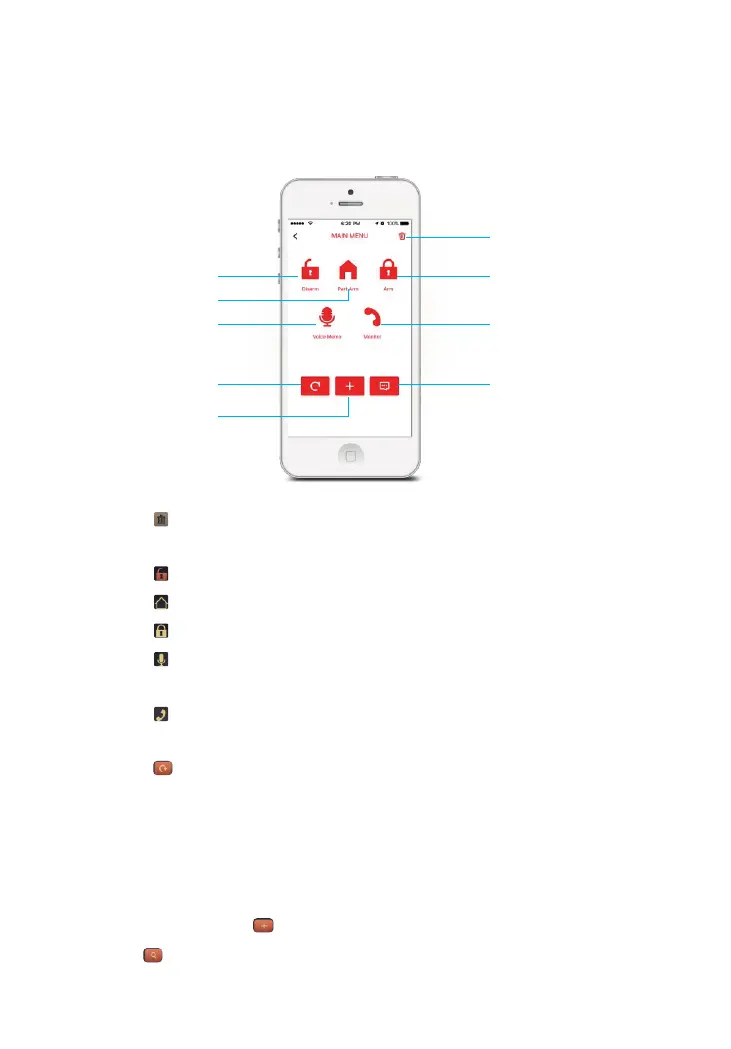
Main menu functions: Disarm, Arm, Part Arm, Monitor, leave Voice Memo.
① [ ] [OK] Press on the main menu after login, tap on the dialog box to confirm
deletion.
② [ ]Press to Disarm the system.
③ [ ]Press to Part Arm (Home Arm) the system.
④ [ ]Press to Arm the system.
⑤ [ ] Press and the Control Panel will call back, pick up and you can leave a 10s
voice recording
⑥ [ ] Press and the Control Panel will call back, pick up and you can listen in to the
surrounding area.
⑦ [ ] Press to enter the account management interface from where you can input
system user mobile phone numbers and their associated login names, tap . The [OK]
default password of the shared account is 123456. It is recommended that you change
the default password to a unique/memorable password that is shared with the user
group only.
⑧ The main account can add at most 5 family accounts. Family accounts can be
deleted by tapping the on the right side in the accounts list. [ ]
⑨ [ ]Tap to check the settings of control panel.
④
①
②
③
⑥
⑦
⑤
⑨
⑧



 To Next Page