S0740 800 152/E061012/P36
-- 1 6 --
ci01i_ma4
INSTRUCTIONS MA4
This chapter is an extract from the instruction manual for the MA4 control panel.
INTRODUCTION
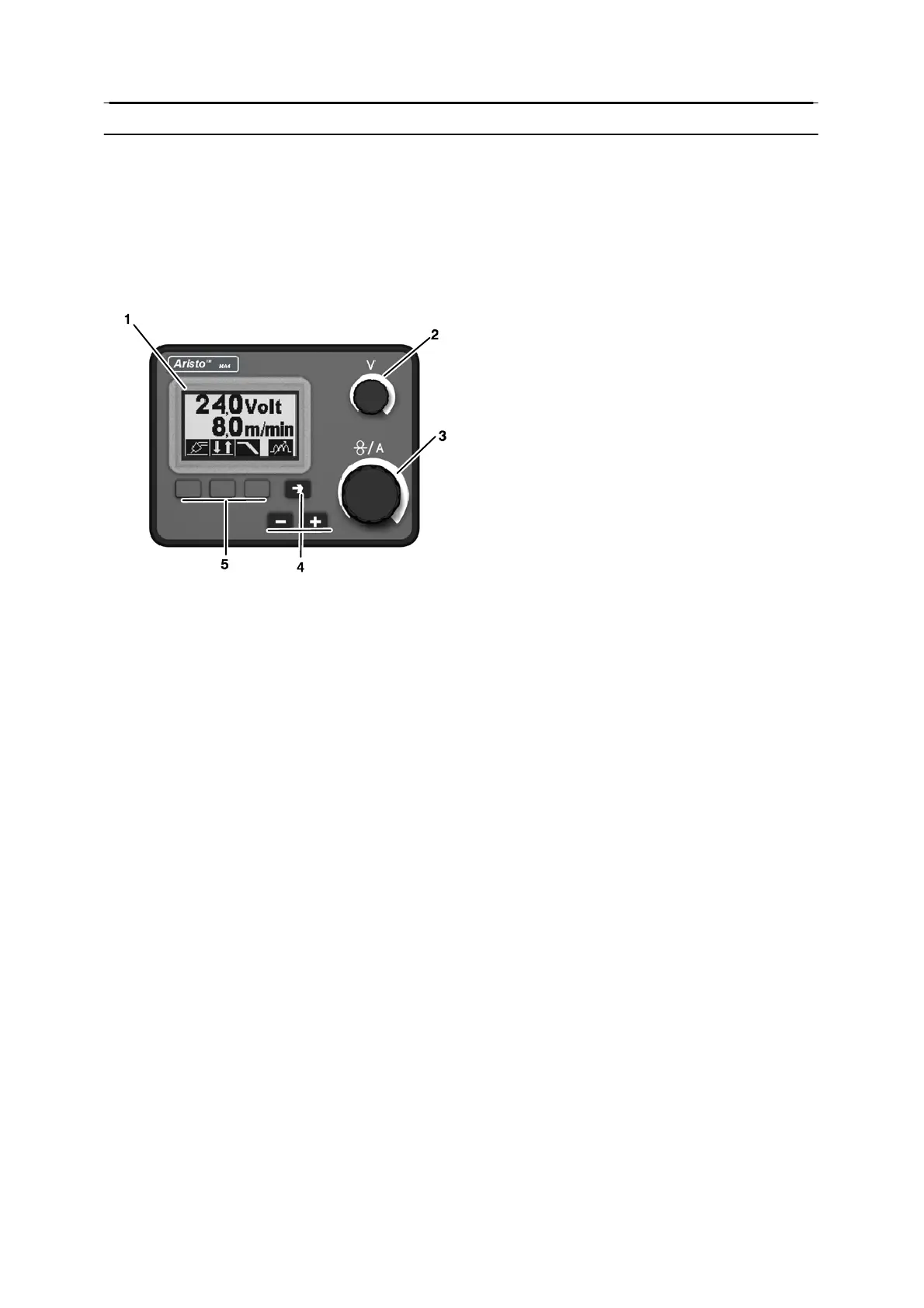
Control panel
1 Display
2 Knob for setting the voltage
3 Knob for setting the wire feed speed and
welding current
4 Increase (+) or Decrease (--) selected by
the function pushbuttons. →
5 First, second and third function pushbut-
tons
Remote control unit
Using a remote control unit, the primary parameters of the welding process can be
controlled from a device other than the control panel.
Machines with intergral control panels should have program version 1.21 or higher, in order
for the remo te control to function correctly.
Control panel’s behaviour on connection of the remote control adapter
S The display freezes in the menu showing when the remote control is connected.
Measurement and setting values are updated, but only shown in those menus in which
the values can be displayed.
S If a fault code symbol is displayed, it cannot be removed until the remote control has
been disconnected.


 To Next Page
 Loading...