LEDs and Coding Switches
4.2 Setting PROFIBUS-DP Address via Coding Switches
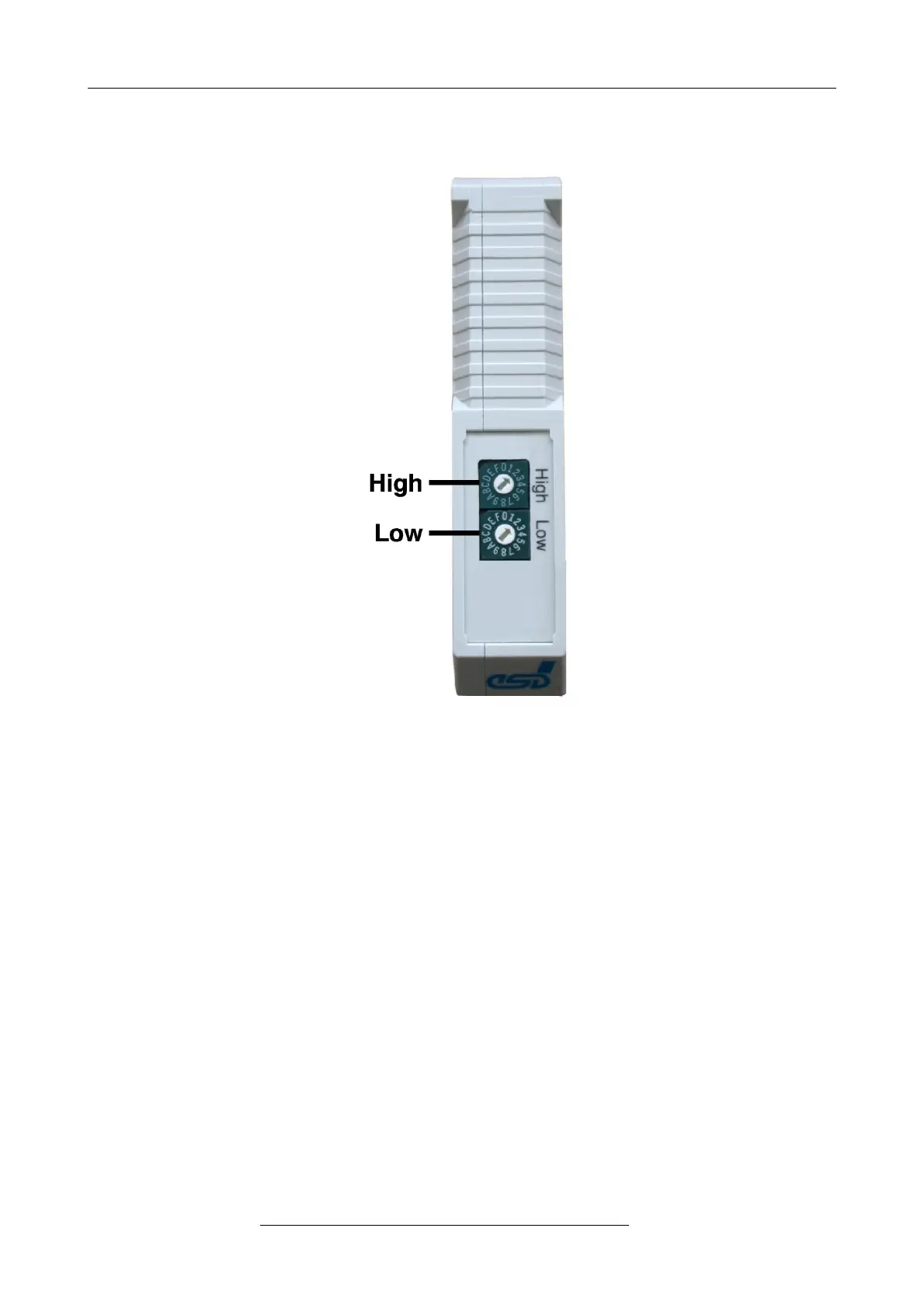
Fig. 4: Position of the Coding Switches
The PROFIBUS-DP address can be set with the coding switches. When switching on the module,
the coding switches are evaluated via the firmware. Changes of the settings have to be made
before switching on the module because changes during operation have no effect.
The CAN-DP/2 and CANopen-DP/2 are operated as slave stations with a configurable decimal
address range from 3 to 124 or hexadecimal from 03h to 7Ch. Configuring an address lower than
3, the address 3 is valid. Configuring an address higher than 124 (decimal), respectively higher
than 7Ch, the address 124 is valid.
The coding switch HIGH configures the more significant bits, the coding switch LOW configures the
low significant bits (refer to figure above).
The CAN identifier of the CAN-DP/2 can be configured via the PROFIBUS-DP configuration tool
(e.g. SIMATIC Manager). Please, refer to the ‘CAN-DP/2 Software Manual’ and ‘CANopen-DP/2
Software Manual’ respectively for further information.
Page 12 of 34
Hardware Manual • Doc. No.: C.2907.21 / Rev. 1.1
CAN-DP/2, CANopen-DP/2


 To Next Page