User’s Guide Introduction
A.6
24-Key Feature Phone
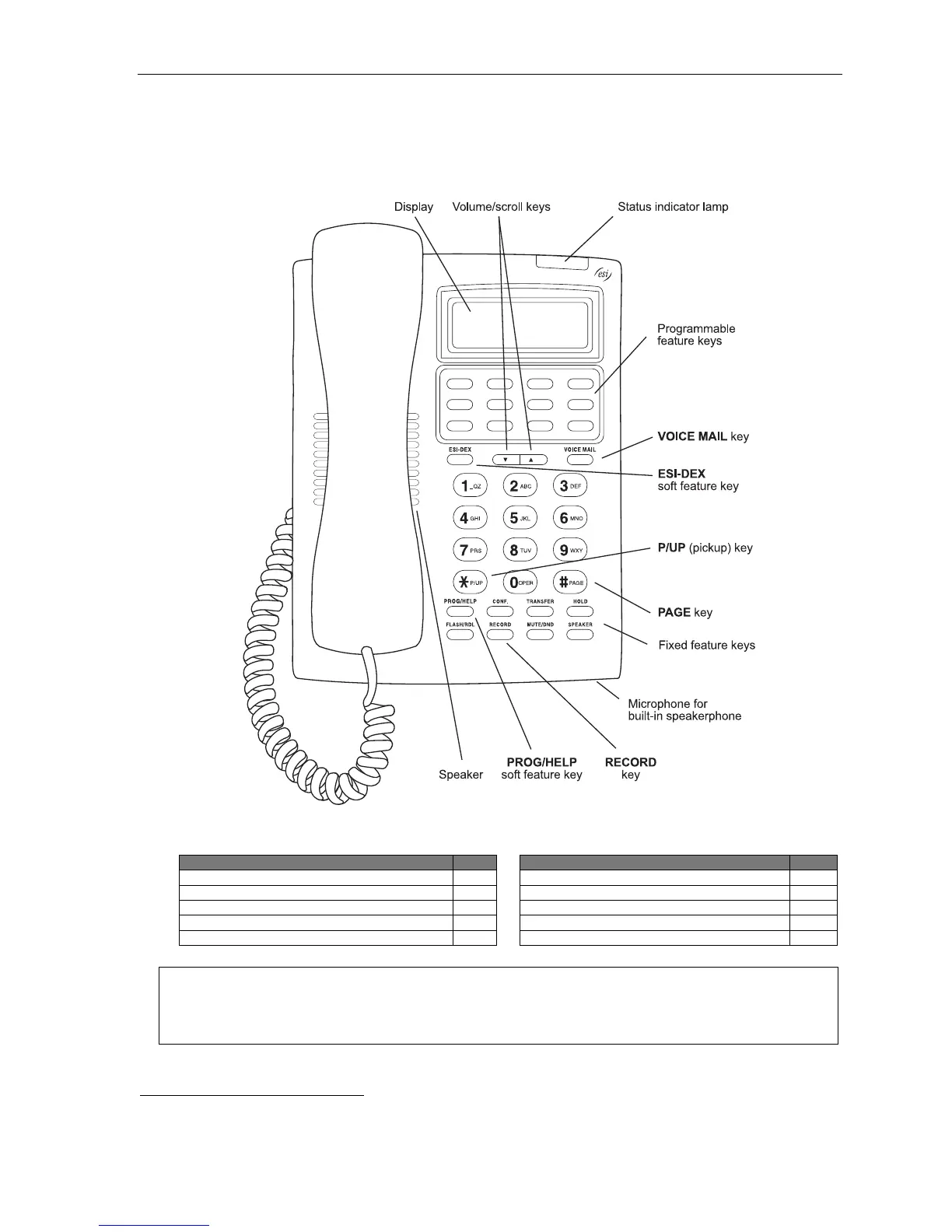
The 24-Key Feature Phone has features similar to those of the ESI desktop phones mentioned earlier.
However, the 24-Key Feature Phone is available only as a digital model and doesn’t support IP, ESI’s VIP family
of software applications
1
, or the Expansion Consoles. As is true for the ESI phones mentioned earlier, the 24-Key
Feature Phone has built-in voice mail features and voice prompts that make it easy to program and use.
Items referenced elsewhere
Item Page
Item Page
PROG/HELP soft feature key C.2
Verbal User Guide and tutorial B.1
P/UP (pickup) key E.16
Status indicator lamp D.10
Fixed feature keys E.2
ESI-DEX soft feature key F.2
VOICE MAIL key D.1
RECORD key D.8
Programmable feature keys C.2
PAGE key E.16
Hint: On any of these ESI phone varieties (including the Expansion Consoles), you can perform direct
programming by holding down a programmable feature key for at least two seconds (similar to how you
might program a car radio button). This isn’t applicable to the fixed-feature keys which, as their name
implies, are already programmed.
1
For information concerning these software applications, see the ESI Web site at www.esi-estech.com.



 To Next Page