D
D
A
A
A
Note:
Note:
A
D
A
D
A
D
Note:
Note:
Note:
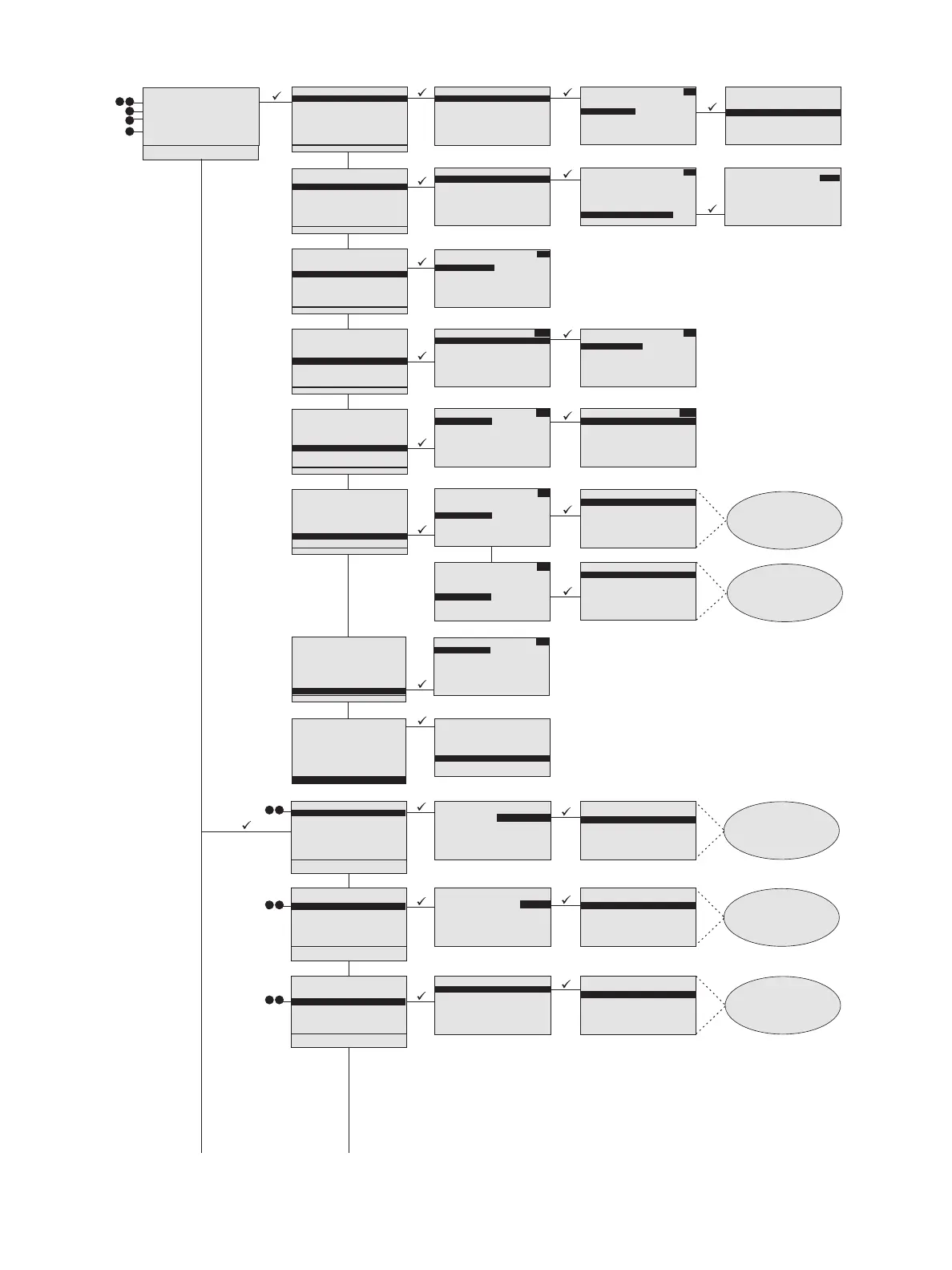
Load Dimming Config
USB:\folder
<...>
<folder2>
DRd6_1
DRd12_2
DRd12_3
DRd6_4
Only the
available removable media
display for selection. <...>
navigates to the root folder
of the removable media. All
folders are indicated
in brackets.
Load Dimming Config
Save to USB Media
Save to SD Media
1 Save Rack Configs
2 Save Dimming Config
3 Load Dimming Config
4 Save Arch Config
5 Load Arch Config
6 Restore Defaults
7 Update Firmware
8 Save LCD Files
9 Save Log Files
File Operations
DRd6_1
DRd6_2
DRd6_3
DRd6_4
DRd6_5
DRd6_6
DRd6_7
Save Filename
Filename
for save defaults to
the name of the currently
running configuration file.
Offers choice of default
names up to DRdxx_24.
xx= 6,12, or 24.
Name: DRd6_2
Save to USB Media
Save to SD Media
Save Dimming Config
1 Save Rack Configs
2 Save Dimming Config
3 Load Dimming Config
4 Save Arch Config
5 Load Arch Config
6 Restore Defaults
7 Update Firmware
8 Save LCD Files
9 Save Log Files
File Operations
Filename
for save defaults to
the name of the currently
running configuration file.
Offers choice of default
names up to
Paradigm_cfg24.
Paradigm_cfg1
Paradigm_cfg2
Paradigm_cfg3
Paradigm_cfg4
Paradigm_cfg5
Paradigm_cfg6
Paradigm_cfg7
Save Filename
Name: Paradigm _cfg1
Save to USB Media
Save to SD Media
Save Rack Configs
1 Save Rack Configs
2 Save Dimming Config
3 Load Dimming Config
4 Save Arch Config
5 Load Arch Config
6 Restore Defaults
7 Update Firmware
8 Save LCD Files
9 Save Log Files
File Operations
1 About
2 Dimming Setup
3 Arch Setup
4 Dimming Control
5 Arch Control
6 File Operations
7 View/Clear Errors
8 Restricted Access
9 Timed Event Setup
Main Menu
This will affect
local Arch control.
Select an option:
Cancel
Clear Boot Look only
Clear ALL Arch Ctrl
Clear Arch Output
Arch Control
Presets
Control Channels
Groups
Walls
Sequences
Macros
Overrides
Clear Arch Output
Daylight: Inactive
Nite Mode: Inactive
Occupancy: Active
Timed Event: Inactive
Arch Control
Presets
Control Channels
Groups
Walls
Sequences
Macros
Overrides
Clear Arch Output
When the selected
macro is a toggle
function macro, the display
will provide actions similar
to this display.
Cue Lights Off: ---
Lockout House: Off
Macro 1: ---
Show Mode: On
Macro 1
Activate/Execute
Cancel
When the selected
macro is a one-shot
function macro, the
display will provide actions
similar to this display.
<All> Presets abc
Atrium Active
Kitchen In a ctive
Off: Active
Preset 1: Inactive
Preset 2: Inactive
Preset 3: Inactive
Preset 4: Inactive
Off:
Active: Pri:10
Activate
Deactivate
Record
Fade Time: 2 secs
Arch Control
Presets
Control Channels
Groups
Walls
Sequences
Macros
Overrides
Clear Arch Output
Intensity: 50%
Arb: HTP with Priority
DMX in: 1A/1, 1A/127
DMX out: 1B/1, 1B/127
ACN out: 1/1
ACN in: 1/1
Zone 1
<All> Channels abc
Chandelier 80%
Cyberlight 1 50%
Revolution 1 50%
Sconce wall 1 25%
Sconce wall 2 100%
Zone 1 50%
Zone 2 0%
Select Space
<All>
Atrium
Hall
Section 1
Section 2
Section 3
Section 4
Arch Control
Presets
Control Channels
Groups
Walls
Sequences
Macros
Overrides
Clear Arch Output
Select Space abc
<All>
Atrium
Hall
Section 1
Section 2
Section 3
Section 4
Arch Control
Presets
Control Channels
Groups
Walls
Sequences
Macros
Overrides
Clear Arch Output
<All> Groups abc
Downlights 0%
Cue Lights 100%
Group 1 ---%
Group 2 80%
Group 3 ---%
Revolutions 100%
RGB LEDs 100%
Sequences abc
Chase Lights: Stopped
Marquee: Paused
Sequence 1: Running
Arch Control
Presets
Control Channels
Groups
Walls
Sequences
Macros
Overrides
Clear Arch Output
<All> Walls abc
Wall 1: Closed
Wall 2: Closed
Wall 3: O pe n
Wall 4: Open
Wall 5: Closed
Chase Lights abc
Start
Paused
Resume
Stop
Macros abc
Cue Lights Off: ---
Lockout House: Off
Macro 1: ---
Show Mode: On
Macros abc
Select Override abc
Show Mode
Activate/turn on
Deactivate/turn off
Cancel
Arch Control
Presets
Control Channels
Groups
Walls
Sequences
Macros
Overrides
Clear Arch Output
Select Space
<All>
Atrium
Hall
Section 1
Section 2
Section 3
Section 4
Arch Control
Presets
Control Channels
Groups
Walls
Sequences
Macros
Overrides
Clear Arch Output



 To Next Page