ETC Quick Guide
Source Four LED Profile
Source Four LED Profile Page 2 of 8 ETC
Install
Lens Tube
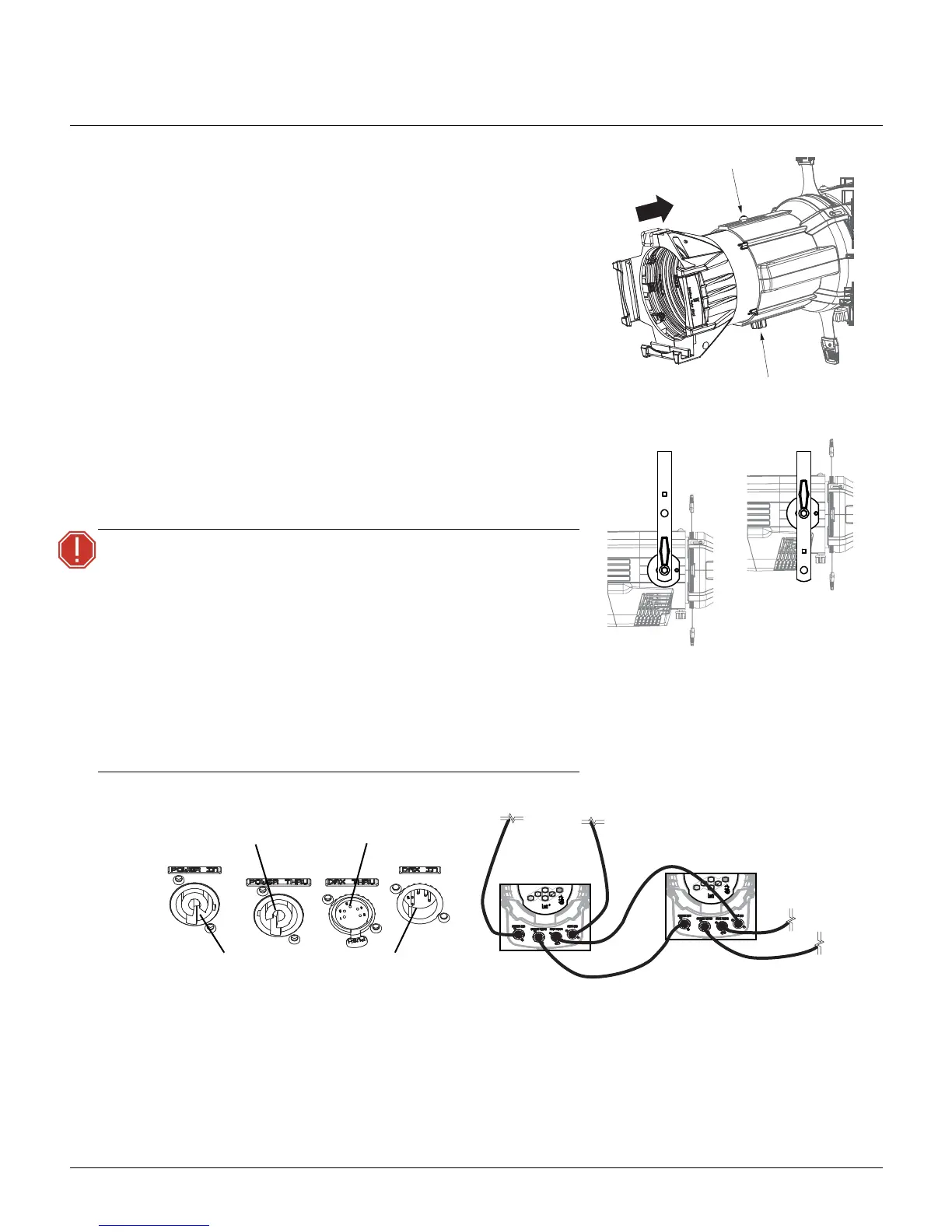
1: Slide the lens tube into the shutter barrel.
2: Tighten the lens zoom knob.
3: Tighten the Phillips screw at the top of the lens barrel.
Install Fixture
1: Hang or mount the fixture.
2: Attach a safety cable.
3: Insert additional accessories such as a top hat, etc.
Connect
1: Attach the power cable to the Power In connector.
2: Attach the 5-pin XLR cable to the DMX In connector (if using external control).
3: Plug the XLR cable (if using) into the data source.
4: Link additional fixtures via the Power Thru and DMX Thru connectors using the following guidelines.
• Up to nine Lustr or seven Daylight HD/Tungsten HD luminaires (15A max) may be linked via
Power Thru connector (10 Lustr or 8 Daylight HD/Tungsten HD fixtures total per circuit) when
WARNING:
• Use only hardware rated for total
weight of fixture and accessories.
• A safety cable (or other approved safety
device) must be securely attached to the
safety cable loop before loosening the
clamp.
• Disconnect the unit from power and
DMX and allow the fixture to cool
before removing or installing the
shutter barrel or other adapters, and all
cleaning and maintenance.




 To Next Page